util

Create an Expirable Token Using Java

On this article, im trying to create a simple java app that will hold a value that have an expiration time. I usually use this for handling request session or to hold a value that have a time limitation. Btw, i’m using EhCache for handling expiration time.

First is a simple pom.xml,

<project xmlns="http://maven.apache.org/POM/4.0.0" xmlns:xsi="http://www.w3.org/2001/XMLSchema-instance"
         xsi:schemaLocation="http://maven.apache.org/POM/4.0.0 http://maven.apache.org/xsd/maven-4.0.0.xsd">
    <modelVersion>4.0.0</modelVersion>

    <groupId>com.edw</groupId>
    <artifactId>ExpirableToken</artifactId>
    <version>1.0-SNAPSHOT</version>
    <packaging>jar</packaging>

    <name>ExpirableToken</name>
    <url>http://maven.apache.org</url>

    <properties>
        <project.build.sourceEncoding>UTF-8</project.build.sourceEncoding>
    </properties>

    <dependencies>
        <dependency>
            <groupId>net.sf.ehcache</groupId>
            <artifactId>ehcache</artifactId>
            <version>2.7.4</version>
        </dependency>           
    </dependencies>
</project>

And a simple xml file to hold ehcache configurations,

<ehcache updateCheck="false" monitoring="off" dynamicConfig="false">
    
    <diskStore path="java.io.tmpdir" />
    
    <defaultCache maxEntriesLocalHeap="0" eternal="false"
                  timeToIdleSeconds="1200" timeToLiveSeconds="1200">
    </defaultCache>
    
    <!-- a 3 seconds -->
    <cache name="token" maxElementsInMemory="1000" eternal="false"
           overflowToDisk="true" diskPersistent="false" timeToIdleSeconds="3" 
           timeToLiveSeconds="3" memoryStoreEvictionPolicy="LFU" statistics="false" transactionalMode="off">       
    </cache>                
    
    <!-- a 10 seconds -->
    <cache name="action" maxElementsInMemory="1000" eternal="false"
           overflowToDisk="true" diskPersistent="false" timeToIdleSeconds="10" 
           timeToLiveSeconds="10" memoryStoreEvictionPolicy="LFU" statistics="false" transactionalMode="off">       
    </cache>        
    
</ehcache>

And this is my java class that i use for testing,

package com.edw.expirabletoken;

import java.util.Date;
import net.sf.ehcache.Cache;
import net.sf.ehcache.CacheManager;
import net.sf.ehcache.Element;

public class App {

    private CacheManager cacheManager= CacheManager.create();
    private Cache tokenCache = cacheManager.getCache("token"); // a 3 seconds cache
    private Cache actionCache = cacheManager.getCache("action"); // a 10 seconds cache

    public App() {
    }

    private void action() throws Exception {
        // add into a 3 seconds cache
        Element regElement = new Element("name", "edwin 3 seconds");
        tokenCache.put(regElement);
        
        // add into a 10 seconds cache
        Element regElement2 = new Element("name", "edwin 10 seconds");
        actionCache.put(regElement2);
        
         // 2 seconds sleep
         Thread.sleep(2000);
         getCacheContent();
         
         // 5 seconds sleep
         Thread.sleep(5000);
         getCacheContent();
         
         // 10 seconds sleep
         Thread.sleep(10000);
         getCacheContent();
    }
    
    private void getCacheContent() {
        Element element3 = tokenCache.get("name"); // get value from a 3 seconds cache
        if (element3 != null) {
            String value = (String) element3.getObjectValue();
            System.out.println(new Date()+" -- "+value);    
        } else {
            System.out.println(new Date()+" -- Empty Cache");
        }
        
         Element element10 = actionCache.get("name"); // get value from a 10 seconds cache
         if (element10 != null) {
            String value = (String) element10.getObjectValue();
            System.out.println(new Date()+" -- "+value);    
        } else {
            System.out.println(new Date()+" -- Empty Cache");
        }
    }
    
    public static void main(String[] args) throws Exception {
        App app = new App();
        app.action();
    }
}

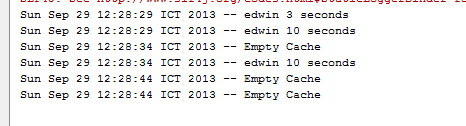
This is what the result on my Netbeans’ console,
This is my Netbeans’ project structure,

Well i hope this helped others, have fun using ehcache.

[Java] How to Convert XMLGregorianCalendar to java.util.Date and The Other Way Around

This is a simple code snippet on how to convert XMLGregorianCalendar into java.util.Date and java.util.Date into javax.xml.datatype.XMLGregorianCalendar. Usually i found XMLGregorianCalendar everytime im trying to convert java bean into webservice using wsdl2java.

But there are some time when i need to convert those XMLGregorianCalendar objects and change them into java.util.Date so i could do a much more various process on them. So this is how i convert XMLGregorianCalendar into java.util.Date,

            
            XMLGregorianCalendar calendar = responseMessage.getDate();
            java.util.Date date = calendar.toGregorianCalendar().getTime();

and this is how i convert java.util.Date into XMLGregorianCalendar

            GregorianCalendar gregorianCalendar = new GregorianCalendar();
            gregorianCalendar.setTime(new Date());
            responseMessage.setDate(new XMLGregorianCalendarImpl(gregorianCalendar));

For example, im using XMLGregorianCalendar value “2012-10-15T00:00:00”. Hope it would help others (H)

How To Change Apache Tomcat’s Server Name

On this tutorial, i’ll show you how to change Apache Tomcat’s server name. This is the screenshot from a regular Apache Tomcat,

And with a simple configuration on server.xml,

 <Connector port="8080" protocol="HTTP/1.1"
         connectionTimeout="20000"
	 server="Why So Serious"
         redirectPort="8443" />

It will change my Tomcat’s server name into,

Not hard actually 😉

A Weird Exception, java.lang.IllegalArgumentException: Filter mapping specifies an unknown filter name “FilterName”

Today i found an exception while deploying my .war application to Tomcat web server for production usage, very weird because i never had this exception on my IDE before. This is the complete exception stacktrace,

Caused by: java.lang.IllegalArgumentException: Filter mapping specifies an unknown filter name FilterName
	at org.apache.catalina.core.StandardContext.addFilterMap(StandardContext.java:2506)
	at sun.reflect.NativeMethodAccessorImpl.invoke0(Native Method)
	at sun.reflect.NativeMethodAccessorImpl.invoke(Unknown Source)
	at sun.reflect.DelegatingMethodAccessorImpl.invoke(Unknown Source)
	at java.lang.reflect.Method.invoke(Unknown Source)

below is my web.xml content,

<?xml version="1.0" encoding="UTF-8"?>
<web-app id="crm" version="2.4" xmlns="http://java.sun.com/xml/ns/j2ee" xmlns:xsi="http://www.w3.org/2001/XMLSchema-instance" xsi:schemaLocation="http://java.sun.com/xml/ns/javaee http://java.sun.com/xml/ns/javaee/web-app_2_4.xsd">
    <display-name>edw</display-name>
    <context-param>
        <param-name>edw</param-name>
        <param-value>edw</param-value>
    </context-param>
    
    <filter-mapping>
        <filter-name>FilterName</filter-name>
        <url-pattern>/*</url-pattern>
    </filter-mapping>
	
    <filter>
        <filter-name>FilterName</filter-name>
        <filter-class>com.edw.filter.FilterName</filter-class>
    </filter>
</web-app>

How to fix it is actually very simple, i only need to swap between and tag. Below is the correct web.xml.

<?xml version="1.0" encoding="UTF-8"?>
<web-app id="crm" version="2.4" xmlns="http://java.sun.com/xml/ns/j2ee" xmlns:xsi="http://www.w3.org/2001/XMLSchema-instance" xsi:schemaLocation="http://java.sun.com/xml/ns/javaee http://java.sun.com/xml/ns/javaee/web-app_2_4.xsd">
    <display-name>edw</display-name>
    <context-param>
        <param-name>edw</param-name>
        <param-value>edw</param-value>
    </context-param>
    
    <filter>
        <filter-name>FilterName</filter-name>
        <filter-class>com.edw.filter.FilterName</filter-class>
    </filter>

    <filter-mapping>
        <filter-name>FilterName</filter-name>
        <url-pattern>/*</url-pattern>
    </filter-mapping>

</web-app>

Weird eh :p

How to Compress Log4J’s Log File

Today i found a very weird condition on one of my end user. Their application’s log file is so big, despite the log4j’s log level is set to INFO. Im using log4j’s DailyRollingFileAppender which would create a new log file everyday. Each file’s size is around 10 to 20MB, and i see the log files is like 3 months old. Which makes total of almost 2GBs of log files.

So my solution to them is to compress everyday’s log into gzip, gz or perhaps into zip file. Basically, im using one of log4j’s companion..

Okay, so here is my solution, first a simple pom.xml to download the libraries needed,

<project xmlns="http://maven.apache.org/POM/4.0.0" xmlns:xsi="http://www.w3.org/2001/XMLSchema-instance"
         xsi:schemaLocation="http://maven.apache.org/POM/4.0.0 http://maven.apache.org/xsd/maven-4.0.0.xsd">
    <modelVersion>4.0.0</modelVersion>

    <groupId>com.edw.compresslogfile</groupId>
    <artifactId>CompressLogFile</artifactId>
    <version>1.0-SNAPSHOT</version>
    <packaging>jar</packaging>

    <name>CompressLogFile</name>
    <url>http://maven.apache.org</url>
    <properties>
        <project.build.sourceEncoding>UTF-8</project.build.sourceEncoding>
    </properties>

    <dependencies>
        <dependency>
            <groupId>junit</groupId>
            <artifactId>junit</artifactId>
            <version>3.8.1</version>
            <scope>test</scope>
        </dependency>
        <dependency>
            <groupId>log4j</groupId>
            <artifactId>apache-log4j-extras</artifactId>
            <version>1.0</version>
        </dependency>
        <dependency>
            <groupId>log4j</groupId>
            <artifactId>log4j</artifactId>
            <version>1.2.17</version>
        </dependency>                        
    </dependencies>
</project>

And then my log4j.properties file, please take a look at line 7. It will create a new log file for every second, change it into “yyyyMMdd” if you want to create a daily appender.

log4j.rootLogger=DEBUG, request

log4j.appender.request=org.apache.log4j.rolling.RollingFileAppender
log4j.appender.request.File=msg.log
log4j.appender.request.RollingPolicy=org.apache.log4j.rolling.TimeBasedRollingPolicy
log4j.appender.request.RollingPolicy.ActiveFileName =msg.log
log4j.appender.request.RollingPolicy.FileNamePattern=msg.%d{yyyyMMdd.HHmmss}.gz
log4j.appender.request.layout = org.apache.log4j.PatternLayout
log4j.appender.request.layout.ConversionPattern=%d{ABSOLUTE} %5p %c{1}:%L - %m%n

And my simple java test case

package com.edw.compresslogfile;

import org.apache.log4j.Logger;

/**
 * Hello world!
 *
 */
public class App {

    private static final Logger LOGGER = Logger.getLogger(App.class);

    public static void main(String[] args) {
        for (int i = 0; i < 10; i++) {
            try {
                LOGGER.debug("Hello World " + i);
                Thread.sleep(5000);
            } catch (Exception e) {
            }
        }
    }
}

It will create a compressed log file for every second.

This is the project structure on my Netbeans,

Hope it helped others, cheers (B)