spring

Belajar Spring Security Sederhana

Beberapa hari yang lalu, gw ditanya oleh salah seorang temen gw, Ariestania Winda. Dia nanya, gimana caranya bikin validasi login sederhana dengan Spring Security. Oke, berikut adalah tutorial yang gw kasih ke dia. Semoga bisa bermanfaat untuk yang lain.

Semua dimulai dengan konfigurasi maven sederhana, berikut pom.xml yang gw punya,

<project xmlns="http://maven.apache.org/POM/4.0.0" xmlns:xsi="http://www.w3.org/2001/XMLSchema-instance"
         xsi:schemaLocation="http://maven.apache.org/POM/4.0.0 http://maven.apache.org/xsd/maven-4.0.0.xsd">
    <modelVersion>4.0.0</modelVersion>

    <groupId>com.edw</groupId>
    <artifactId>SpringSecurityExample</artifactId>
    <version>1.0</version>
    <packaging>war</packaging>

    <name>SpringSecurityExample</name>

    <properties>
        <endorsed.dir>${project.build.directory}/endorsed</endorsed.dir>
        <project.build.sourceEncoding>UTF-8</project.build.sourceEncoding>
    </properties>

    <dependencies>
        <dependency>
            <groupId>javax</groupId>
            <artifactId>javaee-web-api</artifactId>
            <version>6.0</version>
            <scope>provided</scope>
        </dependency>
        <dependency>
            <groupId>javax.servlet</groupId>
            <artifactId>jstl</artifactId>
            <version>1.2</version>
            <scope>runtime</scope>
        </dependency>
        
        <!-- Spring 3 dependencies -->
        <dependency>
            <groupId>org.springframework</groupId>
            <artifactId>spring-core</artifactId>
            <version>4.1.1.RELEASE</version>
        </dependency> 
        <dependency>
            <groupId>org.springframework</groupId>
            <artifactId>spring-web</artifactId>
            <version>4.1.1.RELEASE</version>
        </dependency>
        <dependency>
            <groupId>org.springframework</groupId>
            <artifactId>spring-webmvc</artifactId>
            <version>4.1.1.RELEASE</version>
        </dependency>
        <dependency>
            <groupId>org.springframework</groupId>
            <artifactId>spring-tx</artifactId>
            <version>4.1.1.RELEASE</version>
        </dependency>
        <dependency>
            <groupId>org.springframework</groupId>
            <artifactId>spring-orm</artifactId>
            <version>4.1.1.RELEASE</version>
        </dependency>
        <dependency>
            <groupId>cglib</groupId>
            <artifactId>cglib</artifactId>
            <version>2.2</version>
        </dependency>
        
        <!-- Spring Security -->
        <dependency>
            <groupId>org.springframework.security</groupId>
            <artifactId>spring-security-web</artifactId>
            <version>3.2.5.RELEASE</version>
        </dependency>
        <dependency>
            <groupId>org.springframework.security</groupId>
            <artifactId>spring-security-config</artifactId>
            <version>3.2.5.RELEASE</version>
        </dependency>
        
        <!-- slf4j -->
        <dependency>
            <groupId>org.slf4j</groupId>
            <artifactId>slf4j-log4j12</artifactId>
            <version>1.5.6</version>
        </dependency>
        
    </dependencies>

    <build>
        <plugins>
            <plugin>
                <groupId>org.apache.maven.plugins</groupId>
                <artifactId>maven-compiler-plugin</artifactId>
                <version>2.3.2</version>
                <configuration>
                    <source>1.6</source>
                    <target>1.6</target>
                    <compilerArguments>
                        <endorseddirs>${endorsed.dir}</endorseddirs>
                    </compilerArguments>
                </configuration>
            </plugin>
            <plugin>
                <groupId>org.apache.maven.plugins</groupId>
                <artifactId>maven-war-plugin</artifactId>
                <version>2.1.1</version>
                <configuration>
                    <failOnMissingWebXml>false</failOnMissingWebXml>
                </configuration>
            </plugin>
            <plugin>
                <groupId>org.apache.maven.plugins</groupId>
                <artifactId>maven-dependency-plugin</artifactId>
                <version>2.1</version>
                <executions>
                    <execution>
                        <phase>validate</phase>
                        <goals>
                            <goal>copy</goal>
                        </goals>
                        <configuration>
                            <outputDirectory>${endorsed.dir}</outputDirectory>
                            <silent>true</silent>
                            <artifactItems>
                                <artifactItem>
                                    <groupId>javax</groupId>
                                    <artifactId>javaee-endorsed-api</artifactId>
                                    <version>6.0</version>
                                    <type>jar</type>
                                </artifactItem>
                            </artifactItems>
                        </configuration>
                    </execution>
                </executions>
            </plugin>
        </plugins>
    </build>
</project>

Kemudian register konfigurasi spring di web.xml

<?xml version="1.0" encoding="UTF-8"?>
<web-app version="3.0" xmlns="http://java.sun.com/xml/ns/javaee" xmlns:xsi="http://www.w3.org/2001/XMLSchema-instance" xsi:schemaLocation="http://java.sun.com/xml/ns/javaee http://java.sun.com/xml/ns/javaee/web-app_3_0.xsd">
    <context-param>
        <param-name>contextConfigLocation</param-name>
        <param-value>/WEB-INF/applicationContext.xml, /WEB-INF/applicationSecurity.xml</param-value>
    </context-param>
    <listener>
        <listener-class>org.springframework.web.context.ContextLoaderListener</listener-class>
    </listener>
    <servlet>
        <servlet-name>dispatcher</servlet-name>
        <servlet-class>org.springframework.web.servlet.DispatcherServlet</servlet-class>
        <load-on-startup>2</load-on-startup>
    </servlet>
    <servlet-mapping>
        <servlet-name>dispatcher</servlet-name>
        <url-pattern>/</url-pattern>
    </servlet-mapping>
    
    <!-- Spring Security -->
    <filter>
        <filter-name>springSecurityFilterChain</filter-name>
        <filter-class>org.springframework.web.filter.DelegatingFilterProxy
        </filter-class>
    </filter>
 
    <filter-mapping>
        <filter-name>springSecurityFilterChain</filter-name>
        <url-pattern>/*</url-pattern>
    </filter-mapping>
    
    <session-config>
        <session-timeout>
            30
        </session-timeout>
    </session-config>
</web-app>

Dan 3 xml milik Spring, ApplicationContext.xml, dispatcher-servlet.xml dan applicationSecurity.xml

<?xml version="1.0" encoding="UTF-8"?>
<beans xmlns="http://www.springframework.org/schema/beans"
       xmlns:xsi="http://www.w3.org/2001/XMLSchema-instance"
       xmlns:p="http://www.springframework.org/schema/p"
       xmlns:aop="http://www.springframework.org/schema/aop"
       xmlns:context="http://www.springframework.org/schema/context"
       xmlns:jee="http://www.springframework.org/schema/jee"
       xmlns:tx="http://www.springframework.org/schema/tx"
       xsi:schemaLocation="http://www.springframework.org/schema/beans http://www.springframework.org/schema/beans/spring-beans-3.0.xsd
        http://www.springframework.org/schema/aop http://www.springframework.org/schema/aop/spring-aop-3.0.xsd
        http://www.springframework.org/schema/context http://www.springframework.org/schema/context/spring-context-3.0.xsd
        http://www.springframework.org/schema/jee http://www.springframework.org/schema/jee/spring-jee-3.0.xsd
        http://www.springframework.org/schema/tx http://www.springframework.org/schema/tx/spring-tx-3.0.xsd">

    <context:annotation-config/>
    
    <context:component-scan base-package="com.edw.springsecurityexample.controller"/>
</beans>
<?xml version="1.0" encoding="UTF-8"?>
<beans xmlns="http://www.springframework.org/schema/beans"
       xmlns:xsi="http://www.w3.org/2001/XMLSchema-instance"
       xmlns:p="http://www.springframework.org/schema/p"
       xmlns:context="http://www.springframework.org/schema/context"
       xmlns:mvc="http://www.springframework.org/schema/mvc"
       xsi:schemaLocation="http://www.springframework.org/schema/beans http://www.springframework.org/schema/beans/spring-beans-3.0.xsd
        http://www.springframework.org/schema/mvc http://www.springframework.org/schema/mvc/spring-mvc-3.0.xsd
        http://www.springframework.org/schema/context http://www.springframework.org/schema/context/spring-context-3.0.xsd">


    <!-- the mvc resources tag does the magic -->
    <mvc:resources mapping="/css/**" location="/css/" />
    <mvc:resources mapping="/js/**" location="/js/" />
    <mvc:resources mapping="/img/**" location="/img/" />
    
    <context:component-scan base-package="com.edw.springsecurityexample.controller" />
	
    <mvc:annotation-driven />

    <bean id="viewResolver"
          class="org.springframework.web.servlet.view.InternalResourceViewResolver"
          p:prefix="/WEB-INF/jsp/"
          p:suffix=".jsp" />
</beans>
<?xml version="1.0" encoding="UTF-8"?>
<beans:beans xmlns="http://www.springframework.org/schema/security"
             xmlns:beans="http://www.springframework.org/schema/beans" 
             xmlns:xsi="http://www.w3.org/2001/XMLSchema-instance"
             xsi:schemaLocation="http://www.springframework.org/schema/beans
	http://www.springframework.org/schema/beans/spring-beans-4.0.xsd
	http://www.springframework.org/schema/security
	http://www.springframework.org/schema/security/spring-security-3.2.xsd">
    
    <http auto-config="true" use-expressions="true">
        <intercept-url pattern="/admin/**" access="hasRole('ROLE_USER')" />
        <intercept-url pattern="/" 	access="isAnonymous()"/>
        <form-login login-page="/" 
                    authentication-failure-url="/?error=1" 
                    default-target-url="/admin/index" always-use-default-target="true"/>
        <logout logout-url="/logout" logout-success-url="/" />
    </http>
 
    <authentication-manager>
        <authentication-provider>
            <user-service>
                <user name="edw" password="123456" authorities="ROLE_USER" />
            </user-service>
        </authentication-provider>
    </authentication-manager>
    
    
</beans:beans>

Lalu gw bikin satu java class sebagai controller,

package com.edw.springsecurityexample.controller;

import org.springframework.stereotype.Controller;
import org.springframework.web.bind.annotation.RequestMapping;
import org.springframework.web.bind.annotation.RequestMethod;

@Controller
public class IndexController {
    @RequestMapping(value = "/", method = RequestMethod.GET)
    public String index() {
        return "index";
    }
    
    @RequestMapping(value = "/admin/index", method = RequestMethod.GET)
    public String adminIndex() {
        return "adminIndex";
    }
}

Kemudian satu jsp sederhana sebagai halaman login,

<%@page contentType="text/html" pageEncoding="UTF-8"%>
<%@ taglib uri="http://java.sun.com/jsp/jstl/core" prefix="c" %>

<!DOCTYPE html>
<html>
    <head>
        <meta http-equiv="Content-Type" content="text/html; charset=UTF-8">
        <title>JSP Page</title>
    </head>
    <body>
        <h1>Hello Spring MVC!</h1>
        <h2>Tolong Login Dulu </h2>
        
        <c:if test="${not empty param.error}">
                <div style="color: red;">
                    Username atau Password Salah
                </div>
        </c:if>
        
        <form action="j_spring_security_check" method="POST">
            <table>
                <tr>
                    <td>
                        username
                    </td>
                    <td>
                        <input name="j_username" type="text" />
                    </td>
                </tr>
                <tr>
                    <td>
                        password
                    </td>
                    <td>
                        <input name="j_password" type="password" />
                    </td>
                </tr>
                <tr>
                    <td colspan="2">
                        <input name="submit" type="submit" />
                    </td>
                </tr>
            </table>
        </form>
    </body>
</html>

Dan halaman admin sederhana, yang hanya bisa diakses apabila sudah login yang isinya link logout.

<%@page contentType="text/html" pageEncoding="UTF-8"%>
<!DOCTYPE html>
<html>
    <head>
        <meta http-equiv="Content-Type" content="text/html; charset=UTF-8">
        <title>JSP Page</title>
    </head><a href="http://edwin.baculsoft.com/wp-content/uploads/2014/11/springsecurity-login-gagal.png"><img src="http://edwin.baculsoft.com/wp-content/uploads/2014/11/springsecurity-login-gagal.png" alt="springsecurity login gagal" width="458" height="287" class="aligncenter size-full wp-image-1535" /></a>
    <body>
        <h1>Selamat, anda sudah login -- admin page</h1>
        <br />
        <a href="${pageContext.request.contextPath}/logout">logout</a>
    </body>
</html>

Berikut adalah tampilan struktur netbeans project
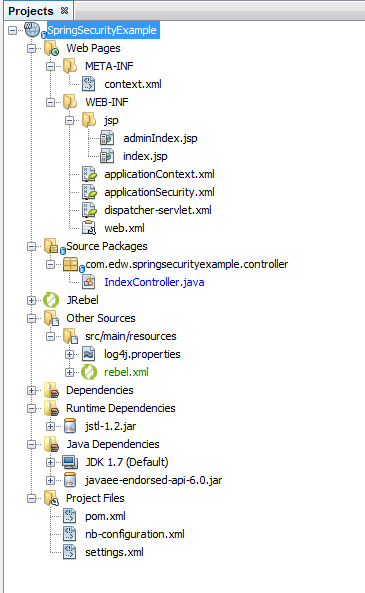
springsecurity project structure

Tampilan halaman login, dan tampilan jika login gagal,
springsecurity login

springsecurity login gagal

Jika login dengan username edw dan password 123456, maka akan tampil halaman seperti berikut,
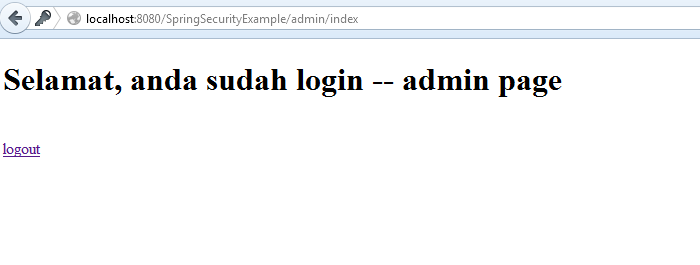
springsecurity login sukses

Source lengkapnya, bisa diakses di github saya, di url ini.

Binding Date Property to SpringMVC’s @ModelAttribute

Let say i have this java bean,

public class MyBean implements Serializable {
    private Integer id;
    private String userid;       
    private Date contacttime;
	
	// other setter and getter	

And i have a SpringMVC Controller like this, using @ModelAttribute as the method’s parameter,

@RequestMapping(value = "/doSomething", method = RequestMethod.POST)
public @ResponseBody Object doSomething(@ModelAttribute MyBean myBean) {
	// do something
}

Im sending HTTP Post which format is like this

id=2&
userid=3abc&
contacttime=130314101010

But it shows error on my server side, which looks like this,

Failed to convert from type java.lang.String to type java.util.Date for value '130314101010'; 
nested exception is java.lang.IllegalArgumentException

Usually, i have to manually use SimpleDateFormat to parse my “ddMMyyHHmmss” String into Date, but SpringMVC provide a very elegant way of handling with this kind of conversion. Just by using @DateTimeFormat

import org.springframework.format.annotation.DateTimeFormat;

public class MyBean implements Serializable {
    private Integer id;
    private String userid;       
	
	@DateTimeFormat(pattern = "ddMMyyHHmmss")
    private Date contacttime;
	
	// other setter and getter	

Dont forget to include JodaTime on your pom.xml

<dependency>
	<groupId>joda-time</groupId>
	<artifactId>joda-time</artifactId>
	<version>2.3</version>
</dependency>

If not, you will find this kind of error,

org.springframework.core.convert.ConversionFailedException: Failed to convert from type java.lang.String to type @org.springframework.format.annotation.DateTimeFormat java.util.Date for value '130314101010'; nested exception is java.lang.IllegalStateException: JodaTime library not available - @DateTimeFormat not supported

Have fun with SpringMVC 😀

A java.lang.IllegalArgumentException when Using SpringMVC @PathVariable

Another exception happened to me today while im deploying my application to Tomcat 7, somehow the error (again) never happen on my IDE. The error is related to Spring MVC’s @PathVariable. Below is the complete stacktrace for the error.

org.springframework.web.util.NestedServletException: Request processing failed; nested exception is java.lang.IllegalArgumentException: Name for argument type [java.lang.String] not available, and parameter name information not found in class file either.
	org.springframework.web.servlet.FrameworkServlet.processRequest(FrameworkServlet.java:894)
	org.springframework.web.servlet.FrameworkServlet.doGet(FrameworkServlet.java:778)
	javax.servlet.http.HttpServlet.service(HttpServlet.java:621)
	javax.servlet.http.HttpServlet.service(HttpServlet.java:722)
	com.opensymphony.module.sitemesh.filter.PageFilter.parsePage(PageFilter.java:119)
	com.opensymphony.module.sitemesh.filter.PageFilter.doFilter(PageFilter.java:55)
	org.springframework.security.web.FilterChainProxy$VirtualFilterChain .doFilter(FilterChainProxy.java:330)
	org.springframework.security.web.access.intercept.FilterSecurityInterceptor .invoke(FilterSecurityInterceptor.java:118)
	org.springframework.security.web.access.intercept.FilterSecurityInterceptor .doFilter(FilterSecurityInterceptor.java:84)

And this is the suspected method which raise exception,

    @RequestMapping(value ="/baculsoft/news/view/{id}", method = RequestMethod.GET)
    public String newsView(ModelMap modelMap, 
                        @PathVariable String id) {
        modelMap.put("news", newsService.get(id);
        return "news/view";
    }

The workaround is actually simple, below is how to deal with it,

    @RequestMapping(value ="/baculsoft/news/view/{id}", method = RequestMethod.GET)
    public String newsView(ModelMap modelMap, 
                        @PathVariable("id") String id) {
        modelMap.put("news", newsService.get(id);
        return "news/view";
    }

Actually very simple workaround, but since i have hundreds of methods using @PathVariable, it’s not so simple anymore. And the weird thing is, the .war exported from Eclipse IDE run perfectly, only .war created from Netbeans that raise exception. I dont know why, but somehow Netbeans’ ant create a different war compared to Eclipse’s war file.

After sometimes googling, i found out that it happens due to javac’s debug parameter on Netbeans’ ant, changing “debug” default value into “on” on Netbeans’ build-impl.xml makes my war file run perfectly on Tomcat 7. Well i hope it hepled others, cheers (B)

A Client Server Application using Spring HTTP Invoker

Right now, im trying to create a simple client-server application using spring HTTP invoker. One major advantage using Spring Http Invoker is that instead of the custom serialization found in Hessian and Burlap, HTTP invoker uses Java serialization — just like RMI. Applications can rely on full serialization power, as long as all transferred objects properly follow Java serialization rules (implementing the java.io.Serializable marker interface and properly defining serialVersionUID if necessary).

Because of the nature of HTTP invoker (which is available only in Spring), both the client side and the server side need to be based on Spring — and on Java in the first place because of the use of Java serialization. In contrast to Hessian and Burlap, there is no option for cross-platform remoting. HTTP invoker is clearly dedicated to powerful and seamless Java-to-Java remoting.

Okay, let me show you my client side’s code, first is a very simple bean.

package com.edw.bean;

import java.io.Serializable;
import java.math.BigDecimal;

public class BeanBego implements Serializable {
    private String nama;
    private int usia;
    private double gaji;
    private float x;
    private float y;
    private BigDecimal z;

    public String getNama() {
        return nama;
    }

    public void setNama(String nama) {
        this.nama = nama;
    }

    public int getUsia() {
        return usia;
    }

    // other setters and getters

next is an interface to connect with the server side application.

package com.edw.service;

public interface TestService {

    void doNothing();

    String doSomething(String something);
    String doSomething(Object something);
}

and this is my client’s side Spring configuration. Take a look at line 6, it is my server side’s application location. And on line 7, is my interface class.

<?xml version="1.0" encoding="UTF-8" ?>
<!DOCTYPE beans PUBLIC "-//SPRING//DTD BEAN//EN" "http://www.springframework.org/dtd/spring-beans.dtd">

<beans>
    <bean id="testHttpInvoker" class="org.springframework.remoting.httpinvoker.HttpInvokerProxyFactoryBean">
        <property name="serviceUrl" value="http://localhost:8084/SpringHttpInvokerServer/testService.service"/>
        <property name="serviceInterface" value="com.edw.service.TestService"/>
    </bean>
</beans>

and this is my application’s main class,

package com.edw.spring.main;

import com.edw.bean.BeanBego;
import com.edw.service.TestService;
import java.math.BigDecimal;
import org.apache.log4j.Logger;
import org.springframework.context.ApplicationContext;
import org.springframework.context.support.ClassPathXmlApplicationContext;

public class Main {

    private Logger logger = Logger.getLogger(this.getClass());

    public Main() throws Exception {
    }

    private void execute() {
        ApplicationContext applicationContext = new ClassPathXmlApplicationContext("spring.xml");
        TestService testService = (TestService) applicationContext.getBean("testHttpInvoker");

        BeanBego beanBego = new BeanBego();
        beanBego.setGaji(2000000000d);
        beanBego.setUsia(500);
        beanBego.setX(500000000f);
        beanBego.setY(6000000f);
        beanBego.setZ(new BigDecimal(Double.MAX_VALUE));

        String testString = "";
        for (int i = 0; i < 2000; i++) {
            testString += " " + i + " pepe ";
        }

        beanBego.setNama(testString);

        logger.debug(testService.doSomething(beanBego));
    }

    public static void main(String[] args) throws Exception {
        Main main = new Main();
        main.execute();
    }
}

and now lets create the server side’s application, btw im using Apache Tomcat as my web server, first i copy my BeanBego class and TestService interface from client’s side to the server side. After that, i create the implementation of TestService interface,

package com.edw.service;

import com.edw.bean.BeanBego;
import org.apache.log4j.Logger;

public class TestServiceImpl implements TestService {

    private Logger logger = Logger.getLogger(this.getClass());

    public void doNothing() {
        logger.debug("im doing nothing");
    }

    public String doSomething(String something) {
        logger.debug("im doing something");
        return "connect successfully";
    }

    public String doSomething(Object something) {
        logger.debug("im doing something");

        if(something instanceof BeanBego)
            return ((BeanBego)something).getGaji()+"";
        return "not a BeanBego instance";
    }
   
}

next step is registering your class to your main Spring configuration, remember to named it “remoting-servlet.xml”.

<?xml version="1.0" encoding="UTF-8"?>
<beans xmlns="http://www.springframework.org/schema/beans"
       xmlns:xsi="http://www.w3.org/2001/XMLSchema-instance"
       xmlns:context="http://www.springframework.org/schema/context"
       xmlns:tx="http://www.springframework.org/schema/tx"
       xmlns:p="http://www.springframework.org/schema/p"
       xsi:schemaLocation="http://www.springframework.org/schema/beans http://www.springframework.org/schema/beans/spring-beans-2.5.xsd
       http://www.springframework.org/schema/context http://www.springframework.org/schema/context/spring-context-2.5.xsd
       http://www.springframework.org/schema/tx http://www.springframework.org/schema/tx/spring-tx-2.5.xsd">

    <bean id="testService" class="com.edw.service.TestServiceImpl"/>

    <bean id="testHttpInvoker" class="org.springframework.remoting.httpinvoker.HttpInvokerServiceExporter">
        <property name="service">
            <ref bean="testService"/>
        </property>
        <property name="serviceInterface">
            <value>com.edw.service.TestService</value>
        </property>
    </bean>
    
    <bean id="urlMapping" class="org.springframework.web.servlet.handler.SimpleUrlHandlerMapping">
        <property name="mappings">
            <props>
                <prop key="/testService.service">testHttpInvoker</prop>
            </props>
        </property>
    </bean>

</beans>

and register your remoting-servlet.xml on your web.xml

<?xml version="1.0" encoding="UTF-8"?>
<web-app version="2.5" xmlns="http://java.sun.com/xml/ns/javaee" xmlns:xsi="http://www.w3.org/2001/XMLSchema-instance" xsi:schemaLocation="http://java.sun.com/xml/ns/javaee http://java.sun.com/xml/ns/javaee/web-app_2_5.xsd">
    <context-param>
        <param-name>contextConfigLocation</param-name>
        <param-value>
			/WEB-INF/remoting-servlet.xml
        </param-value>
    </context-param>
    <listener>
        <listener-class>org.springframework.web.context.ContextLoaderListener</listener-class>
    </listener>

    <servlet>
        <servlet-name>remoting</servlet-name>
        <servlet-class>org.springframework.web.servlet.DispatcherServlet</servlet-class>
        <load-on-startup>2</load-on-startup>
    </servlet>

    <servlet-mapping>
        <servlet-name>remoting</servlet-name>
        <url-pattern>*.service</url-pattern>
    </servlet-mapping>

    <session-config>
        <session-timeout>
            30
        </session-timeout>
    </session-config>
    <welcome-file-list>
        <welcome-file>index.jsp</welcome-file>
    </welcome-file-list>
</web-app>

try to deploy it on your app-server. After that, try to execute your client side’s application. This is what happen on my server’s console

RemoteInvocationTraceInterceptor] DEBUG org.springframework.remoting.support.RemoteInvocationTraceInterceptor:73 - Incoming HttpInvokerServiceExporter remote call: com.edw.service.TestService.doSomething
[TestServiceImpl] DEBUG com.edw.service.TestServiceImpl:26 - im doing something
[RemoteInvocationTraceInterceptor] DEBUG org.springframework.remoting.support.RemoteInvocationTraceInterceptor:79 - Finished processing of HttpInvokerServiceExporter remote call: com.edw.service.TestService.doSomething
[DispatcherServlet] DEBUG org.springframework.web.servlet.DispatcherServlet:909 - Null ModelAndView returned to DispatcherServlet with name 'remoting': assuming HandlerAdapter completed request handling
[DispatcherServlet] DEBUG org.springframework.web.servlet.DispatcherServlet:591 - Successfully completed request

and this on my client’s console

[JdkDynamicAopProxy] DEBUG org.springframework.aop.framework.JdkDynamicAopProxy:113 - Creating JDK dynamic proxy: target source is EmptyTargetSource: no target class, static
[DefaultListableBeanFactory] DEBUG org.springframework.beans.factory.support.DefaultListableBeanFactory:411 - Finished creating instance of bean 'testHttpInvoker'
[DefaultListableBeanFactory] DEBUG org.springframework.beans.factory.support.DefaultListableBeanFactory:214 - Returning cached instance of singleton bean 'testHttpInvoker'
[SimpleHttpInvokerRequestExecutor] DEBUG org.springframework.remoting.httpinvoker.SimpleHttpInvokerRequestExecutor:133 - Sending HTTP invoker request for service at [http://localhost:8084/SpringHttpInvokerServer/testService.service], with size 21766
[Main] DEBUG com.edw.spring.main.Main:41 - 2.0E9

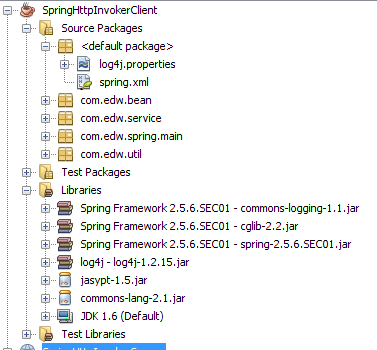
this is my project structure, btw ignore the jasypt.jar and commons-lang.jar on my project classpath, im not using them on this project.
my Netbeans 6.9 Client side's project structure

my Netbeans 6.9 Server side's project structure

If you are looking about a good Spring book, i would highly recommend “Professional Java Development with the Spring Framework”, Published by Wiley Publishing, Inc. FYI im using Spring 2.5.6

Have fun coding it, (H)