Programming

How to Handle Jasper Report’s NoSuchMethodException

I was generating an ordinary report, when suddenly i met a weird error. My Exception showed a net.sf.jasperreports.engine.JRException and a java.lang.NoSuchMethodException: Unknown property '' when im using Jasper Report’s JRBeanCollectionDataSource. I tought it was because my java bean is not Serializable, but changing my bean to Serializable still didnt fix my errors.
Here is my complete stacktrace

net.sf.jasperreports.engine.JRException: Error retrieving field value from bean : 
        at net.sf.jasperreports.engine.data.JRAbstractBeanDataSource.getBeanProperty(JRAbstractBeanDataSource.java:123)
        at net.sf.jasperreports.engine.data.JRAbstractBeanDataSource.getFieldValue(JRAbstractBeanDataSource.java:96)
        at net.sf.jasperreports.engine.data.JRBeanCollectionDataSource.getFieldValue(JRBeanCollectionDataSource.java:100)
        at net.sf.jasperreports.engine.fill.JRFillDataset.setOldValues(JRFillDataset.java:818)
        at net.sf.jasperreports.engine.fill.JRFillDataset.next(JRFillDataset.java:782)
        at net.sf.jasperreports.engine.fill.JRBaseFiller.next(JRBaseFiller.java:1433)
        at net.sf.jasperreports.engine.fill.JRVerticalFiller.fillReport(JRVerticalFiller.java:108)
        at net.sf.jasperreports.engine.fill.JRBaseFiller.fill(JRBaseFiller.java:908)
        at net.sf.jasperreports.engine.fill.JRBaseFiller.fill(JRBaseFiller.java:830)
        at net.sf.jasperreports.engine.fill.JRFiller.fillReport(JRFiller.java:85)
        at net.sf.jasperreports.engine.JasperFillManager.fillReport(JasperFillManager.java:624)

Caused by: java.lang.NoSuchMethodException: Unknown property ''
        at org.apache.commons.beanutils.PropertyUtilsBean.getSimpleProperty(PropertyUtilsBean.java:1122)
        at org.apache.commons.beanutils.PropertyUtilsBean.getNestedProperty(PropertyUtilsBean.java:686)
        at org.apache.commons.beanutils.PropertyUtilsBean.getProperty(PropertyUtilsBean.java:715)

Here is my source code snippet, take a look at line 12, that is where my exception happen.

  @Override
    public ActionForward execute(ActionMapping mapping, ActionForm form,
            HttpServletRequest request, HttpServletResponse response)
            throws Exception {     

        List<Log> logs = logService.select();

        FileInputStream fis = new FileInputStream("/ejournal.jasper");
        BufferedInputStream bufferedInputStream = new BufferedInputStream(fis);

        Map<String, String> map = new HashMap<String, String>();
        JRBeanCollectionDataSource jrbcds = new JRBeanCollectionDataSource(logs);

        JasperReport jasperReport = (JasperReport) JRLoader.loadObject(bufferedInputStream);
        JasperPrint jasperPrint = JasperFillManager.fillReport(jasperReport, map, jrbcds);
    }

Well actually it’s very easy to fix it, you should either

  • Remove the empty field descriptions from the JRXML.
  • Set the field descriptions to match the bean property names.
  • Pass false as isUseFieldDescription when creating the bean data source, e.g. new JRBeanCollectionDataSource(data, false).

This is how i fixed it,

 @Override
    public ActionForward execute(ActionMapping mapping, ActionForm form,
            HttpServletRequest request, HttpServletResponse response)
            throws Exception {     

        List<Log> logs = logService.select();

        FileInputStream fis = new FileInputStream("/ejournal.jasper");
        BufferedInputStream bufferedInputStream = new BufferedInputStream(fis);

        Map<String, String> map = new HashMap<String, String>();
        JRBeanCollectionDataSource jrbcds = new JRBeanCollectionDataSource(logs,false);

        JasperReport jasperReport = (JasperReport) JRLoader.loadObject(bufferedInputStream);
        JasperPrint jasperPrint = JasperFillManager.fillReport(jasperReport, map, jrbcds);
    }

I hope it can help others, because i spend some ridicoulously amount of time looking for this workaround.
😉

How to Handle Jasper Report’s CompilationFailedException

I always use JasperReport for my java projects, but sometimes i found some weird java.lang.NoClassDefFoundError: org/codehaus/groovy/control/CompilationFailedException when im trying to get reports from jasper files. This is my full stack trace exception.

Exception in thread "AWT-EventQueue-0" java.lang.NoClassDefFoundError: org/codehaus/groovy/control/CompilationFailedException
        at java.lang.Class.getDeclaredConstructors0(Native Method)
        at java.lang.Class.privateGetDeclaredConstructors(Class.java:2389)
        at java.lang.Class.getConstructor0(Class.java:2699)
        at java.lang.Class.newInstance0(Class.java:326)
        at java.lang.Class.newInstance(Class.java:308)
        at net.sf.jasperreports.engine.JasperCompileManager.getCompiler(JasperCompileManager.java:472)
        at net.sf.jasperreports.engine.JasperCompileManager.loadEvaluator(JasperCompileManager.java:238)
        at net.sf.jasperreports.engine.fill.JRFillDataset.createCalculator(JRFillDataset.java:416)
        at net.sf.jasperreports.engine.fill.JRBaseFiller.<init>(JRBaseFiller.java:408)
        at net.sf.jasperreports.engine.fill.JRVerticalFiller.<init>(JRVerticalFiller.java:74)
        at net.sf.jasperreports.engine.fill.JRVerticalFiller.<init>(JRVerticalFiller.java:56)
        at net.sf.jasperreports.engine.fill.JRFiller.createFiller(JRFiller.java:143)
        at net.sf.jasperreports.engine.fill.JRFiller.fillReport(JRFiller.java:79)
        at net.sf.jasperreports.engine.JasperFillManager.fillReport(JasperFillManager.java:624)

Actually it happens because im still using Groovy as my report language, instead of Java. All i have to do is change reporting language to java, as you can see below.

Or adding groovy*.jar to your project’s classpath.

Have fun, cheers. (B)

How to Play MP3 Files with Java

Well, it’s actually very simple, first of all you need to download libraries (mp3spi1.9.4.jar, jl1.0.jar and tritonus_share.jar) from Tritonus and from JLayer.

Here is how i code it,

package com.edw.mp3.main;

import java.io.File;
import java.io.IOException;
import javax.sound.sampled.AudioFormat;
import javax.sound.sampled.AudioInputStream;
import javax.sound.sampled.AudioSystem;
import javax.sound.sampled.DataLine;
import javax.sound.sampled.LineUnavailableException;
import javax.sound.sampled.SourceDataLine;
import org.apache.log4j.Logger;

public class Main extends Thread {

    private String filename;
    private static Logger logger = Logger.getLogger(Main.class);

    public Main(String filename) {
        super();
        this.filename = filename;
    }


    @Override
    public void run() {
        try {
            File file = new File(filename);

            AudioInputStream in = AudioSystem.getAudioInputStream(file);
            AudioInputStream din = null;
            AudioFormat baseFormat = in.getFormat();
            AudioFormat decodedFormat = new AudioFormat(AudioFormat.Encoding.PCM_SIGNED,
                    baseFormat.getSampleRate(),
                    16,
                    baseFormat.getChannels(),
                    baseFormat.getChannels() * 2,
                    baseFormat.getSampleRate(),
                    false);
            din = AudioSystem.getAudioInputStream(decodedFormat, in);

            // play it...
            rawplay(decodedFormat, din);
            in.close();

        } catch (Exception e) {
            logger.error(e.getMessage(),e);
        } finally{
            logger.debug("finish playing "+filename);
        }
    }

    private synchronized void rawplay(AudioFormat targetFormat, AudioInputStream din) throws IOException, LineUnavailableException {
        byte[] data = new byte[4096];
        SourceDataLine line = getLine(targetFormat);
        if (line != null) {
            // Start
            line.start();
            int nBytesRead = 0, nBytesWritten = 0;
            while (nBytesRead != -1) {
                nBytesRead = din.read(data, 0, data.length);
                if (nBytesRead != -1) {
                    nBytesWritten = line.write(data, 0, nBytesRead);
                }

            }
            // Stop
            line.drain();
            line.stop();
            line.close();
            din.close();
        }

    }

    private synchronized SourceDataLine getLine(AudioFormat audioFormat) throws LineUnavailableException {
        SourceDataLine res = null;
        DataLine.Info info =
                new DataLine.Info(SourceDataLine.class, audioFormat);
        res = (SourceDataLine) AudioSystem.getLine(info);
        res.open(audioFormat);

        return res;
    }

    public static void main(String[] args) {
        // my relative path file name
        String song = "Bondan ft. Fade2Black-Ya Sudahlah.mp3";
        logger.debug("start playing "+song);
        Main mp3Sound = new Main(song);
        mp3Sound.start();        
    }
}

And my Netbeans’ project structure

Actually i code it a long time ago, Thank God it’s still works. If you have any suggestion, feel free to comment it.
Cheers.. (B)

Beginning MyBatis 3

MyBatis framework is a complete rewrite of iBatis, it’s a data mapper framework that makes it easier to use a relational database with object-oriented applications. The difference from old iBatis is that now everything can now be written in java, from queries, configuration to mappers.

Some people might ask why MyBatis use a different approach from its ancestor, iBatis? iBatis’ code generator use *DAOs while MyBatis use *Mappers. I think they all the same, but then according to Clinton Begin they are, despite their similarity, are not exact in concepts.

DAOs can collect multiple statements and thus aggregate or cohesive data logic into one method. That said, this isn’t necessarily a good thing. After 10 years of writing DAOs, I can say with enough experience that DAOs are a waste of time. They fragment business logic, they’re extra code and the abstraction goes largely unused for the lifetime of most applications that implement it. DAOs were often implemented incorrectly and code would sneak into them that should not.

Mappers on the other hand, are named function that executes a single SQL statement or procedure. There is no extra code, and it eliminates strings in the execution of mapped statements. Mappers also help define the mapped statement.

In a sense, you can also think of it as:

  • DAOs USE mapped statements.
  • Mapper methods ARE mapped statements.

The cohesive grouping or aggregation of related statements that work together to form a business process should now exist in your service layer (be it a Spring bean, or an EJB or a POJO service layer).

Okay enough with the chit-chat, let me show you the code, first as always, a simple mysql database named test, and a table named Contoh.

CREATE TABLE contoh
(
    nama VARCHAR(30) NOT NULL,
    alamat VARCHAR(100),
    PRIMARY KEY (nama)
)

and a java bean

package com.edw.mybatis.bean;

public class Contoh {
    private String nama;
    private String alamat;

    // other setter and getter

    @Override
    public String toString(){
        return nama+" : "+alamat;
    }
}

This is my Contoh table queries, i named it ContohMapper.xml

<?xml version="1.0" encoding="UTF-8" ?>
<!DOCTYPE mapper PUBLIC "-//mybatis.org//DTD Mapper 3.0//EN" "http://mybatis.org/dtd/mybatis-3-mapper.dtd" >
<mapper namespace="com.edw.mybatis.mapper.ContohMapper" >
    
  <resultMap id="ContohMap" type="com.edw.mybatis.bean.Contoh" >
    <id column="nama" property="nama" jdbcType="VARCHAR" />
    <result column="alamat" property="alamat" jdbcType="VARCHAR" />
  </resultMap>

  <insert id="save" parameterType="com.edw.mybatis.bean.Contoh" >
    insert into contoh (nama, alamat)
    values (#{nama,jdbcType=VARCHAR}, #{alamat,jdbcType=VARCHAR})
  </insert>

  <update id="update" parameterType="com.edw.mybatis.bean.Contoh" >
    update contoh
    set alamat = #{alamat,jdbcType=VARCHAR}
    where nama = #{nama,jdbcType=VARCHAR}
  </update>

</mapper>

I register my ContohMapper.xml on Configuration.xml

<?xml version="1.0" encoding="UTF-8" ?>
<!DOCTYPE configuration
PUBLIC "-//mybatis.org//DTD Config 3.0//EN"
"http://mybatis.org/dtd/mybatis-3-config.dtd">
<configuration>
    <environments default="development">
        <environment id="development">
            <transactionManager type="JDBC"/>
            <dataSource type="UNPOOLED">
                <property name="driver" value="com.mysql.jdbc.Driver"/>
                <property name="url" value="jdbc:mysql://localhost/test"/>
                <property name="username" value="root"/>
                <property name="password" value="xxx"/>
            </dataSource>
        </environment>
    </environments>
    <mappers>
        <mapper resource="com/edw/mybatis/xml/ContohMapper.xml"/>
    </mappers>
</configuration>

What makes MyBatis different from iBatis, is the ability to put queries on interfaces using annotations. Here is the example.

package com.edw.mybatis.mapper;

import com.edw.mybatis.bean.Contoh;
import java.util.List;
import org.apache.ibatis.annotations.Delete;
import org.apache.ibatis.annotations.Select;

public interface ContohMapper {    
    int save(Contoh contoh);

    @Delete("DELETE FROM contoh WHERE nama = #{nama}")
    int delete(String nama);

    @Select("SELECT * FROM contoh WHERE nama = #{nama}")
    Contoh select(String nama);

    @Select("SELECT * FROM contoh")
    List<Contoh> selectAll();
}

and a factory class to load my configuration

package com.edw.mybatis.config;

import java.io.Reader;
import org.apache.ibatis.io.Resources;
import org.apache.ibatis.session.SqlSessionFactory;
import org.apache.ibatis.session.SqlSessionFactoryBuilder;


/**
 *
 * @author edw
 */
public class MyBatisSqlSessionFactory {

    protected static final SqlSessionFactory FACTORY;

    static {
        try {
            Reader reader = Resources.getResourceAsReader("com/edw/mybatis/xml/Configuration.xml");
            FACTORY = new SqlSessionFactoryBuilder().build(reader);
        } catch (Exception e){
            throw new RuntimeException("Fatal Error.  Cause: " + e, e);
        }
    }

    public static SqlSessionFactory getSqlSessionFactory() {
        return FACTORY;
    }
}

And here’s my main class

package com.edw.mybatis.main;

import com.edw.mybatis.bean.Contoh;
import com.edw.mybatis.config.MyBatisSqlSessionFactory;
import com.edw.mybatis.mapper.ContohMapper;
import java.util.List;
import org.apache.ibatis.session.SqlSession;
import org.apache.log4j.Logger;

public class Main {

    private Logger logger = Logger.getLogger(Main.class);

    public Main() {
    }

    private void execute() {
        SqlSession session = MyBatisSqlSessionFactory.getSqlSessionFactory().openSession();
        try {
            // select all
            ContohMapper mapper = session.getMapper(ContohMapper.class);
            List<Contoh> contohs = mapper.selectAll();
            for (Contoh contoh1 : contohs) {
                logger.debug(contoh1);
            }

            // delete
            int success = mapper.delete("pepe");
            if (success == 0) {
                logger.debug("failed to delete");
            } else {
                logger.debug("successfully deleted");
            }

            // insert
            Contoh contohExample = new Contoh();
            contohExample.setNama("kacrut");
            contohExample.setAlamat("kacrut alamat");
            int insertSuccess = session.insert("save", contohExample);
            if (insertSuccess == 0) {
                logger.debug("failed to insert");
            } else {
                logger.debug("successfully inserted");
            }

            // check is it inserted yet
            Contoh contoh = (Contoh) mapper.select(contohExample.getNama());
            logger.debug(contoh);

            // update
            Contoh contohExample2 = new Contoh();
            contohExample2.setNama("kacrut");
            contohExample2.setAlamat("kacrut alamat 22");
            int updateSuccess = session.update("com.edw.mybatis.mapper.ContohMapper.update", contohExample2);
            if (updateSuccess == 0) {
                logger.debug("failed to update");
            } else {
                logger.debug("successfully updated");
            }

            session.commit();
        } catch (Exception e) {
            logger.error(e.getMessage(), e);
        } finally {
            session.close();
        }
    }

    public static void main(String[] args) {
        Main main = new Main();
        main.execute();
    }
}

this is what happen when i run my project,

run:
2010-11-12 15:40:41,804 - DEBUG java.sql.Connection:27 - ooo Connection Opened
2010-11-12 15:40:42,041 - DEBUG java.sql.PreparedStatement:27 - ==>  Executing: SELECT * FROM contoh 
2010-11-12 15:40:42,041 - DEBUG java.sql.PreparedStatement:27 - ==> Parameters: 
2010-11-12 15:40:42,100 - DEBUG java.sql.ResultSet:27 - <==    Columns: nama, alamat
2010-11-12 15:40:42,101 - DEBUG java.sql.ResultSet:27 - <==        Row: edwin, singapore
2010-11-12 15:40:42,103 - DEBUG java.sql.ResultSet:27 - <==        Row: kamplenk, ciledug
2010-11-12 15:40:42,104 - DEBUG java.sql.ResultSet:27 - <==        Row: nugie, pamulang
2010-11-12 15:40:42,105 - DEBUG java.sql.ResultSet:27 - <==        Row: samsu, dago
2010-11-12 15:40:42,120 - DEBUG java.sql.ResultSet:27 - <==        Row: tebek, jayapura
2010-11-12 15:40:42,122 - DEBUG com.edw.mybatis.main.Main:24 - edwin : singapore
2010-11-12 15:40:42,122 - DEBUG com.edw.mybatis.main.Main:24 - kamplenk : ciledug
2010-11-12 15:40:42,123 - DEBUG com.edw.mybatis.main.Main:24 - nugie : pamulang
2010-11-12 15:40:42,123 - DEBUG com.edw.mybatis.main.Main:24 - samsu : dago
2010-11-12 15:40:42,123 - DEBUG com.edw.mybatis.main.Main:24 - tebek : jayapura
2010-11-12 15:40:42,133 - DEBUG java.sql.PreparedStatement:27 - ==>  Executing: DELETE FROM contoh WHERE nama = ? 
2010-11-12 15:40:42,134 - DEBUG java.sql.PreparedStatement:27 - ==> Parameters: pepe(String)
2010-11-12 15:40:42,136 - DEBUG com.edw.mybatis.main.Main:30 - failed to delete
2010-11-12 15:40:42,137 - DEBUG java.sql.PreparedStatement:27 - ==>  Executing: insert into contoh (nama, alamat) values (?, ?) 
2010-11-12 15:40:42,138 - DEBUG java.sql.PreparedStatement:27 - ==> Parameters: kacrut(String), kacrut alamat(String)
2010-11-12 15:40:42,159 - DEBUG com.edw.mybatis.main.Main:43 - successfully inserted
2010-11-12 15:40:42,160 - DEBUG java.sql.PreparedStatement:27 - ==>  Executing: SELECT * FROM contoh WHERE nama = ? 
2010-11-12 15:40:42,160 - DEBUG java.sql.PreparedStatement:27 - ==> Parameters: kacrut(String)
2010-11-12 15:40:42,163 - DEBUG java.sql.ResultSet:27 - <==    Columns: nama, alamat
2010-11-12 15:40:42,163 - DEBUG java.sql.ResultSet:27 - <==        Row: kacrut, kacrut alamat
2010-11-12 15:40:42,164 - DEBUG com.edw.mybatis.main.Main:48 - kacrut : kacrut alamat
2010-11-12 15:40:42,166 - DEBUG java.sql.PreparedStatement:27 - ==>  Executing: update contoh set alamat = ? where nama = ? 
2010-11-12 15:40:42,166 - DEBUG java.sql.PreparedStatement:27 - ==> Parameters: kacrut alamat 22(String), kacrut(String)
2010-11-12 15:40:42,202 - DEBUG com.edw.mybatis.main.Main:58 - successfully updated
2010-11-12 15:40:42,259 - DEBUG java.sql.Connection:27 - xxx Connection Closed
BUILD SUCCESSFUL (total time: 2 seconds)

this is my Netbeans 6.9 project structure

Again, another great framework that i’ll obviously use. Cheers, :-[

ps.
i almost forget, here is my log4j.properties.

# Global logging configuration
log4j.rootLogger=DEBUG,stdout

# Console output...
log4j.appender.stdout=org.apache.log4j.ConsoleAppender
log4j.appender.stdout.layout=org.apache.log4j.PatternLayout
log4j.appender.stdout.layout.ConversionPattern=%d - %-5p %c:%L - %m%n

A Client Server Application using Spring HTTP Invoker

Right now, im trying to create a simple client-server application using spring HTTP invoker. One major advantage using Spring Http Invoker is that instead of the custom serialization found in Hessian and Burlap, HTTP invoker uses Java serialization — just like RMI. Applications can rely on full serialization power, as long as all transferred objects properly follow Java serialization rules (implementing the java.io.Serializable marker interface and properly defining serialVersionUID if necessary).

Because of the nature of HTTP invoker (which is available only in Spring), both the client side and the server side need to be based on Spring — and on Java in the first place because of the use of Java serialization. In contrast to Hessian and Burlap, there is no option for cross-platform remoting. HTTP invoker is clearly dedicated to powerful and seamless Java-to-Java remoting.

Okay, let me show you my client side’s code, first is a very simple bean.

package com.edw.bean;

import java.io.Serializable;
import java.math.BigDecimal;

public class BeanBego implements Serializable {
    private String nama;
    private int usia;
    private double gaji;
    private float x;
    private float y;
    private BigDecimal z;

    public String getNama() {
        return nama;
    }

    public void setNama(String nama) {
        this.nama = nama;
    }

    public int getUsia() {
        return usia;
    }

    // other setters and getters

next is an interface to connect with the server side application.

package com.edw.service;

public interface TestService {

    void doNothing();

    String doSomething(String something);
    String doSomething(Object something);
}

and this is my client’s side Spring configuration. Take a look at line 6, it is my server side’s application location. And on line 7, is my interface class.

<?xml version="1.0" encoding="UTF-8" ?>
<!DOCTYPE beans PUBLIC "-//SPRING//DTD BEAN//EN" "http://www.springframework.org/dtd/spring-beans.dtd">

<beans>
    <bean id="testHttpInvoker" class="org.springframework.remoting.httpinvoker.HttpInvokerProxyFactoryBean">
        <property name="serviceUrl" value="http://localhost:8084/SpringHttpInvokerServer/testService.service"/>
        <property name="serviceInterface" value="com.edw.service.TestService"/>
    </bean>
</beans>

and this is my application’s main class,

package com.edw.spring.main;

import com.edw.bean.BeanBego;
import com.edw.service.TestService;
import java.math.BigDecimal;
import org.apache.log4j.Logger;
import org.springframework.context.ApplicationContext;
import org.springframework.context.support.ClassPathXmlApplicationContext;

public class Main {

    private Logger logger = Logger.getLogger(this.getClass());

    public Main() throws Exception {
    }

    private void execute() {
        ApplicationContext applicationContext = new ClassPathXmlApplicationContext("spring.xml");
        TestService testService = (TestService) applicationContext.getBean("testHttpInvoker");

        BeanBego beanBego = new BeanBego();
        beanBego.setGaji(2000000000d);
        beanBego.setUsia(500);
        beanBego.setX(500000000f);
        beanBego.setY(6000000f);
        beanBego.setZ(new BigDecimal(Double.MAX_VALUE));

        String testString = "";
        for (int i = 0; i < 2000; i++) {
            testString += " " + i + " pepe ";
        }

        beanBego.setNama(testString);

        logger.debug(testService.doSomething(beanBego));
    }

    public static void main(String[] args) throws Exception {
        Main main = new Main();
        main.execute();
    }
}

and now lets create the server side’s application, btw im using Apache Tomcat as my web server, first i copy my BeanBego class and TestService interface from client’s side to the server side. After that, i create the implementation of TestService interface,

package com.edw.service;

import com.edw.bean.BeanBego;
import org.apache.log4j.Logger;

public class TestServiceImpl implements TestService {

    private Logger logger = Logger.getLogger(this.getClass());

    public void doNothing() {
        logger.debug("im doing nothing");
    }

    public String doSomething(String something) {
        logger.debug("im doing something");
        return "connect successfully";
    }

    public String doSomething(Object something) {
        logger.debug("im doing something");

        if(something instanceof BeanBego)
            return ((BeanBego)something).getGaji()+"";
        return "not a BeanBego instance";
    }
   
}

next step is registering your class to your main Spring configuration, remember to named it “remoting-servlet.xml”.

<?xml version="1.0" encoding="UTF-8"?>
<beans xmlns="http://www.springframework.org/schema/beans"
       xmlns:xsi="http://www.w3.org/2001/XMLSchema-instance"
       xmlns:context="http://www.springframework.org/schema/context"
       xmlns:tx="http://www.springframework.org/schema/tx"
       xmlns:p="http://www.springframework.org/schema/p"
       xsi:schemaLocation="http://www.springframework.org/schema/beans http://www.springframework.org/schema/beans/spring-beans-2.5.xsd
       http://www.springframework.org/schema/context http://www.springframework.org/schema/context/spring-context-2.5.xsd
       http://www.springframework.org/schema/tx http://www.springframework.org/schema/tx/spring-tx-2.5.xsd">

    <bean id="testService" class="com.edw.service.TestServiceImpl"/>

    <bean id="testHttpInvoker" class="org.springframework.remoting.httpinvoker.HttpInvokerServiceExporter">
        <property name="service">
            <ref bean="testService"/>
        </property>
        <property name="serviceInterface">
            <value>com.edw.service.TestService</value>
        </property>
    </bean>
    
    <bean id="urlMapping" class="org.springframework.web.servlet.handler.SimpleUrlHandlerMapping">
        <property name="mappings">
            <props>
                <prop key="/testService.service">testHttpInvoker</prop>
            </props>
        </property>
    </bean>

</beans>

and register your remoting-servlet.xml on your web.xml

<?xml version="1.0" encoding="UTF-8"?>
<web-app version="2.5" xmlns="http://java.sun.com/xml/ns/javaee" xmlns:xsi="http://www.w3.org/2001/XMLSchema-instance" xsi:schemaLocation="http://java.sun.com/xml/ns/javaee http://java.sun.com/xml/ns/javaee/web-app_2_5.xsd">
    <context-param>
        <param-name>contextConfigLocation</param-name>
        <param-value>
			/WEB-INF/remoting-servlet.xml
        </param-value>
    </context-param>
    <listener>
        <listener-class>org.springframework.web.context.ContextLoaderListener</listener-class>
    </listener>

    <servlet>
        <servlet-name>remoting</servlet-name>
        <servlet-class>org.springframework.web.servlet.DispatcherServlet</servlet-class>
        <load-on-startup>2</load-on-startup>
    </servlet>

    <servlet-mapping>
        <servlet-name>remoting</servlet-name>
        <url-pattern>*.service</url-pattern>
    </servlet-mapping>

    <session-config>
        <session-timeout>
            30
        </session-timeout>
    </session-config>
    <welcome-file-list>
        <welcome-file>index.jsp</welcome-file>
    </welcome-file-list>
</web-app>

try to deploy it on your app-server. After that, try to execute your client side’s application. This is what happen on my server’s console

RemoteInvocationTraceInterceptor] DEBUG org.springframework.remoting.support.RemoteInvocationTraceInterceptor:73 - Incoming HttpInvokerServiceExporter remote call: com.edw.service.TestService.doSomething
[TestServiceImpl] DEBUG com.edw.service.TestServiceImpl:26 - im doing something
[RemoteInvocationTraceInterceptor] DEBUG org.springframework.remoting.support.RemoteInvocationTraceInterceptor:79 - Finished processing of HttpInvokerServiceExporter remote call: com.edw.service.TestService.doSomething
[DispatcherServlet] DEBUG org.springframework.web.servlet.DispatcherServlet:909 - Null ModelAndView returned to DispatcherServlet with name 'remoting': assuming HandlerAdapter completed request handling
[DispatcherServlet] DEBUG org.springframework.web.servlet.DispatcherServlet:591 - Successfully completed request

and this on my client’s console

[JdkDynamicAopProxy] DEBUG org.springframework.aop.framework.JdkDynamicAopProxy:113 - Creating JDK dynamic proxy: target source is EmptyTargetSource: no target class, static
[DefaultListableBeanFactory] DEBUG org.springframework.beans.factory.support.DefaultListableBeanFactory:411 - Finished creating instance of bean 'testHttpInvoker'
[DefaultListableBeanFactory] DEBUG org.springframework.beans.factory.support.DefaultListableBeanFactory:214 - Returning cached instance of singleton bean 'testHttpInvoker'
[SimpleHttpInvokerRequestExecutor] DEBUG org.springframework.remoting.httpinvoker.SimpleHttpInvokerRequestExecutor:133 - Sending HTTP invoker request for service at [http://localhost:8084/SpringHttpInvokerServer/testService.service], with size 21766
[Main] DEBUG com.edw.spring.main.Main:41 - 2.0E9

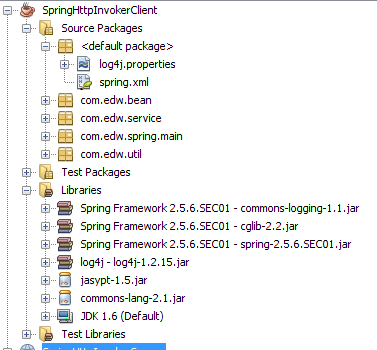
this is my project structure, btw ignore the jasypt.jar and commons-lang.jar on my project classpath, im not using them on this project.
my Netbeans 6.9 Client side's project structure

my Netbeans 6.9 Server side's project structure

If you are looking about a good Spring book, i would highly recommend “Professional Java Development with the Spring Framework”, Published by Wiley Publishing, Inc. FYI im using Spring 2.5.6

Have fun coding it, (H)