javabean

How to Compress a Java Object

Recently i’m developing a simple client server application, using serialized java objects as parameter. To increase performance, im trying to compress my java object. Here’s how i do it.

a simple serialized java bean

package com.edw.bean;

import java.io.Serializable;
import java.math.BigDecimal;

public class TestBean implements Serializable {
    private BigDecimal id;
    private String value;

    public BigDecimal getId() {
        return id;
    }

    public void setId(BigDecimal id) {
        this.id = id;
    }

    public String getValue() {
        return value;
    }

    public void setValue(String value) {
        this.value = value;
    }
}

and a class to compress my object

package com.edw.main;

import com.edw.bean.TestBean;
import java.io.File;
import java.io.FileInputStream;
import java.io.FileOutputStream;
import java.io.ObjectInputStream;
import java.io.ObjectOutputStream;
import java.math.BigDecimal;
import java.util.zip.Deflater;
import java.util.zip.GZIPInputStream;
import java.util.zip.GZIPOutputStream;
import org.apache.log4j.Logger;

public class Main {

    private final static Logger logger = Logger.getLogger(Main.class);

    public Main() {
    }

    private void startApp() throws Exception {
        // create a very big bean
        TestBean tb = new TestBean();
        tb.setId(new BigDecimal(Double.MAX_VALUE));
        String bigString = "";
        for (int i = 0; i < 5000; i++) {
            bigString += " test " + i;
        }
        tb.setValue(bigString);

        // write it to file to see this object's size
        ObjectOutputStream oos = new ObjectOutputStream(new FileOutputStream(new File("test.size"), false));
        oos.writeObject(tb);
        oos.flush();
        oos.close();

        // get the serialized object
        ObjectInputStream ois = new ObjectInputStream(new FileInputStream(new File("test.size")));
        Object regularObject = ois.readObject();
        logger.debug(((TestBean) regularObject).getId());

        // write compressed object to file to see this object's size
        FileOutputStream fos = new FileOutputStream(new File("testCompressed.size"), false);
        GZIPOutputStream gzipos = new GZIPOutputStream(fos) {

            {
                def.setLevel(Deflater.BEST_COMPRESSION);
            }
        };

        ObjectOutputStream oosCompressed = new ObjectOutputStream(gzipos);
        oosCompressed.writeObject(tb);
        oosCompressed.flush();
        oosCompressed.close();

        // get the serialized object
        FileInputStream fis = new FileInputStream(new File("testCompressed.size"));
        GZIPInputStream gzipis = new GZIPInputStream(fis);
        ObjectInputStream oisCompressed = new ObjectInputStream(gzipis);
        Object compressedObject = oisCompressed.readObject();
        logger.debug(((TestBean) compressedObject).getId());
    }

    public static void main(String[] args) throws Exception {
        Main main = new Main();
        main.startApp();
    }
}

it can compress up to 75% of size,

Thank you and have a good time coding. (*)

A Simple Swing and iBatis Integration Example

According to Wikipedia, iBATIS is a persistence framework which automates the mapping between SQL databases and objects in Java, .NET, and Ruby on Rails. In Java, the objects are POJOs (Plain Old Java Objects). The mappings are decoupled from the application logic by packaging the SQL statements in XML configuration files. The result is a significant reduction in the amount of code that a developer needs to access a relational database using lower level APIs like JDBC and ODBC.

Here, we are trying to create a simple java application using iBatis framework. Im using Netbeans as my IDE and MySql for my database. First of all, we create a simple “test” database, and “contoh” table consisting of two varchar fields.

CREATE DATABASE 'test'
USE 'test'

CREATE TABLE 'contoh' (
  'nama' varchar(30) NOT NULL,
  'alamat' varchar(100) DEFAULT NULL,
  PRIMARY KEY ('nama')
) 

next step is creating a java bean for database mapping

package com.edw.bean;

public class Contoh {

    private String nama;
    private String alamat;

    public String getAlamat() {
        return alamat;
    }

    public void setAlamat(String alamat) {
        this.alamat = alamat;
    }

    public String getNama() {
        return nama;
    }

    public void setNama(String nama) {
        this.nama = nama;
    }
    
}

and an xml mapping for database queries, i name it contoh.xml, and place it in

<?xml version="1.0" encoding="UTF-8" ?>
<!DOCTYPE sqlMap PUBLIC "-//ibatis.apache.org//DTD SQL Map 2.0//EN" "http://ibatis.apache.org/dtd/sql-map-2.dtd" >
<sqlMap namespace="contoh" >

  <insert id="insertContoh" parameterClass="com.edw.bean.Contoh" >
    insert into contoh (nama, alamat)
    values (#nama:VARCHAR#, #alamat:VARCHAR#)
  </insert>
</sqlMap>

and one xml file to contain all of our basic database connection and configuration files

<?xml version="1.0" encoding="UTF-8"?>
<!DOCTYPE sqlMapConfig
PUBLIC "-//ibatis.apache.org//DTD SQL Map Config 2.0//EN"
"http://ibatis.apache.org/dtd/sql-map-config-2.dtd">

<sqlMapConfig>
    <settings
        useStatementNamespaces="true"
        lazyLoadingEnabled="true"
        enhancementEnabled="true"
        maxSessions="20"
        />

    <transactionManager type="JDBC" commitRequired="false">
        <dataSource type="SIMPLE">

            <property name="SetAutoCommitAllowed" value="false"/>
            <property name="DefaultAutoCommit" value="false"/>
            
            <property name="JDBC.Driver" value="com.mysql.jdbc.Driver"/>
            <property name="JDBC.ConnectionURL" value="jdbc:mysql://localhost/test"/>
            <property name="JDBC.Username" value="root"/>
            <property name="JDBC.Password" value=""/>
   
        </dataSource>
    </transactionManager>


    <!-- dont forget to register your sql map configs -->
    <sqlMap resource="com/edw/sqlmap/contoh.xml"/>

</sqlMapConfig>

dont forget to register you xml queries here (line 28), or iBatis wont find it. And as you can see, at line 11, we can set our maximum session to database. 20 maxSessions means, there wont be more than 20 concurrent connection to database. Dont worry, iBatis can also connect to your connection pooling or JNDI as Datasource.

next step is, we create a singleton java class, to load our iBatis configuration.

package com.edw.config;

import com.ibatis.common.resources.Resources;
import com.ibatis.sqlmap.client.SqlMapClient;
import com.ibatis.sqlmap.client.SqlMapClientBuilder;

import java.io.IOException;
import java.io.Reader;

public class SqlMapConfig {

    protected static final SqlMapClient sqlMap;

    static {
        try {
            Reader reader = Resources.getResourceAsReader("com/edw/sqlmap/sqlmapconfig.xml");
            sqlMap = SqlMapClientBuilder.buildSqlMapClient(reader);
        } catch (IOException e) {
            throw new RuntimeException("Fatal Error, ga dapet sqlmapconfignya.  Cause: " + e, e);
        } catch (Exception e){
            throw new RuntimeException("Fatal Error.  Cause: " + e, e);
        }
    }

    public static SqlMapClient getSqlMap() {
        return sqlMap;
    }
}

and after that, we create our UI Class. Im using a simple Swing class for example.

package com.edw.ui;

import com.edw.bean.Contoh;
import com.edw.config.SqlMapConfig;
import com.ibatis.sqlmap.client.SqlMapClient;
import java.awt.Container;
import java.awt.GridLayout;
import java.awt.event.ActionEvent;
import java.awt.event.ActionListener;
import java.sql.SQLException;
import javax.swing.JButton;
import javax.swing.JFrame;
import javax.swing.JLabel;
import javax.swing.JTextField;

public class FrameUtama extends JFrame implements ActionListener {

    private JTextField txtNama = new JTextField();
    private JTextField txtAlamat = new JTextField();
    private JButton cmdButton = new JButton("Save");

    public FrameUtama(){
        setLayout(new GridLayout(3, 3));
        Container con = this.getContentPane();
        con.add(new JLabel("nama : "));
        con.add(txtNama);
        con.add(new JLabel("Alamat : "));
        con.add(txtAlamat);
        con.add(cmdButton);

        cmdButton.addActionListener(this);
    }

    public void actionPerformed(ActionEvent e) {

    }

    public static void main(String[] edw) {
        FrameUtama frameUtama = new FrameUtama();
        frameUtama.setVisible(true);
        frameUtama.setSize(300,150);
        frameUtama.setLocationRelativeTo(null);
    }

}

and we just put this simple snippet code to connect our Swing UI code to database via iBatis.

 public void actionPerformed(ActionEvent e) {
        if(e.getSource() == cmdButton){
            Contoh contoh = new Contoh();
            contoh.setNama(txtNama.getText());
            contoh.setAlamat(txtAlamat.getText());

            SqlMapClient sqlMapClient = SqlMapConfig.getSqlMap();
            try {
                sqlMapClient.insert("contoh.insertContoh", contoh);
                System.out.println("Success");
            } catch (SQLException ex) {
                ex.printStackTrace();
            }
        }
    }

well, this is the project file structure in NB 6.8.
my ibatis project structure

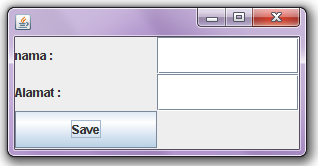
and this is the UI layout
Application GUI

this is what happen if we submit a data
successfully submit data

the data we submitted is in the database
mysql data

dont forget to download ibatis jars here, im using iBatis 2.3.4 currently.
Thanks.

Menyimpan Objek Java di Database

Untuk menyimpan suatu java object ke table, dibutuhkan field dengan tipe data BLOB, berikut adalah cara menyimpan java object (dalam hal ini javabean) kedalam database, gw pake JDK 6.0 dan MySQL 5. Misalkan ada javabean dengan nama BeanTest (usahakan selalu implements Serializable), dengan struktur dibawah ini :

import java.io.Serializable;

public class BeanTest implements Serializable {

	private String nama;
	private String alamat;

	/**
	 * @return the nama
	 */
	public String getNama() {
		return nama;
	}

	/**
	 * @param nama
	 *            the nama to set
	 */
	public void setNama(String nama) {
		this.nama = nama;
	}

	/**
	 * @return the alamat
	 */
	public String getAlamat() {
		return alamat;
	}

	/**
	 * @param alamat
	 *            the alamat to set
	 */
	public void setAlamat(String alamat) {
		this.alamat = alamat;
	}

}

lalu buat table di database

create database testest;
use testest;

CREATE TABLE IF NOT EXISTS x (
satu varchar(5) NOT NULL DEFAULT ” ,
dua blob ,
PRIMARY KEY (satu)
);

Lalu buatlah class yang akan digunakan untuk berhubungan dengan database, gunakan method setData() untuk memasukkan object ke database, dan getData() untuk mengambil data dari database.

import java.sql.Connection;
import java.sql.DriverManager;
import java.sql.ResultSet;
import java.sql.Statement;
import java.util.logging.Level;
import java.util.logging.Logger;

public class Main {

	public static void main(String[] args) {
		Main main = new Main();

		// simpan data ke database
		main.setData();

		//tarik isi database
		main.getData();
	}

	private void setData() {
		try {

			BeanTest bean = new BeanTest();

			bean.setNama("edwin");
			bean.setAlamat("jakarta");

			Class.forName("com.mysql.jdbc.Driver");
			Connection con = DriverManager.getConnection("jdbc:mysql://localhost:3306/testest", "root", "");
			java.sql.PreparedStatement statement = con.prepareStatement("insert into x values (?,?)");

			statement.setString(1, "00001");
			statement.setBytes(2, toBytes(bean));

			statement.executeUpdate();

			statement.close();
			con.close();
		} catch (Exception ex) {
			Logger.getLogger(Main.class.getName()).log(Level.SEVERE, null, ex);
		}
	}

	private byte[] toBytes(Object object) {
		java.io.ByteArrayOutputStream baos = new java.io.ByteArrayOutputStream();
		try {
			java.io.ObjectOutputStream oos = new java.io.ObjectOutputStream(baos);
			oos.writeObject(object);
			oos.flush();
			oos.close();
		} catch (Exception ioe) {
			ioe.getMessage();
		}

		return baos.toByteArray();
	}

	private void getData() {
		try {
			Class.forName("com.mysql.jdbc.Driver");

			Connection con = DriverManager.getConnection(
					"jdbc:mysql://localhost:3306/testest", "root", "");
			Statement statement = con.createStatement();
			ResultSet res = statement.executeQuery("select * from x");

			while (res.next()) {
				Object o = toObject(res.getBytes(2));

				if (o instanceof BeanTest) {
					BeanTest beanTest = (BeanTest) o;
					System.out.println(beanTest.getNama());
					System.out.println(beanTest.getAlamat());

				}
			}
			statement.close();
			con.close();
		} catch (Exception ex) {
			Logger.getLogger(Main.class.getName()).log(Level.SEVERE, null, ex);
		}
	}

	private Object toObject(byte[] bytes) {
		Object object = null;
		try {
			object = new java.io.ObjectInputStream(
					new java.io.ByteArrayInputStream(bytes)).readObject();
		} catch (Exception cnfe) {
			cnfe.getMessage();
		}
		return object;
	}
}

sekian dan terima kasih,

Wassalam.