Java

java

A Client Server Application using Spring HTTP Invoker

Right now, im trying to create a simple client-server application using spring HTTP invoker. One major advantage using Spring Http Invoker is that instead of the custom serialization found in Hessian and Burlap, HTTP invoker uses Java serialization — just like RMI. Applications can rely on full serialization power, as long as all transferred objects properly follow Java serialization rules (implementing the java.io.Serializable marker interface and properly defining serialVersionUID if necessary).

Because of the nature of HTTP invoker (which is available only in Spring), both the client side and the server side need to be based on Spring — and on Java in the first place because of the use of Java serialization. In contrast to Hessian and Burlap, there is no option for cross-platform remoting. HTTP invoker is clearly dedicated to powerful and seamless Java-to-Java remoting.

Okay, let me show you my client side’s code, first is a very simple bean.

package com.edw.bean;

import java.io.Serializable;
import java.math.BigDecimal;

public class BeanBego implements Serializable {
    private String nama;
    private int usia;
    private double gaji;
    private float x;
    private float y;
    private BigDecimal z;

    public String getNama() {
        return nama;
    }

    public void setNama(String nama) {
        this.nama = nama;
    }

    public int getUsia() {
        return usia;
    }

    // other setters and getters

next is an interface to connect with the server side application.

package com.edw.service;

public interface TestService {

    void doNothing();

    String doSomething(String something);
    String doSomething(Object something);
}

and this is my client’s side Spring configuration. Take a look at line 6, it is my server side’s application location. And on line 7, is my interface class.

<?xml version="1.0" encoding="UTF-8" ?>
<!DOCTYPE beans PUBLIC "-//SPRING//DTD BEAN//EN" "http://www.springframework.org/dtd/spring-beans.dtd">

<beans>
    <bean id="testHttpInvoker" class="org.springframework.remoting.httpinvoker.HttpInvokerProxyFactoryBean">
        <property name="serviceUrl" value="http://localhost:8084/SpringHttpInvokerServer/testService.service"/>
        <property name="serviceInterface" value="com.edw.service.TestService"/>
    </bean>
</beans>

and this is my application’s main class,

package com.edw.spring.main;

import com.edw.bean.BeanBego;
import com.edw.service.TestService;
import java.math.BigDecimal;
import org.apache.log4j.Logger;
import org.springframework.context.ApplicationContext;
import org.springframework.context.support.ClassPathXmlApplicationContext;

public class Main {

    private Logger logger = Logger.getLogger(this.getClass());

    public Main() throws Exception {
    }

    private void execute() {
        ApplicationContext applicationContext = new ClassPathXmlApplicationContext("spring.xml");
        TestService testService = (TestService) applicationContext.getBean("testHttpInvoker");

        BeanBego beanBego = new BeanBego();
        beanBego.setGaji(2000000000d);
        beanBego.setUsia(500);
        beanBego.setX(500000000f);
        beanBego.setY(6000000f);
        beanBego.setZ(new BigDecimal(Double.MAX_VALUE));

        String testString = "";
        for (int i = 0; i < 2000; i++) {
            testString += " " + i + " pepe ";
        }

        beanBego.setNama(testString);

        logger.debug(testService.doSomething(beanBego));
    }

    public static void main(String[] args) throws Exception {
        Main main = new Main();
        main.execute();
    }
}

and now lets create the server side’s application, btw im using Apache Tomcat as my web server, first i copy my BeanBego class and TestService interface from client’s side to the server side. After that, i create the implementation of TestService interface,

package com.edw.service;

import com.edw.bean.BeanBego;
import org.apache.log4j.Logger;

public class TestServiceImpl implements TestService {

    private Logger logger = Logger.getLogger(this.getClass());

    public void doNothing() {
        logger.debug("im doing nothing");
    }

    public String doSomething(String something) {
        logger.debug("im doing something");
        return "connect successfully";
    }

    public String doSomething(Object something) {
        logger.debug("im doing something");

        if(something instanceof BeanBego)
            return ((BeanBego)something).getGaji()+"";
        return "not a BeanBego instance";
    }
   
}

next step is registering your class to your main Spring configuration, remember to named it “remoting-servlet.xml”.

<?xml version="1.0" encoding="UTF-8"?>
<beans xmlns="http://www.springframework.org/schema/beans"
       xmlns:xsi="http://www.w3.org/2001/XMLSchema-instance"
       xmlns:context="http://www.springframework.org/schema/context"
       xmlns:tx="http://www.springframework.org/schema/tx"
       xmlns:p="http://www.springframework.org/schema/p"
       xsi:schemaLocation="http://www.springframework.org/schema/beans http://www.springframework.org/schema/beans/spring-beans-2.5.xsd
       http://www.springframework.org/schema/context http://www.springframework.org/schema/context/spring-context-2.5.xsd
       http://www.springframework.org/schema/tx http://www.springframework.org/schema/tx/spring-tx-2.5.xsd">

    <bean id="testService" class="com.edw.service.TestServiceImpl"/>

    <bean id="testHttpInvoker" class="org.springframework.remoting.httpinvoker.HttpInvokerServiceExporter">
        <property name="service">
            <ref bean="testService"/>
        </property>
        <property name="serviceInterface">
            <value>com.edw.service.TestService</value>
        </property>
    </bean>
    
    <bean id="urlMapping" class="org.springframework.web.servlet.handler.SimpleUrlHandlerMapping">
        <property name="mappings">
            <props>
                <prop key="/testService.service">testHttpInvoker</prop>
            </props>
        </property>
    </bean>

</beans>

and register your remoting-servlet.xml on your web.xml

<?xml version="1.0" encoding="UTF-8"?>
<web-app version="2.5" xmlns="http://java.sun.com/xml/ns/javaee" xmlns:xsi="http://www.w3.org/2001/XMLSchema-instance" xsi:schemaLocation="http://java.sun.com/xml/ns/javaee http://java.sun.com/xml/ns/javaee/web-app_2_5.xsd">
    <context-param>
        <param-name>contextConfigLocation</param-name>
        <param-value>
			/WEB-INF/remoting-servlet.xml
        </param-value>
    </context-param>
    <listener>
        <listener-class>org.springframework.web.context.ContextLoaderListener</listener-class>
    </listener>

    <servlet>
        <servlet-name>remoting</servlet-name>
        <servlet-class>org.springframework.web.servlet.DispatcherServlet</servlet-class>
        <load-on-startup>2</load-on-startup>
    </servlet>

    <servlet-mapping>
        <servlet-name>remoting</servlet-name>
        <url-pattern>*.service</url-pattern>
    </servlet-mapping>

    <session-config>
        <session-timeout>
            30
        </session-timeout>
    </session-config>
    <welcome-file-list>
        <welcome-file>index.jsp</welcome-file>
    </welcome-file-list>
</web-app>

try to deploy it on your app-server. After that, try to execute your client side’s application. This is what happen on my server’s console

RemoteInvocationTraceInterceptor] DEBUG org.springframework.remoting.support.RemoteInvocationTraceInterceptor:73 - Incoming HttpInvokerServiceExporter remote call: com.edw.service.TestService.doSomething
[TestServiceImpl] DEBUG com.edw.service.TestServiceImpl:26 - im doing something
[RemoteInvocationTraceInterceptor] DEBUG org.springframework.remoting.support.RemoteInvocationTraceInterceptor:79 - Finished processing of HttpInvokerServiceExporter remote call: com.edw.service.TestService.doSomething
[DispatcherServlet] DEBUG org.springframework.web.servlet.DispatcherServlet:909 - Null ModelAndView returned to DispatcherServlet with name 'remoting': assuming HandlerAdapter completed request handling
[DispatcherServlet] DEBUG org.springframework.web.servlet.DispatcherServlet:591 - Successfully completed request

and this on my client’s console

[JdkDynamicAopProxy] DEBUG org.springframework.aop.framework.JdkDynamicAopProxy:113 - Creating JDK dynamic proxy: target source is EmptyTargetSource: no target class, static
[DefaultListableBeanFactory] DEBUG org.springframework.beans.factory.support.DefaultListableBeanFactory:411 - Finished creating instance of bean 'testHttpInvoker'
[DefaultListableBeanFactory] DEBUG org.springframework.beans.factory.support.DefaultListableBeanFactory:214 - Returning cached instance of singleton bean 'testHttpInvoker'
[SimpleHttpInvokerRequestExecutor] DEBUG org.springframework.remoting.httpinvoker.SimpleHttpInvokerRequestExecutor:133 - Sending HTTP invoker request for service at [http://localhost:8084/SpringHttpInvokerServer/testService.service], with size 21766
[Main] DEBUG com.edw.spring.main.Main:41 - 2.0E9

this is my project structure, btw ignore the jasypt.jar and commons-lang.jar on my project classpath, im not using them on this project.
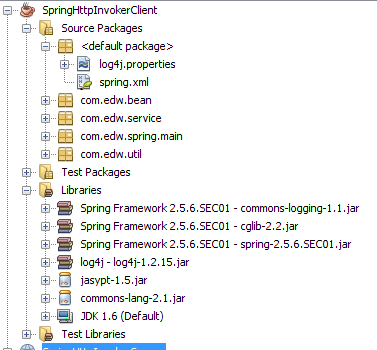
my Netbeans 6.9 Client side's project structure

my Netbeans 6.9 Server side's project structure

If you are looking about a good Spring book, i would highly recommend “Professional Java Development with the Spring Framework”, Published by Wiley Publishing, Inc. FYI im using Spring 2.5.6

Have fun coding it, (H)

How to Compress a Java Object

Recently i’m developing a simple client server application, using serialized java objects as parameter. To increase performance, im trying to compress my java object. Here’s how i do it.

a simple serialized java bean

package com.edw.bean;

import java.io.Serializable;
import java.math.BigDecimal;

public class TestBean implements Serializable {
    private BigDecimal id;
    private String value;

    public BigDecimal getId() {
        return id;
    }

    public void setId(BigDecimal id) {
        this.id = id;
    }

    public String getValue() {
        return value;
    }

    public void setValue(String value) {
        this.value = value;
    }
}

and a class to compress my object

package com.edw.main;

import com.edw.bean.TestBean;
import java.io.File;
import java.io.FileInputStream;
import java.io.FileOutputStream;
import java.io.ObjectInputStream;
import java.io.ObjectOutputStream;
import java.math.BigDecimal;
import java.util.zip.Deflater;
import java.util.zip.GZIPInputStream;
import java.util.zip.GZIPOutputStream;
import org.apache.log4j.Logger;

public class Main {

    private final static Logger logger = Logger.getLogger(Main.class);

    public Main() {
    }

    private void startApp() throws Exception {
        // create a very big bean
        TestBean tb = new TestBean();
        tb.setId(new BigDecimal(Double.MAX_VALUE));
        String bigString = "";
        for (int i = 0; i < 5000; i++) {
            bigString += " test " + i;
        }
        tb.setValue(bigString);

        // write it to file to see this object's size
        ObjectOutputStream oos = new ObjectOutputStream(new FileOutputStream(new File("test.size"), false));
        oos.writeObject(tb);
        oos.flush();
        oos.close();

        // get the serialized object
        ObjectInputStream ois = new ObjectInputStream(new FileInputStream(new File("test.size")));
        Object regularObject = ois.readObject();
        logger.debug(((TestBean) regularObject).getId());

        // write compressed object to file to see this object's size
        FileOutputStream fos = new FileOutputStream(new File("testCompressed.size"), false);
        GZIPOutputStream gzipos = new GZIPOutputStream(fos) {

            {
                def.setLevel(Deflater.BEST_COMPRESSION);
            }
        };

        ObjectOutputStream oosCompressed = new ObjectOutputStream(gzipos);
        oosCompressed.writeObject(tb);
        oosCompressed.flush();
        oosCompressed.close();

        // get the serialized object
        FileInputStream fis = new FileInputStream(new File("testCompressed.size"));
        GZIPInputStream gzipis = new GZIPInputStream(fis);
        ObjectInputStream oisCompressed = new ObjectInputStream(gzipis);
        Object compressedObject = oisCompressed.readObject();
        logger.debug(((TestBean) compressedObject).getId());
    }

    public static void main(String[] args) throws Exception {
        Main main = new Main();
        main.startApp();
    }
}

it can compress up to 75% of size,

Thank you and have a good time coding. (*)

Connecting a Servlet, iBatis and Glassfish 3

This time im trying to change my programming style, from a simple JDBC connection to a bit more complicated JDBC Connection Pool so i could increase my application’s response time. Btw, what is a Connection Pools? Basically, it’s a cached connections that are kept in a runtime object pool and can be used and reused as needed by the application. For a more complete explanation, you can check here.

Im planning to deploy my application on a Glassfish v3 and change my iBatis’ setting from simple JDBC to JNDI connection, but first i have create a MySql DataSource on m Glassfish. In order to create a connection pool, i put my MySQL JDBC Jar in <glassfish installation folder>/lib.

From my Glassfish console (http://localhost:4848/), i create a new Connection pools,

Start by giving its name, and selecting resource and database vendor type,

Connection type,

Dont forget adding these properties, so you can connect to your MySql Database,

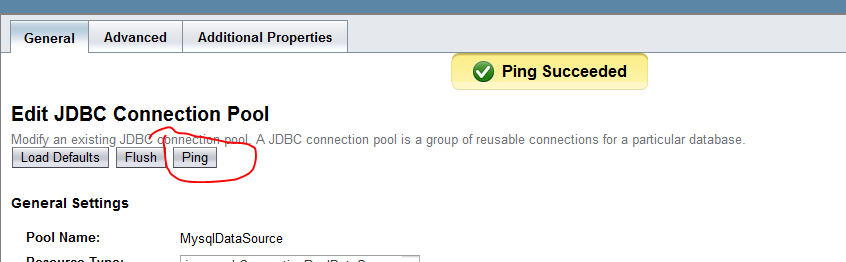
you can test your connection by pinging it,

Btw, if you cant find the which resource type you need, here are some hints

  1. javax.sql.DataSource: is a non-pooled direct connection
  2. javax.sql.ConnectionPoolDataSource: connection is coming from pool
  3. javax.sql.XADataSource: is for distributed transactions

Create a new JDBC Resources using your new Connection Pool,

Next step is creating a simple web application using NetBeans 6.9. As usual, i create a simple table

CREATE DATABASE 'test'
USE 'test'

CREATE TABLE `contoh` (
  `nama` varchar(30) NOT NULL DEFAULT '',
  `alamat` varchar(100) DEFAULT NULL,
  PRIMARY KEY (`nama`)
)

insert into contoh (nama, alamat) values ('edwin', 'jakarta');
insert into contoh (nama, alamat) values ('kamplenk', 'ciledug');
insert into contoh (nama, alamat) values ('nugie', 'pamulang');
insert into contoh (nama, alamat) values ('samsu', 'dago');
insert into contoh (nama, alamat) values ('tebek', 'jayapura');

next step is creating a java bean for database mapping

package com.edw.bean;

/**
 *
 * @author edw
 */
public class Contoh {

    private String nama;
    private String alamat;

    public Contoh(String nama, String alamat) {
        this.nama = nama;
        this.alamat = alamat;
    }

    public Contoh() {
    }

    public String getAlamat() {
        return alamat;
    }

    public void setAlamat(String alamat) {
        this.alamat = alamat;
    }

    public String getNama() {
        return nama;
    }

    public void setNama(String nama) {
        this.nama = nama;
    }

    @Override
    public String toString() {
        return "Contoh{" + "nama=" + nama + " and alamat=" + alamat + '}';
    }        
}

and an xml mapping for database queries, i named it contoh.xml

<?xml version="1.0" encoding="UTF-8" ?>
<!DOCTYPE sqlMap PUBLIC "-//ibatis.apache.org//DTD SQL Map 2.0//EN" "http://ibatis.apache.org/dtd/sql-map-2.dtd" >
<sqlMap namespace="contoh" >

    <!--alias-->
    <typeAlias alias="Contoh" type="com.edw.bean.Contoh" />

    <resultMap id="result" class="Contoh">
        <result property="nama" column="NAMA" columnIndex="1"/>
        <result property="alamat" column="ALAMAT" columnIndex="2"/>
    </resultMap>

    <insert id="insertContoh" parameterClass="Contoh" >
    insert into contoh (nama, alamat)
    values (#nama:VARCHAR#, #alamat:VARCHAR#)
    </insert>

    <!--query select all-->
    <select id="selectAllContoh" resultMap="result">
    select nama, alamat
    from contoh
    </select>

    <!--query with Bean parameter-->
    <select id="selectContohWithPKfromBean" resultClass="Contoh" parameterClass="Contoh">
    select nama, alamat
    from contoh
    where nama like #nama:VARCHAR#
    </select>

    <!--query with String parameter-->
    <select id="selectContohWithPKfromString" resultClass="Contoh" parameterClass="java.lang.String">
    select nama, alamat
    from contoh
    where nama like #nama#
    </select>

    <!--query with Map parameter-->
    <select id="selectContohWithPKfromMap" resultClass="Contoh" parameterClass="java.util.Map">
    select nama, alamat
    from contoh
    where nama like #nama#
    </select>

</sqlMap>

and ibatis’ main xml configuration, sqlmapconfig.xml

<?xml version="1.0" encoding="UTF-8"?>
<!DOCTYPE sqlMapConfig
PUBLIC "-//ibatis.apache.org//DTD SQL Map Config 2.0//EN"
"http://ibatis.apache.org/dtd/sql-map-config-2.dtd">

<sqlMapConfig>
    <settings
        useStatementNamespaces="true"
        lazyLoadingEnabled="true"
        enhancementEnabled="true"
        />

    <transactionManager type="JDBC" commitRequired="false">
        <dataSource type="JNDI">
            <property name="DataSource" value="mysqljndi"/>
        </dataSource>
    </transactionManager>

    <sqlMap resource="com/edw/sqlmap/contoh.xml"/>
</sqlMapConfig>

next step is creating a simple java class to load all iBatis’ configuration file.

package com.edw.config;

import com.ibatis.common.resources.Resources;
import com.ibatis.sqlmap.client.SqlMapClient;
import com.ibatis.sqlmap.client.SqlMapClientBuilder;
import java.io.IOException;
import java.io.Reader;


/**
 *
 * @author edw
 */
public class SqlMapConfig {

    protected static final SqlMapClient sqlMap;

    static {
        try {
            Reader reader = Resources.getResourceAsReader("com/edw/sqlmap/sqlmapconfig.xml");
            sqlMap = SqlMapClientBuilder.buildSqlMapClient(reader);
        } catch (IOException e) {
            throw new RuntimeException("Fatal Error, ga dapet sqlmapconfignya.  Cause: " + e, e);
        } catch (Exception e){
            throw new RuntimeException("Fatal Error.  Cause: " + e, e);
        }
    }

    public static SqlMapClient getSqlMap() {
        return sqlMap;
    }
}

a simple Servlet

package com.edw.servlet;

import com.edw.bean.Contoh;
import com.edw.config.SqlMapConfig;
import java.io.IOException;
import java.io.PrintWriter;
import java.util.HashMap;
import java.util.List;
import java.util.Map;
import javax.servlet.ServletException;
import javax.servlet.http.HttpServlet;
import javax.servlet.http.HttpServletRequest;
import javax.servlet.http.HttpServletResponse;
import org.apache.log4j.Logger;

/**
 *
 * @author edw
 */
public class Main extends HttpServlet {

    private Logger logger = Logger.getLogger(this.getClass());

    protected void processRequest(HttpServletRequest request, HttpServletResponse response)
    throws ServletException, IOException {
        response.setContentType("text/html;charset=UTF-8");
        PrintWriter out = response.getWriter();
        try {
          
            out.println("<html>");
            out.println("<head>");
            out.println("<title>iBatis Test</title>");
            out.println("</head>");
            out.println("<body>");

            out.println("-----------------------");
            out.println("select all <br />");

            List<Contoh> contohs = SqlMapConfig.getSqlMap().queryForList("contoh.selectAllContoh");
            for (Contoh contoh : contohs) {
                out.println(contoh+"<br />");
            }

            out.println("<br />");
            out.println("<br />");
            
            out.println("-----------------------");
            out.println("select with Parameter Bean");
            out.println("<br />"+SqlMapConfig.getSqlMap().queryForObject("contoh.selectContohWithPKfromBean", new Contoh("samsu", null))+"<br /><br />");

            out.println("-----------------------");
            out.println("select with Parameter String");
            out.println("<br />"+SqlMapConfig.getSqlMap().queryForObject("contoh.selectContohWithPKfromString", "kamplenk")+"<br /><br />");

            out.println("-----------------------");
            out.println("select with Parameter Map");
            Map<String, String> map = new HashMap<String, String>();
            map.put("nama", "tebek");
            out.println("<br />"+SqlMapConfig.getSqlMap().queryForObject("contoh.selectContohWithPKfromMap", map)+"<br /><br />");
            
            out.println("</body>");
            out.println("</html>");

        } catch(Exception ex){
            logger.error(ex.getMessage(),ex);
        } finally {
            out.close();
        }
    } 

    @Override
    protected void doGet(HttpServletRequest request, HttpServletResponse response)
    throws ServletException, IOException {
        processRequest(request, response);
    } 
   
    @Override
    protected void doPost(HttpServletRequest request, HttpServletResponse response)
    throws ServletException, IOException {
        processRequest(request, response);
    }
  
    @Override
    public String getServletInfo() {
        return "My Main Servlet";
    }
}

and my web.xml configuration

<?xml version="1.0" encoding="UTF-8"?>
<web-app version="2.5" xmlns="http://java.sun.com/xml/ns/javaee" xmlns:xsi="http://www.w3.org/2001/XMLSchema-instance" xsi:schemaLocation="http://java.sun.com/xml/ns/javaee http://java.sun.com/xml/ns/javaee/web-app_2_5.xsd">
    <servlet>
        <servlet-name>Main</servlet-name>
        <servlet-class>com.edw.servlet.Main</servlet-class>
    </servlet>
    <servlet-mapping>
        <servlet-name>Main</servlet-name>
        <url-pattern>/Main</url-pattern>
    </servlet-mapping>
    <session-config>
        <session-timeout>
            30
        </session-timeout>
    </session-config>
    <welcome-file-list>
        <welcome-file>Main</welcome-file>
    </welcome-file-list>
</web-app>

this is the result on my browser when i run my application

this is my netbeans project structure

Again, i hope this simple tutorial could be useful for others. Cheers (B)
nb. im using Netbeans 6.9, iBatis 2.3.4 and Glassfish 3.

A Simple Java Client Server Application using EJB3 and Glassfish3

Well, in this tutorial i want to show you how to create a simple client server application using java. Actually java has dozens of different network protocols, from a simple socket, hessian, burlap, SpringHttpInvoker, SOAP, XML and so on. But in this example, i will try to create a very simple client server application with EJB 3, using Glassfish 3 as JavaEE Container. As usual, i use Netbeans 6.9 with its default Glassfish3 installation.

First, i create a new JavaEE, EJB Module project, named CompressedEJBServer, and create a simple Stateless Session Bean in it

package com.edw.facade;

import javax.ejb.Remote;

/**
 *
 * @author edw
 */
@Remote
public interface ConnectionFacadeRemote {
    String sayHello(String string);
    int sayAge(int age);  
}

and its implementation

package com.edw.facade;

import javax.ejb.Stateless;

/**
 *
 * @author edw
 */
@Stateless
public class ConnectionFacade implements ConnectionFacadeRemote {

    public String sayHello(String string) {
        System.out.println("im at " + this.getClass().getName() + " method sayHello()");
        return "hello " + string;
    }

    public int sayAge(int age) {
        System.out.println("im at " + this.getClass().getName() + " method sayAge()");
        return age * 2;
    }
}

and that’s my EJB3 Server side files. Simple isn’t it?

Next step is creating a Standard Java Application project, for my EJB3 client application. It consist only 1 java file, for testing connection to the server.

package com.edw.main;

import com.edw.facade.ConnectionFacadeRemote;
import java.util.Properties;

import javax.naming.Context;
import javax.naming.InitialContext;
import org.apache.log4j.Logger;

/**
 *
 * @author edw
 */
public class Main {

    private Logger logger = Logger.getLogger(Main.class);

    private void connect() {
        try {
            Properties props = new Properties();
            props.put(Context.INITIAL_CONTEXT_FACTORY, "com.sun.enterprise.naming.SerialInitContextFactory");
            props.setProperty("org.omg.CORBA.ORBInitialHost", "localhost");
            
            // glassfish default port value will be 3700, 
            // but im using tcpviewer to redirect my 50005 port to 3700
            props.setProperty("org.omg.CORBA.ORBInitialPort", "50005");

            InitialContext ctx = new InitialContext(props);
            ConnectionFacadeRemote connectionFacadeRemote = (ConnectionFacadeRemote) ctx.lookup("com.edw.facade.ConnectionFacadeRemote");
            logger.debug(connectionFacadeRemote.sayHello("edwin "));
            logger.debug("my age is " + connectionFacadeRemote.sayAge(12) + " years");
        } catch (Exception ex) {
            logger.error(ex.getMessage(), ex);
        }
    }

    public static void main(String[] args) {
        Main x = new Main();
        x.connect();
    }
}

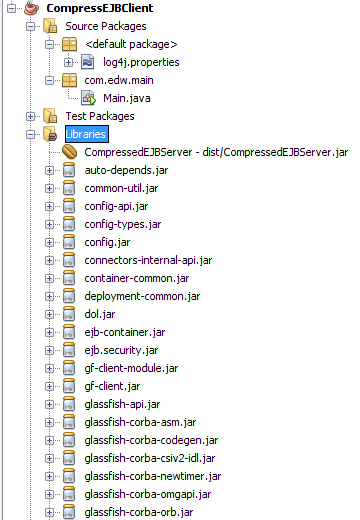
include these jars to your client side’s application,

auto-depends.jar
common-util.jar
config.jar
config-api.jar
config-types.jar
connectors-internal-api.jar
container-common.jar
deployment-common.jar
dol.jar
ejb.security.jar
ejb-container.jar
glassfish-api.jar
glassfish-corba-asm.jar
glassfish-corba-codegen.jar
glassfish-corba-csiv2-idl.jar
glassfish-corba-newtimer.jar
glassfish-corba-omgapi.jar
glassfish-corba-orb.jar
glassfish-corba-orbgeneric.jar
glassfish-naming.jar
gmbal.jar
hk2-core.jar
internal-api.jar
javax.ejb.jar
javax.jms.jar
javax.resource.jar
javax.servlet.jar
javax.transaction.jar
jta.jar
kernel.jar
management-api.jar
orb-connector.jar
orb-iiop.jar
security.jar
tiger-types-osgi.jar
transaction-internal-api.jar 

and dont forget to add CompressedEJBServer project into CompressEJBClient’s project

this is what happen if i run my client side’s application

[Main] DEBUG com.edw.main.Main:30 - hello edwin 
[Main] DEBUG com.edw.main.Main:31 - my age is 24 years

this is my Server side’s project structures

and this is my Client side’s project structures
My Client Side's Project Structure

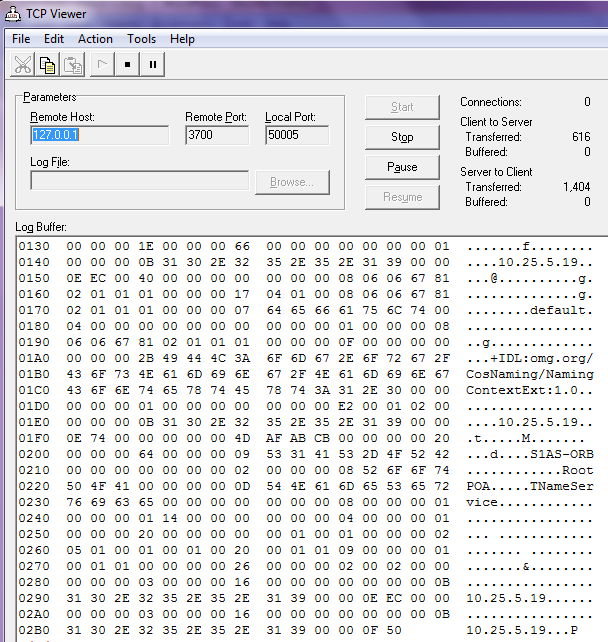
and this is my TCP Viewer logs, i try to redirect my localhost’s port 50005 into my localhost’s port 3700 (Glassfish’s port), so i can see what is passing through my 50005 port via TCP Viewer’s console.

Hope this can help, have fun and good luck. May the Source be with You.
(*)

Creating an Autocomplete Text Field in Java using SwingX

Again, my friend Iswi asked me a simple question, but a little bit hard to do. She asked me, how can she create an autocomplete jtextfield in java, maybe something like NetBean’s autocompletion feature. It took me a while to try several workarounds, before i found a very neat library, swingx. Let just say that this SwingX library helped me alot, and it have lots of other cool swing components. Really worth a try.

In this example, i try to create a simple application consist of 2 autocompletion components, 1 unrestricted jcombobox and 1 restricted jtextfield. Both components will connect to one table using Hibernate. Let’s give it a try.

First, a simple 2 column table.

CREATE DATABASE 'test'
USE 'test'

CREATE TABLE 'contoh' (
  'nama' varchar(30) NOT NULL,
  'alamat' varchar(100) DEFAULT NULL,
  PRIMARY KEY ('nama')
) 

next step is creating a java bean and its hbm.xml for database mapping

package com.edw.bean;

/**
 * Contoh generated by hbm2java
 */
public class Contoh implements java.io.Serializable {

    private String nama;
    private String alamat;

    public Contoh() {
    }

    public Contoh(String nama) {
        this.nama = nama;
    }

    public Contoh(String nama, String alamat) {
        this.nama = nama;
        this.alamat = alamat;
    }

    public String getNama() {
        return this.nama;
    }

    public void setNama(String nama) {
        this.nama = nama;
    }

    public String getAlamat() {
        return this.alamat;
    }

    public void setAlamat(String alamat) {
        this.alamat = alamat;
    }
}

FYI, im using NetBeans’ Hibernate POJO and XML generator.

<?xml version="1.0" encoding="UTF-8"?>
<!DOCTYPE hibernate-mapping PUBLIC "-//Hibernate/Hibernate Mapping DTD 3.0//EN" "http://hibernate.sourceforge.net/hibernate-mapping-3.0.dtd">
<!-- Generated Sep 1, 2010 10:10:38 AM by Hibernate Tools 3.2.1.GA -->
<hibernate-mapping>
  <class catalog="test" name="com.edw.bean.Contoh" table="contoh">
    <id name="nama" type="string">
      <column length="30" name="nama"/>
      <generator class="assigned"/>
    </id>
    <property name="alamat" type="string">
      <column length="100" name="alamat"/>
    </property>
  </class>
</hibernate-mapping>

this is my hibernate.cfg.xml, for my default hibernate configuration

<?xml version="1.0" encoding="UTF-8"?>
<!DOCTYPE hibernate-configuration PUBLIC "-//Hibernate/Hibernate Configuration DTD 3.0//EN" "http://hibernate.sourceforge.net/hibernate-configuration-3.0.dtd">
<hibernate-configuration>
  <session-factory>
    <property name="hibernate.dialect">org.hibernate.dialect.MySQLDialect</property>
    <property name="hibernate.connection.driver_class">com.mysql.jdbc.Driver</property>
    <property name="hibernate.connection.url">jdbc:mysql://localhost:3306/test</property>
    <property name="hibernate.connection.username">admin</property>
    <property name="hibernate.connection.password">xxx</property>
    <mapping resource="com/edw/bean/Contoh.hbm.xml"/>
  </session-factory>
</hibernate-configuration>

and my java class to load hibernate’s main xml configuration

package com.edw.hbm.util;

import org.hibernate.cfg.AnnotationConfiguration;
import org.hibernate.SessionFactory;

/**
 * Hibernate Utility class with a convenient method to get Session Factory object.
 *
 * @author edw
 */
public class HibernateUtil {
    private static final SessionFactory sessionFactory;

    static {
        try {
            // Create the SessionFactory from standard (hibernate.cfg.xml) 
            // config file.
            sessionFactory = new AnnotationConfiguration().configure().buildSessionFactory();
        } catch (Throwable ex) {
            // Log the exception. 
            System.err.println("Initial SessionFactory creation failed." + ex);
            throw new ExceptionInInitializerError(ex);
        }
    }

    public static SessionFactory getSessionFactory() {
        return sessionFactory;
    }
}

this is my main java class, you’ll see some imported SwingX’s classes.

package com.edw.swingx;

import com.edw.bean.Contoh;
import com.edw.hbm.util.HibernateUtil;
import java.awt.Container;
import java.awt.FlowLayout;
import java.awt.event.ActionEvent;
import java.awt.event.ActionListener;
import java.util.ArrayList;
import java.util.Collections;
import java.util.List;
import javax.swing.JButton;
import javax.swing.JComboBox;
import javax.swing.JFrame;
import javax.swing.JTextField;
import org.apache.log4j.Logger;
import org.hibernate.Session;

import org.jdesktop.swingx.autocomplete.AutoCompleteDecorator;
import org.jdesktop.swingx.combobox.ListComboBoxModel;

/**
 *
 * @author edw
 */
public class AutoCompletionTextField extends JFrame implements ActionListener {

    private JButton button = new JButton("tombol");
    private JComboBox comboComplete = new JComboBox();
    private JTextField textComplete = new JTextField(30);
    private Logger logger = Logger.getLogger(this.getClass());
    private List<String> strings = new ArrayList<String>();

    public void actionPerformed(ActionEvent e) {
        if(e.getSource() == button){
            logger.debug(comboComplete.getSelectedItem().toString());
            logger.debug(textComplete.getText().toString());
        }
    }

    public AutoCompletionTextField() {

        try {
            Session session = HibernateUtil.getSessionFactory().openSession();
            List<Contoh> contohs = (List<Contoh>)session.createCriteria(Contoh.class).list();
            session.close();

            for (Contoh contoh : contohs) {
                strings.add(contoh.getNama());
            }

            Collections.sort(strings);

            // change true to false to enable string restriction
            comboComplete.setEditable(true);
            comboComplete.setModel(new ListComboBoxModel<String>(strings));

            AutoCompleteDecorator.decorate(comboComplete);
            // change true to false to disable string restriction
            AutoCompleteDecorator.decorate(textComplete, strings, true);

            Container con = getContentPane();
            con.setLayout(new FlowLayout());
            con.add(comboComplete);
            con.add(textComplete);
            con.add(button);

            button.addActionListener(this);
            comboComplete.addActionListener(this);
        } catch (Exception ex) {
            logger.error(ex.getMessage(), ex);
        }
    }
    
    public static void main(String[] args) {
        AutoCompletionTextField autoCompletionTextField = new AutoCompletionTextField();
        autoCompletionTextField.setVisible(true);
        autoCompletionTextField.pack();
        autoCompletionTextField.setDefaultCloseOperation(JFrame.EXIT_ON_CLOSE);
    }
}

this is my UI result,

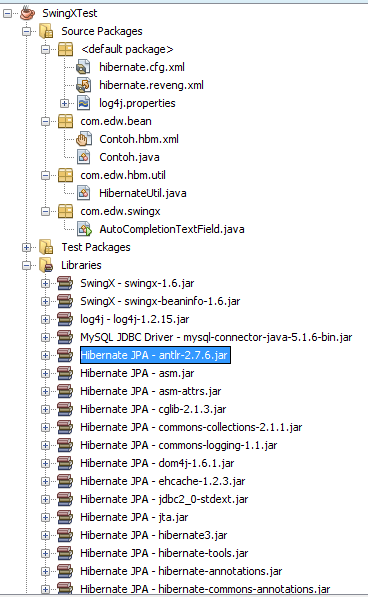
this is NetBeans 6.9 project structure,

Again, thank you Iswi for your questions. Cheers, (B)