Programming

basic programming

Beginning MyBatis 3

MyBatis framework is a complete rewrite of iBatis, it’s a data mapper framework that makes it easier to use a relational database with object-oriented applications. The difference from old iBatis is that now everything can now be written in java, from queries, configuration to mappers.

Some people might ask why MyBatis use a different approach from its ancestor, iBatis? iBatis’ code generator use *DAOs while MyBatis use *Mappers. I think they all the same, but then according to Clinton Begin they are, despite their similarity, are not exact in concepts.

DAOs can collect multiple statements and thus aggregate or cohesive data logic into one method. That said, this isn’t necessarily a good thing. After 10 years of writing DAOs, I can say with enough experience that DAOs are a waste of time. They fragment business logic, they’re extra code and the abstraction goes largely unused for the lifetime of most applications that implement it. DAOs were often implemented incorrectly and code would sneak into them that should not.

Mappers on the other hand, are named function that executes a single SQL statement or procedure. There is no extra code, and it eliminates strings in the execution of mapped statements. Mappers also help define the mapped statement.

In a sense, you can also think of it as:

  • DAOs USE mapped statements.
  • Mapper methods ARE mapped statements.

The cohesive grouping or aggregation of related statements that work together to form a business process should now exist in your service layer (be it a Spring bean, or an EJB or a POJO service layer).

Okay enough with the chit-chat, let me show you the code, first as always, a simple mysql database named test, and a table named Contoh.

CREATE TABLE contoh
(
    nama VARCHAR(30) NOT NULL,
    alamat VARCHAR(100),
    PRIMARY KEY (nama)
)

and a java bean

package com.edw.mybatis.bean;

public class Contoh {
    private String nama;
    private String alamat;

    // other setter and getter

    @Override
    public String toString(){
        return nama+" : "+alamat;
    }
}

This is my Contoh table queries, i named it ContohMapper.xml

<?xml version="1.0" encoding="UTF-8" ?>
<!DOCTYPE mapper PUBLIC "-//mybatis.org//DTD Mapper 3.0//EN" "http://mybatis.org/dtd/mybatis-3-mapper.dtd" >
<mapper namespace="com.edw.mybatis.mapper.ContohMapper" >
    
  <resultMap id="ContohMap" type="com.edw.mybatis.bean.Contoh" >
    <id column="nama" property="nama" jdbcType="VARCHAR" />
    <result column="alamat" property="alamat" jdbcType="VARCHAR" />
  </resultMap>

  <insert id="save" parameterType="com.edw.mybatis.bean.Contoh" >
    insert into contoh (nama, alamat)
    values (#{nama,jdbcType=VARCHAR}, #{alamat,jdbcType=VARCHAR})
  </insert>

  <update id="update" parameterType="com.edw.mybatis.bean.Contoh" >
    update contoh
    set alamat = #{alamat,jdbcType=VARCHAR}
    where nama = #{nama,jdbcType=VARCHAR}
  </update>

</mapper>

I register my ContohMapper.xml on Configuration.xml

<?xml version="1.0" encoding="UTF-8" ?>
<!DOCTYPE configuration
PUBLIC "-//mybatis.org//DTD Config 3.0//EN"
"http://mybatis.org/dtd/mybatis-3-config.dtd">
<configuration>
    <environments default="development">
        <environment id="development">
            <transactionManager type="JDBC"/>
            <dataSource type="UNPOOLED">
                <property name="driver" value="com.mysql.jdbc.Driver"/>
                <property name="url" value="jdbc:mysql://localhost/test"/>
                <property name="username" value="root"/>
                <property name="password" value="xxx"/>
            </dataSource>
        </environment>
    </environments>
    <mappers>
        <mapper resource="com/edw/mybatis/xml/ContohMapper.xml"/>
    </mappers>
</configuration>

What makes MyBatis different from iBatis, is the ability to put queries on interfaces using annotations. Here is the example.

package com.edw.mybatis.mapper;

import com.edw.mybatis.bean.Contoh;
import java.util.List;
import org.apache.ibatis.annotations.Delete;
import org.apache.ibatis.annotations.Select;

public interface ContohMapper {    
    int save(Contoh contoh);

    @Delete("DELETE FROM contoh WHERE nama = #{nama}")
    int delete(String nama);

    @Select("SELECT * FROM contoh WHERE nama = #{nama}")
    Contoh select(String nama);

    @Select("SELECT * FROM contoh")
    List<Contoh> selectAll();
}

and a factory class to load my configuration

package com.edw.mybatis.config;

import java.io.Reader;
import org.apache.ibatis.io.Resources;
import org.apache.ibatis.session.SqlSessionFactory;
import org.apache.ibatis.session.SqlSessionFactoryBuilder;


/**
 *
 * @author edw
 */
public class MyBatisSqlSessionFactory {

    protected static final SqlSessionFactory FACTORY;

    static {
        try {
            Reader reader = Resources.getResourceAsReader("com/edw/mybatis/xml/Configuration.xml");
            FACTORY = new SqlSessionFactoryBuilder().build(reader);
        } catch (Exception e){
            throw new RuntimeException("Fatal Error.  Cause: " + e, e);
        }
    }

    public static SqlSessionFactory getSqlSessionFactory() {
        return FACTORY;
    }
}

And here’s my main class

package com.edw.mybatis.main;

import com.edw.mybatis.bean.Contoh;
import com.edw.mybatis.config.MyBatisSqlSessionFactory;
import com.edw.mybatis.mapper.ContohMapper;
import java.util.List;
import org.apache.ibatis.session.SqlSession;
import org.apache.log4j.Logger;

public class Main {

    private Logger logger = Logger.getLogger(Main.class);

    public Main() {
    }

    private void execute() {
        SqlSession session = MyBatisSqlSessionFactory.getSqlSessionFactory().openSession();
        try {
            // select all
            ContohMapper mapper = session.getMapper(ContohMapper.class);
            List<Contoh> contohs = mapper.selectAll();
            for (Contoh contoh1 : contohs) {
                logger.debug(contoh1);
            }

            // delete
            int success = mapper.delete("pepe");
            if (success == 0) {
                logger.debug("failed to delete");
            } else {
                logger.debug("successfully deleted");
            }

            // insert
            Contoh contohExample = new Contoh();
            contohExample.setNama("kacrut");
            contohExample.setAlamat("kacrut alamat");
            int insertSuccess = session.insert("save", contohExample);
            if (insertSuccess == 0) {
                logger.debug("failed to insert");
            } else {
                logger.debug("successfully inserted");
            }

            // check is it inserted yet
            Contoh contoh = (Contoh) mapper.select(contohExample.getNama());
            logger.debug(contoh);

            // update
            Contoh contohExample2 = new Contoh();
            contohExample2.setNama("kacrut");
            contohExample2.setAlamat("kacrut alamat 22");
            int updateSuccess = session.update("com.edw.mybatis.mapper.ContohMapper.update", contohExample2);
            if (updateSuccess == 0) {
                logger.debug("failed to update");
            } else {
                logger.debug("successfully updated");
            }

            session.commit();
        } catch (Exception e) {
            logger.error(e.getMessage(), e);
        } finally {
            session.close();
        }
    }

    public static void main(String[] args) {
        Main main = new Main();
        main.execute();
    }
}

this is what happen when i run my project,

run:
2010-11-12 15:40:41,804 - DEBUG java.sql.Connection:27 - ooo Connection Opened
2010-11-12 15:40:42,041 - DEBUG java.sql.PreparedStatement:27 - ==>  Executing: SELECT * FROM contoh 
2010-11-12 15:40:42,041 - DEBUG java.sql.PreparedStatement:27 - ==> Parameters: 
2010-11-12 15:40:42,100 - DEBUG java.sql.ResultSet:27 - <==    Columns: nama, alamat
2010-11-12 15:40:42,101 - DEBUG java.sql.ResultSet:27 - <==        Row: edwin, singapore
2010-11-12 15:40:42,103 - DEBUG java.sql.ResultSet:27 - <==        Row: kamplenk, ciledug
2010-11-12 15:40:42,104 - DEBUG java.sql.ResultSet:27 - <==        Row: nugie, pamulang
2010-11-12 15:40:42,105 - DEBUG java.sql.ResultSet:27 - <==        Row: samsu, dago
2010-11-12 15:40:42,120 - DEBUG java.sql.ResultSet:27 - <==        Row: tebek, jayapura
2010-11-12 15:40:42,122 - DEBUG com.edw.mybatis.main.Main:24 - edwin : singapore
2010-11-12 15:40:42,122 - DEBUG com.edw.mybatis.main.Main:24 - kamplenk : ciledug
2010-11-12 15:40:42,123 - DEBUG com.edw.mybatis.main.Main:24 - nugie : pamulang
2010-11-12 15:40:42,123 - DEBUG com.edw.mybatis.main.Main:24 - samsu : dago
2010-11-12 15:40:42,123 - DEBUG com.edw.mybatis.main.Main:24 - tebek : jayapura
2010-11-12 15:40:42,133 - DEBUG java.sql.PreparedStatement:27 - ==>  Executing: DELETE FROM contoh WHERE nama = ? 
2010-11-12 15:40:42,134 - DEBUG java.sql.PreparedStatement:27 - ==> Parameters: pepe(String)
2010-11-12 15:40:42,136 - DEBUG com.edw.mybatis.main.Main:30 - failed to delete
2010-11-12 15:40:42,137 - DEBUG java.sql.PreparedStatement:27 - ==>  Executing: insert into contoh (nama, alamat) values (?, ?) 
2010-11-12 15:40:42,138 - DEBUG java.sql.PreparedStatement:27 - ==> Parameters: kacrut(String), kacrut alamat(String)
2010-11-12 15:40:42,159 - DEBUG com.edw.mybatis.main.Main:43 - successfully inserted
2010-11-12 15:40:42,160 - DEBUG java.sql.PreparedStatement:27 - ==>  Executing: SELECT * FROM contoh WHERE nama = ? 
2010-11-12 15:40:42,160 - DEBUG java.sql.PreparedStatement:27 - ==> Parameters: kacrut(String)
2010-11-12 15:40:42,163 - DEBUG java.sql.ResultSet:27 - <==    Columns: nama, alamat
2010-11-12 15:40:42,163 - DEBUG java.sql.ResultSet:27 - <==        Row: kacrut, kacrut alamat
2010-11-12 15:40:42,164 - DEBUG com.edw.mybatis.main.Main:48 - kacrut : kacrut alamat
2010-11-12 15:40:42,166 - DEBUG java.sql.PreparedStatement:27 - ==>  Executing: update contoh set alamat = ? where nama = ? 
2010-11-12 15:40:42,166 - DEBUG java.sql.PreparedStatement:27 - ==> Parameters: kacrut alamat 22(String), kacrut(String)
2010-11-12 15:40:42,202 - DEBUG com.edw.mybatis.main.Main:58 - successfully updated
2010-11-12 15:40:42,259 - DEBUG java.sql.Connection:27 - xxx Connection Closed
BUILD SUCCESSFUL (total time: 2 seconds)

this is my Netbeans 6.9 project structure

Again, another great framework that i’ll obviously use. Cheers, :-[

ps.
i almost forget, here is my log4j.properties.

# Global logging configuration
log4j.rootLogger=DEBUG,stdout

# Console output...
log4j.appender.stdout=org.apache.log4j.ConsoleAppender
log4j.appender.stdout.layout=org.apache.log4j.PatternLayout
log4j.appender.stdout.layout.ConversionPattern=%d - %-5p %c:%L - %m%n

Creating a Calendar or Date Picker using JQuery

Well, it’s actually quite easy to create a simple calendar or datepicker using jquery. But first you need to download jQuery and jQuery UI libs. This is how you do it,

<html>
    <head>
        <title>JQuery Test</title>
        <meta http-equiv="Content-Type" content="text/html; charset=UTF-8">
        <link href="datePicker.css" type="text/css" rel="stylesheet" />
        <script type="text/javascript" src="jquery.js"></script>
        <script type="text/javascript" src="jquery-datepicker.js"></script>
        <script type="text/javascript">
            $(function()
            {
                $('#date-pick').datepicker({
                    showOn: "button",
                    dateFormat: "dd/mm/yy",
                    disabled: true,
                    buttonImage: "calendar.png",
                    buttonImageOnly: true
                });
            });
        </script>
    </head>
    <body>
        Enter your birthdate :
        <input name="date1" type="text" id="date-pick" size="10" maxlength="10" />
    </body>
</html>

It will look like this,

For the live example, you can see here. Cheers (B)

A Client Server Application using Spring HTTP Invoker

Right now, im trying to create a simple client-server application using spring HTTP invoker. One major advantage using Spring Http Invoker is that instead of the custom serialization found in Hessian and Burlap, HTTP invoker uses Java serialization — just like RMI. Applications can rely on full serialization power, as long as all transferred objects properly follow Java serialization rules (implementing the java.io.Serializable marker interface and properly defining serialVersionUID if necessary).

Because of the nature of HTTP invoker (which is available only in Spring), both the client side and the server side need to be based on Spring — and on Java in the first place because of the use of Java serialization. In contrast to Hessian and Burlap, there is no option for cross-platform remoting. HTTP invoker is clearly dedicated to powerful and seamless Java-to-Java remoting.

Okay, let me show you my client side’s code, first is a very simple bean.

package com.edw.bean;

import java.io.Serializable;
import java.math.BigDecimal;

public class BeanBego implements Serializable {
    private String nama;
    private int usia;
    private double gaji;
    private float x;
    private float y;
    private BigDecimal z;

    public String getNama() {
        return nama;
    }

    public void setNama(String nama) {
        this.nama = nama;
    }

    public int getUsia() {
        return usia;
    }

    // other setters and getters

next is an interface to connect with the server side application.

package com.edw.service;

public interface TestService {

    void doNothing();

    String doSomething(String something);
    String doSomething(Object something);
}

and this is my client’s side Spring configuration. Take a look at line 6, it is my server side’s application location. And on line 7, is my interface class.

<?xml version="1.0" encoding="UTF-8" ?>
<!DOCTYPE beans PUBLIC "-//SPRING//DTD BEAN//EN" "http://www.springframework.org/dtd/spring-beans.dtd">

<beans>
    <bean id="testHttpInvoker" class="org.springframework.remoting.httpinvoker.HttpInvokerProxyFactoryBean">
        <property name="serviceUrl" value="http://localhost:8084/SpringHttpInvokerServer/testService.service"/>
        <property name="serviceInterface" value="com.edw.service.TestService"/>
    </bean>
</beans>

and this is my application’s main class,

package com.edw.spring.main;

import com.edw.bean.BeanBego;
import com.edw.service.TestService;
import java.math.BigDecimal;
import org.apache.log4j.Logger;
import org.springframework.context.ApplicationContext;
import org.springframework.context.support.ClassPathXmlApplicationContext;

public class Main {

    private Logger logger = Logger.getLogger(this.getClass());

    public Main() throws Exception {
    }

    private void execute() {
        ApplicationContext applicationContext = new ClassPathXmlApplicationContext("spring.xml");
        TestService testService = (TestService) applicationContext.getBean("testHttpInvoker");

        BeanBego beanBego = new BeanBego();
        beanBego.setGaji(2000000000d);
        beanBego.setUsia(500);
        beanBego.setX(500000000f);
        beanBego.setY(6000000f);
        beanBego.setZ(new BigDecimal(Double.MAX_VALUE));

        String testString = "";
        for (int i = 0; i < 2000; i++) {
            testString += " " + i + " pepe ";
        }

        beanBego.setNama(testString);

        logger.debug(testService.doSomething(beanBego));
    }

    public static void main(String[] args) throws Exception {
        Main main = new Main();
        main.execute();
    }
}

and now lets create the server side’s application, btw im using Apache Tomcat as my web server, first i copy my BeanBego class and TestService interface from client’s side to the server side. After that, i create the implementation of TestService interface,

package com.edw.service;

import com.edw.bean.BeanBego;
import org.apache.log4j.Logger;

public class TestServiceImpl implements TestService {

    private Logger logger = Logger.getLogger(this.getClass());

    public void doNothing() {
        logger.debug("im doing nothing");
    }

    public String doSomething(String something) {
        logger.debug("im doing something");
        return "connect successfully";
    }

    public String doSomething(Object something) {
        logger.debug("im doing something");

        if(something instanceof BeanBego)
            return ((BeanBego)something).getGaji()+"";
        return "not a BeanBego instance";
    }
   
}

next step is registering your class to your main Spring configuration, remember to named it “remoting-servlet.xml”.

<?xml version="1.0" encoding="UTF-8"?>
<beans xmlns="http://www.springframework.org/schema/beans"
       xmlns:xsi="http://www.w3.org/2001/XMLSchema-instance"
       xmlns:context="http://www.springframework.org/schema/context"
       xmlns:tx="http://www.springframework.org/schema/tx"
       xmlns:p="http://www.springframework.org/schema/p"
       xsi:schemaLocation="http://www.springframework.org/schema/beans http://www.springframework.org/schema/beans/spring-beans-2.5.xsd
       http://www.springframework.org/schema/context http://www.springframework.org/schema/context/spring-context-2.5.xsd
       http://www.springframework.org/schema/tx http://www.springframework.org/schema/tx/spring-tx-2.5.xsd">

    <bean id="testService" class="com.edw.service.TestServiceImpl"/>

    <bean id="testHttpInvoker" class="org.springframework.remoting.httpinvoker.HttpInvokerServiceExporter">
        <property name="service">
            <ref bean="testService"/>
        </property>
        <property name="serviceInterface">
            <value>com.edw.service.TestService</value>
        </property>
    </bean>
    
    <bean id="urlMapping" class="org.springframework.web.servlet.handler.SimpleUrlHandlerMapping">
        <property name="mappings">
            <props>
                <prop key="/testService.service">testHttpInvoker</prop>
            </props>
        </property>
    </bean>

</beans>

and register your remoting-servlet.xml on your web.xml

<?xml version="1.0" encoding="UTF-8"?>
<web-app version="2.5" xmlns="http://java.sun.com/xml/ns/javaee" xmlns:xsi="http://www.w3.org/2001/XMLSchema-instance" xsi:schemaLocation="http://java.sun.com/xml/ns/javaee http://java.sun.com/xml/ns/javaee/web-app_2_5.xsd">
    <context-param>
        <param-name>contextConfigLocation</param-name>
        <param-value>
			/WEB-INF/remoting-servlet.xml
        </param-value>
    </context-param>
    <listener>
        <listener-class>org.springframework.web.context.ContextLoaderListener</listener-class>
    </listener>

    <servlet>
        <servlet-name>remoting</servlet-name>
        <servlet-class>org.springframework.web.servlet.DispatcherServlet</servlet-class>
        <load-on-startup>2</load-on-startup>
    </servlet>

    <servlet-mapping>
        <servlet-name>remoting</servlet-name>
        <url-pattern>*.service</url-pattern>
    </servlet-mapping>

    <session-config>
        <session-timeout>
            30
        </session-timeout>
    </session-config>
    <welcome-file-list>
        <welcome-file>index.jsp</welcome-file>
    </welcome-file-list>
</web-app>

try to deploy it on your app-server. After that, try to execute your client side’s application. This is what happen on my server’s console

RemoteInvocationTraceInterceptor] DEBUG org.springframework.remoting.support.RemoteInvocationTraceInterceptor:73 - Incoming HttpInvokerServiceExporter remote call: com.edw.service.TestService.doSomething
[TestServiceImpl] DEBUG com.edw.service.TestServiceImpl:26 - im doing something
[RemoteInvocationTraceInterceptor] DEBUG org.springframework.remoting.support.RemoteInvocationTraceInterceptor:79 - Finished processing of HttpInvokerServiceExporter remote call: com.edw.service.TestService.doSomething
[DispatcherServlet] DEBUG org.springframework.web.servlet.DispatcherServlet:909 - Null ModelAndView returned to DispatcherServlet with name 'remoting': assuming HandlerAdapter completed request handling
[DispatcherServlet] DEBUG org.springframework.web.servlet.DispatcherServlet:591 - Successfully completed request

and this on my client’s console

[JdkDynamicAopProxy] DEBUG org.springframework.aop.framework.JdkDynamicAopProxy:113 - Creating JDK dynamic proxy: target source is EmptyTargetSource: no target class, static
[DefaultListableBeanFactory] DEBUG org.springframework.beans.factory.support.DefaultListableBeanFactory:411 - Finished creating instance of bean 'testHttpInvoker'
[DefaultListableBeanFactory] DEBUG org.springframework.beans.factory.support.DefaultListableBeanFactory:214 - Returning cached instance of singleton bean 'testHttpInvoker'
[SimpleHttpInvokerRequestExecutor] DEBUG org.springframework.remoting.httpinvoker.SimpleHttpInvokerRequestExecutor:133 - Sending HTTP invoker request for service at [http://localhost:8084/SpringHttpInvokerServer/testService.service], with size 21766
[Main] DEBUG com.edw.spring.main.Main:41 - 2.0E9

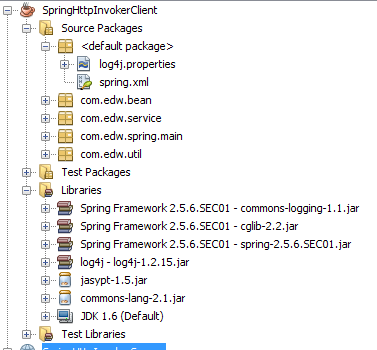
this is my project structure, btw ignore the jasypt.jar and commons-lang.jar on my project classpath, im not using them on this project.
my Netbeans 6.9 Client side's project structure

my Netbeans 6.9 Server side's project structure

If you are looking about a good Spring book, i would highly recommend “Professional Java Development with the Spring Framework”, Published by Wiley Publishing, Inc. FYI im using Spring 2.5.6

Have fun coding it, (H)

How to Compress a Java Object

Recently i’m developing a simple client server application, using serialized java objects as parameter. To increase performance, im trying to compress my java object. Here’s how i do it.

a simple serialized java bean

package com.edw.bean;

import java.io.Serializable;
import java.math.BigDecimal;

public class TestBean implements Serializable {
    private BigDecimal id;
    private String value;

    public BigDecimal getId() {
        return id;
    }

    public void setId(BigDecimal id) {
        this.id = id;
    }

    public String getValue() {
        return value;
    }

    public void setValue(String value) {
        this.value = value;
    }
}

and a class to compress my object

package com.edw.main;

import com.edw.bean.TestBean;
import java.io.File;
import java.io.FileInputStream;
import java.io.FileOutputStream;
import java.io.ObjectInputStream;
import java.io.ObjectOutputStream;
import java.math.BigDecimal;
import java.util.zip.Deflater;
import java.util.zip.GZIPInputStream;
import java.util.zip.GZIPOutputStream;
import org.apache.log4j.Logger;

public class Main {

    private final static Logger logger = Logger.getLogger(Main.class);

    public Main() {
    }

    private void startApp() throws Exception {
        // create a very big bean
        TestBean tb = new TestBean();
        tb.setId(new BigDecimal(Double.MAX_VALUE));
        String bigString = "";
        for (int i = 0; i < 5000; i++) {
            bigString += " test " + i;
        }
        tb.setValue(bigString);

        // write it to file to see this object's size
        ObjectOutputStream oos = new ObjectOutputStream(new FileOutputStream(new File("test.size"), false));
        oos.writeObject(tb);
        oos.flush();
        oos.close();

        // get the serialized object
        ObjectInputStream ois = new ObjectInputStream(new FileInputStream(new File("test.size")));
        Object regularObject = ois.readObject();
        logger.debug(((TestBean) regularObject).getId());

        // write compressed object to file to see this object's size
        FileOutputStream fos = new FileOutputStream(new File("testCompressed.size"), false);
        GZIPOutputStream gzipos = new GZIPOutputStream(fos) {

            {
                def.setLevel(Deflater.BEST_COMPRESSION);
            }
        };

        ObjectOutputStream oosCompressed = new ObjectOutputStream(gzipos);
        oosCompressed.writeObject(tb);
        oosCompressed.flush();
        oosCompressed.close();

        // get the serialized object
        FileInputStream fis = new FileInputStream(new File("testCompressed.size"));
        GZIPInputStream gzipis = new GZIPInputStream(fis);
        ObjectInputStream oisCompressed = new ObjectInputStream(gzipis);
        Object compressedObject = oisCompressed.readObject();
        logger.debug(((TestBean) compressedObject).getId());
    }

    public static void main(String[] args) throws Exception {
        Main main = new Main();
        main.startApp();
    }
}

it can compress up to 75% of size,

Thank you and have a good time coding. (*)

a Simple iBatis Cache using OSCache

Some values in a database are know to change slower than others. To improve performance, many developers like to cache often-used data to avoid making unnecessary trips back to the database. iBATIS provides its own caching system, that you configure through a <cacheModel> element.

The results from a query Mapped Statement can be cached simply by specifying the cacheModel parameter. A cache model is a configured cache that is defined within your DataMapper configuration file. IBATIS cache focuses on caching results within the persistence layer. As such, it is independent of the service or presentation layers, and is not based on object identity.

In this simple example, i’m using OSCache. OSCache is a robust caching framework that is able to perform many of the same type of caching strategies that iBATIS provides in its other cache models. When using the OSCACHE model, you create a dependency on the OSCache JARs. You will need to include the OSCache JAR in your project when you use this setting. This cache is configured in the same manner as a standard OSCache install. This means that you will need to have an oscache.properties file available on the root of your classpath for OSCache to read.

Okay, here’s my code,
a simple “test” database, and a “contoh” table

CREATE DATABASE 'test'
USE 'test'

CREATE TABLE `contoh` (
  `nama` varchar(30) NOT NULL DEFAULT '',
  `alamat` varchar(100) DEFAULT NULL,
  PRIMARY KEY (`nama`)
)

insert into contoh (nama, alamat) values ('edwin', 'jakarta');
insert into contoh (nama, alamat) values ('kamplenk', 'ciledug');
insert into contoh (nama, alamat) values ('nugie', 'pamulang');
insert into contoh (nama, alamat) values ('samsu', 'dago');
insert into contoh (nama, alamat) values ('tebek', 'jayapura');

a contoh POJO

package com.edw.bean;

/**
 *
 * @author edw
 */
public class Contoh {
    private String nama;
    private String alamat;

    // other setter and getter
}

and my sqlmapconfig.xml as my ibatis xml configuration

<?xml version="1.0" encoding="UTF-8"?>
<!DOCTYPE sqlMapConfig
PUBLIC "-//ibatis.apache.org//DTD SQL Map Config 2.0//EN"
"http://ibatis.apache.org/dtd/sql-map-config-2.dtd">

<sqlMapConfig>
    <settings
        useStatementNamespaces="true"
        lazyLoadingEnabled="true"
        enhancementEnabled="true"
        maxSessions="20"
        />

    <transactionManager type="JDBC" commitRequired="false">
        <dataSource type="SIMPLE">

            <property name="SetAutoCommitAllowed" value="false"/>
            <property name="DefaultAutoCommit" value="false"/>
            
            <property name="JDBC.Driver" value="com.mysql.jdbc.Driver"/>
            <property name="JDBC.ConnectionURL" value="jdbc:mysql://localhost/test"/>
            <property name="JDBC.Username" value="root"/>
            <property name="JDBC.Password" value="xxx"/>
   
        </dataSource>
    </transactionManager>

    <sqlMap resource="com/edw/sqlmap/contoh.xml"/>
</sqlMapConfig>

and my xml query, at line 5 to 9 is my OSCache caching, and at line 21 is cacheModel implementation on query “selectAllContoh”. It means that i’m storing “selectAllContoh” resultSet on a cache, so the next time query “selectAllContoh” is called, iBatis will get resultSet from my cache instead of hitting my database.

<?xml version="1.0" encoding="UTF-8" ?>
<!DOCTYPE sqlMap PUBLIC "-//ibatis.apache.org//DTD SQL Map 2.0//EN" "http://ibatis.apache.org/dtd/sql-map-2.dtd" >
<sqlMap namespace="contoh" >

    <cacheModel id="contohCache" type="OSCACHE">
        <flushInterval hours="24"/>
        <flushOnExecute statement="contoh.insertContoh"/>
        <property name="reference-type" value="SOFT"/>
    </cacheModel>

    <resultMap id="result" class="com.edw.bean.Contoh">
        <result property="nama" column="NAMA" columnIndex="1"/>
        <result property="alamat" column="ALAMAT" columnIndex="2"/>
    </resultMap>

    <insert id="insertContoh" parameterClass="com.edw.bean.Contoh" >
    insert into contoh (nama, alamat)
    values (#nama:VARCHAR#, #alamat:VARCHAR#)
    </insert>

    <select id="selectAllContoh" resultMap="result" cacheModel="contohCache">
    select nama, alamat
    from contoh
    </select>

</sqlMap>

a class to load my ibatis xml configuration

package com.edw.config;

import com.ibatis.common.resources.Resources;
import com.ibatis.sqlmap.client.SqlMapClient;
import com.ibatis.sqlmap.client.SqlMapClientBuilder;
import java.io.Reader;


/**
 *
 * @author edw
 */
public class SqlMapConfig {

    protected static final SqlMapClient sqlMap;

    static {
        try {
            Reader reader = Resources.getResourceAsReader("com/edw/sqlmap/sqlmapconfig.xml");
            sqlMap = SqlMapClientBuilder.buildSqlMapClient(reader);       
        } catch (Exception e){
            throw new RuntimeException("Fatal Error.  Cause: " + e, e);
        }
    }

    public static SqlMapClient getSqlMap() {
        return sqlMap;
    }
}

and my log4j configuration, i named it log4j.properties

# Global logging configuration
log4j.rootLogger=DEBUG,stdout

# Console output...
log4j.appender.stdout=org.apache.log4j.ConsoleAppender
log4j.appender.stdout.layout=org.apache.log4j.PatternLayout
log4j.appender.stdout.layout.ConversionPattern=%d [%c{1}] %-5p %c:%L - %m%n

and my oscache.properties

cache.capacity=1000

i create a simple JUnit class to test my class

package com.edw.test;

import com.edw.bean.Contoh;
import com.edw.config.SqlMapConfig;
import java.util.List;
import org.apache.log4j.Logger;
import org.junit.Test;
import static org.junit.Assert.*;

/**
 *
 * @author edw
 */
public class TestIbatisCaching {

    @Test
    public void testIbatisCaching() {
        Logger logger = Logger.getLogger(this.getClass());
        try {
            // repeated queries
            for (int i = 0; i < 5; i++) {
                List<Contoh> contohs = SqlMapConfig.getSqlMap().queryForList("contoh.selectAllContoh");

                // check if it's null
                assertNotNull(contohs);

                //sleep
                Object o = new Object();
                synchronized(o){
                    o.wait(2000);
                }

                for (Contoh contoh : contohs) {
                    logger.debug(contoh.getNama());
                }

                logger.debug("================================");
            }
        } catch (Exception ex) {
            logger.error(ex);
        }
    }
}

this is what happen on my console,
on line 24-25 shows how OSCache creating a cache from a query “contoh.selectAllContoh”,
and on line 37-38 shows how query “contoh.selectAllContoh” hitting Ibatis’ cache instead of the database.

2010-10-09 18:49:24,961 [Config] DEBUG com.opensymphony.oscache.base.Config:61 - OSCache: Config called
2010-10-09 18:49:24,968 [Config] INFO  com.opensymphony.oscache.base.Config:147 - OSCache: Properties read {cache.capacity=1000}
2010-10-09 18:49:24,969 [AbstractCacheAdministrator] DEBUG com.opensymphony.oscache.base.AbstractCacheAdministrator:160 - Constructed AbstractCacheAdministrator()
2010-10-09 18:49:24,993 [GeneralCacheAdministrator] INFO  com.opensymphony.oscache.general.GeneralCacheAdministrator:98 - Constructed GeneralCacheAdministrator()
2010-10-09 18:49:24,993 [GeneralCacheAdministrator] INFO  com.opensymphony.oscache.general.GeneralCacheAdministrator:301 - Creating new cache
2010-10-09 18:49:25,028 [AbstractConcurrentReadCache] DEBUG com.opensymphony.oscache.base.algorithm.AbstractConcurrentReadCache:694 - get called (key=1542486422|5257123254|contoh.selectAllContoh|1339823102|     select nama, alamat     from contoh     |executeQueryForList|0|-999999)
2010-10-09 18:49:25,028 [AbstractConcurrentReadCache] DEBUG com.opensymphony.oscache.base.algorithm.AbstractConcurrentReadCache:1061 - persistRetrieve called (key=1542486422|5257123254|contoh.selectAllContoh|1339823102|     select nama, alamat     from contoh     |executeQueryForList|0|-999999)
2010-10-09 18:49:25,099 [Cache] DEBUG com.opensymphony.oscache.base.Cache:697 - No cache entry exists for key='1542486422|5257123254|contoh.selectAllContoh|1339823102|     select nama, alamat     from contoh     |executeQueryForList|0|-999999', creating
2010-10-09 18:49:25,106 [CacheModel] DEBUG com.ibatis.sqlmap.engine.cache.CacheModel:27 - Cache 'contoh.contohCache': cache miss
2010-10-09 18:49:25,331 [SimpleDataSource] DEBUG com.ibatis.common.jdbc.SimpleDataSource:27 - Created connection 5230193.
2010-10-09 18:49:25,334 [Connection] DEBUG java.sql.Connection:27 - {conn-100000} Connection
2010-10-09 18:49:25,336 [Connection] DEBUG java.sql.Connection:27 - {conn-100000} Preparing Statement:      select nama, alamat     from contoh     
2010-10-09 18:49:25,381 [PreparedStatement] DEBUG java.sql.PreparedStatement:27 - {pstm-100001} Executing Statement:      select nama, alamat     from contoh     
2010-10-09 18:49:25,405 [PreparedStatement] DEBUG java.sql.PreparedStatement:27 - {pstm-100001} Parameters: []
2010-10-09 18:49:25,406 [PreparedStatement] DEBUG java.sql.PreparedStatement:27 - {pstm-100001} Types: []
2010-10-09 18:49:25,411 [ResultSet] DEBUG java.sql.ResultSet:27 - {rset-100002} ResultSet
2010-10-09 18:49:25,429 [ResultSet] DEBUG java.sql.ResultSet:27 - {rset-100002} Header: [NAMA, ALAMAT]
2010-10-09 18:49:25,429 [ResultSet] DEBUG java.sql.ResultSet:27 - {rset-100002} Result: [edwin, singapore]
2010-10-09 18:49:25,430 [ResultSet] DEBUG java.sql.ResultSet:27 - {rset-100002} Result: [kamplenk, ciledug]
2010-10-09 18:49:25,430 [ResultSet] DEBUG java.sql.ResultSet:27 - {rset-100002} Result: [nugie, pamulang]
2010-10-09 18:49:25,511 [ResultSet] DEBUG java.sql.ResultSet:27 - {rset-100002} Result: [samsu, dago]
2010-10-09 18:49:25,513 [ResultSet] DEBUG java.sql.ResultSet:27 - {rset-100002} Result: [tebek, jayapura]
2010-10-09 18:49:25,514 [AbstractConcurrentReadCache] DEBUG com.opensymphony.oscache.base.algorithm.AbstractConcurrentReadCache:694 - get called (key=1542486422|5257123254|contoh.selectAllContoh|1339823102|     select nama, alamat     from contoh     |executeQueryForList|0|-999999)
2010-10-09 18:49:25,515 [AbstractConcurrentReadCache] DEBUG com.opensymphony.oscache.base.algorithm.AbstractConcurrentReadCache:1061 - persistRetrieve called (key=1542486422|5257123254|contoh.selectAllContoh|1339823102|     select nama, alamat     from contoh     |executeQueryForList|0|-999999)
2010-10-09 18:49:25,519 [Cache] DEBUG com.opensymphony.oscache.base.Cache:697 - No cache entry exists for key='1542486422|5257123254|contoh.selectAllContoh|1339823102|     select nama, alamat     from contoh     |executeQueryForList|0|-999999', creating
2010-10-09 18:49:25,520 [AbstractConcurrentReadCache] DEBUG com.opensymphony.oscache.base.algorithm.AbstractConcurrentReadCache:1108 - persistStore called (key=1542486422|5257123254|contoh.selectAllContoh|1339823102|     select nama, alamat     from contoh     |executeQueryForList|0|-999999)
2010-10-09 18:49:25,521 [AbstractConcurrentReadCache] DEBUG com.opensymphony.oscache.base.algorithm.AbstractConcurrentReadCache:1087 - persistRetrieveGroup called (groupName=contoh.contohCache)
2010-10-09 18:49:25,521 [AbstractConcurrentReadCache] DEBUG com.opensymphony.oscache.base.algorithm.AbstractConcurrentReadCache:1127 - persistStoreGroup called (groupName=contoh.contohCache)
2010-10-09 18:49:25,523 [CacheModel] DEBUG com.ibatis.sqlmap.engine.cache.CacheModel:27 - Cache 'contoh.contohCache': stored object '[com.edw.bean.Contoh@12bb7e0, com.edw.bean.Contoh@134f69a, com.edw.bean.Contoh@2a15cd, com.edw.bean.Contoh@fd68b1, com.edw.bean.Contoh@e45076]'
2010-10-09 18:49:25,525 [SimpleDataSource] DEBUG com.ibatis.common.jdbc.SimpleDataSource:27 - Returned connection 5230193 to pool.
2010-10-09 18:49:27,526 [TestIbatisCaching] DEBUG com.edw.test.TestIbatisCaching:34 - edwin
2010-10-09 18:49:27,526 [TestIbatisCaching] DEBUG com.edw.test.TestIbatisCaching:34 - kamplenk
2010-10-09 18:49:27,526 [TestIbatisCaching] DEBUG com.edw.test.TestIbatisCaching:34 - nugie
2010-10-09 18:49:27,526 [TestIbatisCaching] DEBUG com.edw.test.TestIbatisCaching:34 - samsu
2010-10-09 18:49:27,526 [TestIbatisCaching] DEBUG com.edw.test.TestIbatisCaching:34 - tebek
2010-10-09 18:49:27,526 [TestIbatisCaching] DEBUG com.edw.test.TestIbatisCaching:37 - ================================
2010-10-09 18:49:27,536 [AbstractConcurrentReadCache] DEBUG com.opensymphony.oscache.base.algorithm.AbstractConcurrentReadCache:694 - get called (key=1542486422|5257123254|contoh.selectAllContoh|1339823102|     select nama, alamat     from contoh     |executeQueryForList|0|-999999)
2010-10-09 18:49:27,536 [CacheModel] DEBUG com.ibatis.sqlmap.engine.cache.CacheModel:27 - Cache 'contoh.contohCache': retrieved object '[com.edw.bean.Contoh@12bb7e0, com.edw.bean.Contoh@134f69a, com.edw.bean.Contoh@2a15cd, com.edw.bean.Contoh@fd68b1, com.edw.bean.Contoh@e45076]'
2010-10-09 18:49:29,536 [TestIbatisCaching] DEBUG com.edw.test.TestIbatisCaching:34 - edwin
2010-10-09 18:49:29,536 [TestIbatisCaching] DEBUG com.edw.test.TestIbatisCaching:34 - kamplenk
2010-10-09 18:49:29,536 [TestIbatisCaching] DEBUG com.edw.test.TestIbatisCaching:34 - nugie
2010-10-09 18:49:29,536 [TestIbatisCaching] DEBUG com.edw.test.TestIbatisCaching:34 - samsu
2010-10-09 18:49:29,536 [TestIbatisCaching] DEBUG com.edw.test.TestIbatisCaching:34 - tebek
2010-10-09 18:49:29,536 [TestIbatisCaching] DEBUG com.edw.test.TestIbatisCaching:37 - ================================

this is my Netbeans project structure

Well, i guess it can help others. Thank you and see you again. (H)