Programming

basic programming

How to Convert PDF Files to Images using Java

Several days ago, i met a very rare condition where i had to open pdf files on my java swing application. After spending several time brainstorming and googling i decide to convert pdf pages into jpg images and attach it to JPanel using a very neat library, pdf-renderer.

To diplay pdf files, it’s a simple as this,

package com.baculsoft.pdfviewer.main;

import com.sun.pdfview.PDFViewer;
import java.io.File;

/**
 *
 * @author edw
 * @created Dec 28, 2010, 1:23:46 PM
 * @purpose Main Frame to Display PDF files
 */
public class Main {

    private void execute() throws Exception{

        //  load a pdf from a file
        File file = new File("a.pdf");

        // display it on a JFrame
        PDFViewer pdfv = new PDFViewer(true);
        pdfv.openFile(file) ;
        pdfv.setEnabling();
        pdfv.pack();
        pdfv.setVisible(true);

    }

    public static void main(String[] args) {
        Main main = new Main();
        try {
            main.execute();
        } catch (Exception ex) {
            ex.printStackTrace();
        }
    }
}

It will show a PDF Viewer Frame like this.

But then i was thinking, if it can displays PDF pages on JPanel, can it also convert pdf pages to images? The answer is obviously yes. This is how to do it.

package com.baculsoft.pdfviewer.util;

import com.sun.pdfview.PDFFile;
import com.sun.pdfview.PDFPage;
import java.awt.Graphics;
import java.awt.Image;
import java.awt.Rectangle;
import java.awt.image.BufferedImage;
import java.io.File;
import java.io.FileInputStream;
import java.io.RandomAccessFile;
import java.nio.ByteBuffer;
import java.nio.channels.Channels;
import java.nio.channels.FileChannel;
import java.nio.channels.ReadableByteChannel;
import javax.imageio.ImageIO;

public class PDFToImageConverter {

    private void convert() throws Exception {
        
        //  load a pdf from a file
        File file = new File("a.pdf");
        RandomAccessFile raf = new RandomAccessFile(file, "r");
        ReadableByteChannel ch = Channels.newChannel(new FileInputStream(file));

        FileChannel channel = raf.getChannel();
        ByteBuffer buf = channel.map(FileChannel.MapMode.READ_ONLY,
                0, channel.size());
        PDFFile pdffile = new PDFFile(buf);

        //   get number of pages
        int jumlahhalaman = pdffile.getNumPages();

        //  iterate through the number of pages
        for (int i = 1; i <= jumlahhalaman; i++) {
            PDFPage page = pdffile.getPage(i);

            //  create new image
            Rectangle rect = new Rectangle(0, 0,
                    (int) page.getBBox().getWidth(),
                    (int) page.getBBox().getHeight());

            Image img = page.getImage(
                    rect.width, rect.height, //width & height
                    rect, // clip rect
                    null, // null for the ImageObserver
                    true, // fill background with white
                    true // block until drawing is done
                    );

            BufferedImage bufferedImage = new BufferedImage(rect.width, rect.height, BufferedImage.TYPE_INT_RGB);
            Graphics g = bufferedImage.createGraphics();
            g.drawImage(img, 0, 0, null);
            g.dispose();

            File asd = new File("bbb" + i + ".jpg");
            if (asd.exists()) {
                asd.delete();
            }
            ImageIO.write(bufferedImage, "jpg", asd);
        }
    }

    public static void main(String[] args) {
        PDFToImageConverter converter = new PDFToImageConverter();
        try {
            converter.convert();
        } catch (Exception ex) {
            ex.printStackTrace();
        }
    }
}

Before :

After :

As you can see, it will create some jpg files. The number of jpg files created depends on how many pages your PDF files have. You can also test to convert to PNG or maybe GIF file types. Just change on line 57 and 61 from “jpg” to “png” or “gif”.

This is my Netbeans 6.9 project structure

Cheers. (B)

Beginning MyBatis 3 Part 3 : How to Get Table’s Generated Ids

I have a very simple MySql table with an auto increament primary key,

CREATE TABLE sampah
(
    id INT(10) NOT NULL AUTO_INCREMENT,
    name VARCHAR(30),
    PRIMARY KEY (id)
)

my question is, how can i get my object’s generated primary key if i insert a new object to table “sampah”?

The answer is actually quite easy, as you can see here on my xml sql mapper, take a look an line 11.

<?xml version="1.0" encoding="UTF-8" ?>
<!DOCTYPE mapper PUBLIC "-//mybatis.org//DTD Mapper 3.0//EN" "http://mybatis.org/dtd/mybatis-3-mapper.dtd" >
<mapper namespace="com.edw.mybatis.mapper.SampahMapper" >

    <resultMap id="SampahMap" type="com.edw.mybatis.bean.Sampah" >
        <id column="id" property="id" jdbcType="INTEGER" />
        <result column="name" property="name" jdbcType="VARCHAR" />
    </resultMap>

    <insert id="saveUsingXML" parameterType="com.edw.mybatis.bean.Sampah"
            useGeneratedKeys="true" keyProperty="id" >
    insert into sampah(name)
    values (#{name,jdbcType=VARCHAR})
    </insert>

</mapper>

Here is my main java class, you can see how i got my generated id in line 25.

package com.edw.mybatis.main;

import com.edw.mybatis.bean.Sampah;
import com.edw.mybatis.config.MyBatisSqlSessionFactory;
import com.edw.mybatis.mapper.SampahMapper;
import org.apache.ibatis.session.SqlSession;
import org.apache.log4j.Logger;

public class Main {

    private Logger logger = Logger.getLogger(Main.class);

    public Main() {
    }

    private void testSampah() {
        SqlSession session = MyBatisSqlSessionFactory.getSqlSessionFactory().openSession();
        try {
            SampahMapper sampahMapper = session.getMapper(SampahMapper.class);
            Sampah sampah1 = new Sampah();
            sampah1.setName("satu satu");
            sampahMapper.saveUsingXML(sampah1);           

            // my generated ID
            logger.debug(sampah1.getId());

            session.commit();
        } finally {
            session.close();
        }
    }

    public static void main(String[] args) {
        Main main = new Main();
        main.testSampah();
    }
}

Easy isnt it? (H)

Beginning MyBatis 3 Part 2 : How to Handle One-to-Many and One-to-One Selects

One of the latest MyBatis feature is the ability to use Annotations or XML to do One-to-One or One-to-Many queries. Let’s start with an example, as usual im using PostgreSQL, Netbeans 6.9 and MyBatis 3.0.2.
First is a simple database with 2 different tables,

CREATE DATABASE test
CREATE TABLE master
    (
        nama CHARACTER VARYING(30) NOT NULL,
        usia SMALLINT,
        CONSTRAINT idnama PRIMARY KEY (nama)
    )
CREATE TABLE contoh
    (
        id INTEGER NOT NULL,
        nama CHARACTER VARYING(30),
        alamat CHARACTER VARYING(50),
        CONSTRAINT id PRIMARY KEY (id)
    )
ALTER TABLE
    contoh ADD CONSTRAINT master FOREIGN KEY (nama) REFERENCES master (nama) 
    ON DELETE CASCADE 
    ON UPDATE CASCADE

insert into master (nama, usia) values ('pepe', 17);
insert into master (nama, usia) values ('bubu', 19);

insert into contoh (id, nama, alamat) values (1, 'bubu', 'Tangerang');
insert into contoh (id, nama, alamat) values (2, 'pepe', 'Jakarta');
insert into contoh (id, nama, alamat) values (3, 'bubu', 'Singapore');
insert into contoh (id, nama, alamat) values (4, 'pepe', 'Kuburan');
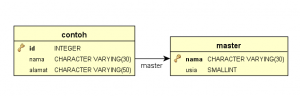
My java bean, as my java object representation of my database tables,

package com.edw.bean;

import java.util.List;

public class Master {
    
    private String nama;
    private Short usia;
    private List<Contoh> contohs;

    // other setters and getters

    @Override
    public String toString() {
        return "Master{" + "nama=" + nama + " usia=" + usia + " contohs=" + contohs + '}';
    }    
}
package com.edw.bean;

public class Contoh {

    private Integer id;
    private String nama;
    private String alamat;
    private Master master;

    // other setters and getters

    @Override
    public String toString() {
        return "Contoh{" + "id=" + id + " nama=" + nama + " alamat=" + alamat + " master=" + master + '}';
    }
}

My XML files for table Contoh and Master queries, please take a look at association tags and collection tags. The association element deals with a has-one type relationship. While collection deals with a has-lots-of type relationship.

<?xml version="1.0" encoding="UTF-8" ?>
<!DOCTYPE mapper PUBLIC "-//mybatis.org//DTD Mapper 3.0//EN" "http://mybatis.org/dtd/mybatis-3-mapper.dtd" >
<mapper namespace="com.edw.mapper.MasterMapper" >
    <!--    result maps     -->
    <resultMap id="ResultMap" type="com.edw.bean.Master" >
        <id column="nama" property="nama"  />
        <result column="usia" property="usia" />
        <!--    collections of Contoh     -->
        <collection property="contohs" ofType="com.edw.bean.Contoh" 
            column="nama" select="selectContohFromMaster" />
    </resultMap>

    <!--    one to many select  -->
    <select id="selectUsingXML" resultMap="ResultMap" parameterType="java.lang.String" >
        SELECT
            master.nama,
            master.usia
        FROM
            test.master
        WHERE master.nama = #{nama}
    </select>

    <select id="selectContohFromMaster"
          parameterType="java.lang.String"
          resultType="com.edw.bean.Contoh">
        SELECT
            id,
            nama,
            alamat
        FROM
            test.contoh
        WHERE
            nama = #{nama}
    </select>
</mapper>
<?xml version="1.0" encoding="UTF-8" ?>
<!DOCTYPE mapper PUBLIC "-//mybatis.org//DTD Mapper 3.0//EN" "http://mybatis.org/dtd/mybatis-3-mapper.dtd" >
<mapper namespace="com.edw.mapper.ContohMapper" >
    <!--    result maps     -->
    <resultMap id="BaseResultMap" type="com.edw.bean.Contoh" >
        <id column="id" property="id" jdbcType="INTEGER" />
        <result column="nama" property="nama" jdbcType="VARCHAR" />
        <result column="alamat" property="alamat" jdbcType="VARCHAR" />

        <!--        one to one     -->
        <association property="master" column="nama" javaType="com.edw.bean.Master"
            select="selectMasterFromContoh"/>            
    </resultMap>

    <!-- one to one select  -->
    <select id="selectUsingXML" resultMap="BaseResultMap" parameterType="java.lang.Integer" >
    SELECT
        contoh.id,
        contoh.nama,
        contoh.alamat
    FROM
        test.contoh
    WHERE
        id = #{id,jdbcType=INTEGER}
    </select>

    <select id="selectMasterFromContoh"
          parameterType="java.lang.String"
          resultType="com.edw.bean.Master">
        SELECT
            master.nama,
            master.usia
        FROM
            test.master
        WHERE
            nama = #{nama}
    </select>
</mapper>

This is my main xml configuration to handle my database connections,

<?xml version="1.0" encoding="UTF-8" ?>
<!DOCTYPE configuration
PUBLIC "-//mybatis.org//DTD Config 3.0//EN"
"http://mybatis.org/dtd/mybatis-3-config.dtd">
<configuration>
    <environments default="development">
        <environment id="development">
            <transactionManager type="JDBC"/>
            <dataSource type="UNPOOLED">
                <property name="driver" value="org.postgresql.Driver"/>
                <property name="url" value="jdbc:postgresql://localhost:5432/test"/>
                <property name="username" value="postgres"/>
                <property name="password" value="password"/>
            </dataSource>
        </environment>
    </environments>
    <mappers>
        <mapper resource="com/edw/xml/ContohMapper.xml" />
        <mapper resource="com/edw/xml/MasterMapper.xml" />
    </mappers>
</configuration>

and a java class to load my XML files

package com.edw.config;

import java.io.Reader;
import org.apache.ibatis.io.Resources;
import org.apache.ibatis.session.SqlSessionFactory;
import org.apache.ibatis.session.SqlSessionFactoryBuilder;

public class MyBatisSqlSessionFactory {

    protected static final SqlSessionFactory FACTORY;

    static {
        try {
            Reader reader = Resources.getResourceAsReader("com/edw/xml/Configuration.xml");
            FACTORY = new SqlSessionFactoryBuilder().build(reader);
        } catch (Exception e){
            throw new RuntimeException("Fatal Error.  Cause: " + e, e);
        }
    }

    public static SqlSessionFactory getSqlSessionFactory() {
        return FACTORY;
    }
}

These are my mapper interfaces, i put my annotation queries here. Please take a note at @Many and @One annotations. MyBatis use @One to map a single property value of a complex type, while @Many for mapping a collection property of a complex types.

package com.edw.mapper;

import com.edw.bean.Contoh;
import com.edw.bean.Master;
import java.util.List;

import org.apache.ibatis.annotations.Many;
import org.apache.ibatis.annotations.Result;
import org.apache.ibatis.annotations.Results;
import org.apache.ibatis.annotations.Select;

public interface MasterMapper {

    Master selectUsingXML(String nama);   

    /*
     *  one to many Select.
     */
    @Select("SELECT master.nama, master.usia FROM test.master WHERE master.nama = #{nama}")
    @Results(value = {
                      @Result(property="nama", column="nama"),
                      @Result(property="usia", column="usia"),
                      @Result(property="contohs", javaType=List.class, column="nama", 
                             many=@Many(select="getContohs"))
                      })
    Master selectUsingAnnotations(String nama);

    @Select("SELECT contoh.id, contoh.nama, contoh.alamat FROM test.contoh WHERE contoh.nama = #{nama}")
    List<Contoh> getContohs(String nama);
}
package com.edw.mapper;

import com.edw.bean.Contoh;
import com.edw.bean.Master;
import org.apache.ibatis.annotations.One;
import org.apache.ibatis.annotations.Result;
import org.apache.ibatis.annotations.Results;
import org.apache.ibatis.annotations.Select;

public interface ContohMapper {

    Contoh selectUsingXML(Integer nama);

    /*
     *  one to one Select.
     */
    @Select("SELECT contoh.id, contoh.nama, contoh.alamat FROM test.contoh WHERE contoh.id = #{id}")
    @Results(value = {
        @Result(property = "nama", column = "nama"),
        @Result(property = "alamat", column = "alamat"),
        @Result(property = "master", column = "nama", one=@One(select = "getMaster"))
    })
    Contoh selectUsingAnnotations(Integer id);

    @Select("SELECT master.nama, master.usia FROM test.master WHERE master.nama = #{nama}")
    Master getMaster(String nama);
}

Here is my main java class

package com.edw.main;

import com.edw.bean.Contoh;
import com.edw.bean.Master;
import com.edw.config.MyBatisSqlSessionFactory;
import com.edw.mapper.ContohMapper;
import com.edw.mapper.MasterMapper;
import java.util.List;
import org.apache.ibatis.session.SqlSession;
import org.apache.log4j.Logger;

public class Main {

    private static Logger logger = Logger.getLogger(Main.class);

    public Main() {
    }

    private void execute() throws Exception{
       SqlSession session = MyBatisSqlSessionFactory.getSqlSessionFactory().openSession();
        try {
            MasterMapper masterMapper = session.getMapper(MasterMapper.class);

            // using XML queries ------------------------------
            Master master = masterMapper.selectUsingXML("pepe");
            logger.debug(master);

            List<Contoh> contohs = master.getContohs();
            for (Contoh contoh : contohs) {
                logger.debug(contoh);
            }

            // using annotation queries ------------------------------
            master = masterMapper.selectUsingAnnotations("pepe");
            logger.debug(master);

            List<Contoh> contohs2 = master.getContohs();
            for (Contoh contoh : contohs2) {
                logger.debug(contoh);
            }

            // using XML queries ------------------------------
            ContohMapper contohMapper = session.getMapper(ContohMapper.class);
            Contoh contoh = contohMapper.selectUsingXML(1);
            logger.debug(contoh.getMaster());
            
            // using annotation queries ------------------------------
            contoh = contohMapper.selectUsingAnnotations(1);
            logger.debug(contoh);

            session.commit();
        } finally {
            session.close();
        }
    }

    public static void main(String[] args) throws Exception {
        try {
            Main main = new Main();
            main.execute();
        } catch (Exception exception) {
            logger.error(exception.getMessage(), exception);
        }
    }
}

And this is what happen on my java console, im using log4j to do all the loggings.

DEBUG java.sql.Connection:27 - ooo Connection Opened
DEBUG java.sql.PreparedStatement:27 - ==>  Executing: SELECT master.nama, master.usia FROM test.master WHERE master.nama = ? 
DEBUG java.sql.PreparedStatement:27 - ==> Parameters: pepe(String)
DEBUG java.sql.ResultSet:27 - <==    Columns: nama, usia
DEBUG java.sql.ResultSet:27 - <==        Row: pepe, 17
DEBUG java.sql.PreparedStatement:27 - ==>  Executing: SELECT id, nama, alamat FROM test.contoh WHERE nama = ? 
DEBUG java.sql.PreparedStatement:27 - ==> Parameters: pepe(String)
DEBUG java.sql.ResultSet:27 - <==    Columns: id, nama, alamat
DEBUG java.sql.ResultSet:27 - <==        Row: 2, pepe, Jakarta
DEBUG java.sql.ResultSet:27 - <==        Row: 4, pepe, Kuburan
DEBUG com.edw.main.Main:32 - Master{nama=pepe usia=17 contohs=[Contoh{id=2 nama=pepe alamat=Jakarta master=null}, Contoh{id=4 nama=pepe alamat=Kuburan master=null}]}
DEBUG com.edw.main.Main:36 - Contoh{id=2 nama=pepe alamat=Jakarta master=null}
DEBUG com.edw.main.Main:36 - Contoh{id=4 nama=pepe alamat=Kuburan master=null}
DEBUG java.sql.PreparedStatement:27 - ==>  Executing: SELECT master.nama, master.usia FROM test.master WHERE master.nama = ? 
DEBUG java.sql.PreparedStatement:27 - ==> Parameters: pepe(String)
DEBUG java.sql.ResultSet:27 - <==    Columns: nama, usia
DEBUG java.sql.ResultSet:27 - <==        Row: pepe, 17
DEBUG java.sql.PreparedStatement:27 - ==>  Executing: SELECT contoh.id, contoh.nama, contoh.alamat FROM test.contoh WHERE contoh.nama = ? 
DEBUG java.sql.PreparedStatement:27 - ==> Parameters: pepe(String)
DEBUG java.sql.ResultSet:27 - <==    Columns: id, nama, alamat
DEBUG java.sql.ResultSet:27 - <==        Row: 2, pepe, Jakarta
DEBUG java.sql.ResultSet:27 - <==        Row: 4, pepe, Kuburan
DEBUG com.edw.main.Main:41 - Master{nama=pepe usia=17 contohs=[Contoh{id=2 nama=pepe alamat=Jakarta master=null}, Contoh{id=4 nama=pepe alamat=Kuburan master=null}]}
DEBUG com.edw.main.Main:45 - Contoh{id=2 nama=pepe alamat=Jakarta master=null}
DEBUG com.edw.main.Main:45 - Contoh{id=4 nama=pepe alamat=Kuburan master=null}
DEBUG java.sql.PreparedStatement:27 - ==>  Executing: SELECT contoh.id, contoh.nama, contoh.alamat FROM test.contoh WHERE id = ? 
DEBUG java.sql.PreparedStatement:27 - ==> Parameters: 1(Integer)
DEBUG java.sql.ResultSet:27 - <==    Columns: id, nama, alamat
DEBUG java.sql.ResultSet:27 - <==        Row: 1, bubu, Tangerang
DEBUG java.sql.PreparedStatement:27 - ==>  Executing: SELECT master.nama, master.usia FROM test.master WHERE nama = ? 
DEBUG java.sql.PreparedStatement:27 - ==> Parameters: bubu(String)
DEBUG java.sql.ResultSet:27 - <==    Columns: nama, usia
DEBUG java.sql.ResultSet:27 - <==        Row: bubu, 19
DEBUG com.edw.main.Main:51 - Master{nama=bubu usia=19 contohs=null}
DEBUG java.sql.PreparedStatement:27 - ==>  Executing: SELECT contoh.id, contoh.nama, contoh.alamat FROM test.contoh WHERE contoh.id = ? 
DEBUG java.sql.PreparedStatement:27 - ==> Parameters: 1(Integer)
DEBUG java.sql.ResultSet:27 - <==    Columns: id, nama, alamat
DEBUG java.sql.ResultSet:27 - <==        Row: 1, bubu, Tangerang
DEBUG java.sql.PreparedStatement:27 - ==>  Executing: SELECT master.nama, master.usia FROM test.master WHERE master.nama = ? 
DEBUG java.sql.PreparedStatement:27 - ==> Parameters: bubu(String)
DEBUG java.sql.ResultSet:27 - <==    Columns: nama, usia
DEBUG java.sql.ResultSet:27 - <==        Row: bubu, 19
DEBUG com.edw.main.Main:55 - Contoh{id=1 nama=bubu alamat=Tangerang master=Master{nama=bubu usia=19 contohs=null}}
DEBUG java.sql.Connection:27 - xxx Connection Closed

my log4j.properties

# Global logging configuration
log4j.rootLogger=DEBUG,stdout

# Console output...
log4j.appender.stdout=org.apache.log4j.ConsoleAppender
log4j.appender.stdout.layout=org.apache.log4j.PatternLayout
log4j.appender.stdout.layout.ConversionPattern=%-5p %c:%L - %m%n

And finally, this is my netbeans project structure

Well despite lack of documentations, im still enjoy using MyBatis. 😉

How to Handle Jasper Report’s NoSuchMethodException

I was generating an ordinary report, when suddenly i met a weird error. My Exception showed a net.sf.jasperreports.engine.JRException and a java.lang.NoSuchMethodException: Unknown property '' when im using Jasper Report’s JRBeanCollectionDataSource. I tought it was because my java bean is not Serializable, but changing my bean to Serializable still didnt fix my errors.
Here is my complete stacktrace

net.sf.jasperreports.engine.JRException: Error retrieving field value from bean : 
        at net.sf.jasperreports.engine.data.JRAbstractBeanDataSource.getBeanProperty(JRAbstractBeanDataSource.java:123)
        at net.sf.jasperreports.engine.data.JRAbstractBeanDataSource.getFieldValue(JRAbstractBeanDataSource.java:96)
        at net.sf.jasperreports.engine.data.JRBeanCollectionDataSource.getFieldValue(JRBeanCollectionDataSource.java:100)
        at net.sf.jasperreports.engine.fill.JRFillDataset.setOldValues(JRFillDataset.java:818)
        at net.sf.jasperreports.engine.fill.JRFillDataset.next(JRFillDataset.java:782)
        at net.sf.jasperreports.engine.fill.JRBaseFiller.next(JRBaseFiller.java:1433)
        at net.sf.jasperreports.engine.fill.JRVerticalFiller.fillReport(JRVerticalFiller.java:108)
        at net.sf.jasperreports.engine.fill.JRBaseFiller.fill(JRBaseFiller.java:908)
        at net.sf.jasperreports.engine.fill.JRBaseFiller.fill(JRBaseFiller.java:830)
        at net.sf.jasperreports.engine.fill.JRFiller.fillReport(JRFiller.java:85)
        at net.sf.jasperreports.engine.JasperFillManager.fillReport(JasperFillManager.java:624)

Caused by: java.lang.NoSuchMethodException: Unknown property ''
        at org.apache.commons.beanutils.PropertyUtilsBean.getSimpleProperty(PropertyUtilsBean.java:1122)
        at org.apache.commons.beanutils.PropertyUtilsBean.getNestedProperty(PropertyUtilsBean.java:686)
        at org.apache.commons.beanutils.PropertyUtilsBean.getProperty(PropertyUtilsBean.java:715)

Here is my source code snippet, take a look at line 12, that is where my exception happen.

  @Override
    public ActionForward execute(ActionMapping mapping, ActionForm form,
            HttpServletRequest request, HttpServletResponse response)
            throws Exception {     

        List<Log> logs = logService.select();

        FileInputStream fis = new FileInputStream("/ejournal.jasper");
        BufferedInputStream bufferedInputStream = new BufferedInputStream(fis);

        Map<String, String> map = new HashMap<String, String>();
        JRBeanCollectionDataSource jrbcds = new JRBeanCollectionDataSource(logs);

        JasperReport jasperReport = (JasperReport) JRLoader.loadObject(bufferedInputStream);
        JasperPrint jasperPrint = JasperFillManager.fillReport(jasperReport, map, jrbcds);
    }

Well actually it’s very easy to fix it, you should either

  • Remove the empty field descriptions from the JRXML.
  • Set the field descriptions to match the bean property names.
  • Pass false as isUseFieldDescription when creating the bean data source, e.g. new JRBeanCollectionDataSource(data, false).

This is how i fixed it,

 @Override
    public ActionForward execute(ActionMapping mapping, ActionForm form,
            HttpServletRequest request, HttpServletResponse response)
            throws Exception {     

        List<Log> logs = logService.select();

        FileInputStream fis = new FileInputStream("/ejournal.jasper");
        BufferedInputStream bufferedInputStream = new BufferedInputStream(fis);

        Map<String, String> map = new HashMap<String, String>();
        JRBeanCollectionDataSource jrbcds = new JRBeanCollectionDataSource(logs,false);

        JasperReport jasperReport = (JasperReport) JRLoader.loadObject(bufferedInputStream);
        JasperPrint jasperPrint = JasperFillManager.fillReport(jasperReport, map, jrbcds);
    }

I hope it can help others, because i spend some ridicoulously amount of time looking for this workaround.
😉

Creating Web Based Reports using Jasper Report

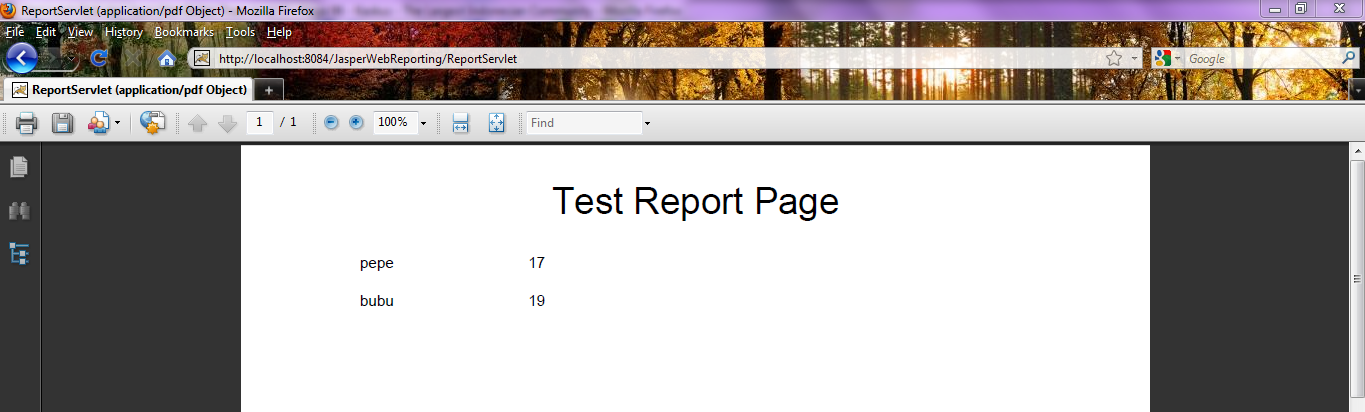
It’s easy to export reports to PDF if you do it in desktop application, but what if you had to do it in a web-based application? Here im trying to demonstrate on how to use servlets to generate a pdf based reports, using JasperReport libraries of course.

First, as always, a simple postgresql table,
on database “test”, schema “test”.

DROP TABLE master;
CREATE
    TABLE test.master
    (
        nama CHARACTER VARYING(30) NOT NULL,
        usia SMALLINT,
        CONSTRAINT idnama PRIMARY KEY (nama)
    )

Next step is a very simple jrxml file, i named it reportTest.jrxml

<?xml version="1.0" encoding="UTF-8"?>
<jasperReport xmlns="http://jasperreports.sourceforge.net/jasperreports" xmlns:xsi="http://www.w3.org/2001/XMLSchema-instance" xsi:schemaLocation="http://jasperreports.sourceforge.net/jasperreports http://jasperreports.sourceforge.net/xsd/jasperreport.xsd" name="reportTest" pageWidth="595" pageHeight="842" columnWidth="555" leftMargin="20" rightMargin="20" topMargin="20" bottomMargin="20">
	<field name="nama" class="java.lang.String"/>
	<field name="usia" class="java.lang.Short"/>
	<background>
		<band splitType="Stretch"/>
	</background>
	<title>
		<band height="31" splitType="Stretch">
			<staticText>
				<reportElement x="0" y="0" width="555" height="31"/>
				<textElement textAlignment="Center" verticalAlignment="Middle">
					<font size="24" isBold="true"/>
				</textElement>
				<text><![CDATA[Test Report Page]]></text>
			</staticText>
		</band>
	</title>
	<pageHeader>
		<band height="11" splitType="Stretch"/>
	</pageHeader>
	<columnHeader>
		<band height="8" splitType="Stretch"/>
	</columnHeader>
	<detail>
		<band height="25" splitType="Stretch">
			<textField>
				<reportElement x="19" y="0" width="100" height="20"/>
				<textElement textAlignment="Center"/>
				<textFieldExpression class="java.lang.String"><![CDATA[$F{nama}]]></textFieldExpression>
			</textField>
			<textField>
				<reportElement x="168" y="0" width="100" height="20"/>
				<textElement/>
				<textFieldExpression class="java.lang.Short"><![CDATA[$F{usia}]]></textFieldExpression>
			</textField>
		</band>
	</detail>
	<columnFooter>
		<band height="20" splitType="Stretch">
			<textField pattern="dd MMMMM yyyy">
				<reportElement x="455" y="0" width="100" height="20"/>
				<textElement textAlignment="Right"/>
				<textFieldExpression class="java.util.Date"><![CDATA[new java.util.Date()]]></textFieldExpression>
			</textField>
		</band>
	</columnFooter>
	<pageFooter>
		<band splitType="Stretch"/>
	</pageFooter>
	<summary>
		<band height="6" splitType="Stretch"/>
	</summary>
</jasperReport>

Im using Hibernate as my ORM library, thats why i need a java bean and a hbm.xml file,

package com.edw.report.bean;

public class Master  implements java.io.Serializable {

    private String nama;
    private Short usia;

    public Master() {
    }

    // other setters and getters

    @Override
    public String toString() {
        return "Master{" + "nama=" + nama + " usia=" + usia + '}';
    }
}
<?xml version="1.0"?>
<!DOCTYPE hibernate-mapping PUBLIC "-//Hibernate/Hibernate Mapping DTD 3.0//EN"
"http://hibernate.sourceforge.net/hibernate-mapping-3.0.dtd">

<hibernate-mapping>
    <class name="com.edw.report.bean.Master" table="master" schema="test">
        <id name="nama" type="string">
            <column name="nama" length="30" />
            <generator class="assigned" />
        </id>
        <property name="usia" type="java.lang.Short">
            <column name="usia" />
        </property>
    </class>
</hibernate-mapping>

And this is my main hibernate configuration file, hibernate.cfg.xml

<?xml version="1.0" encoding="UTF-8"?>
<!DOCTYPE hibernate-configuration PUBLIC "-//Hibernate/Hibernate Configuration DTD 3.0//EN" "http://hibernate.sourceforge.net/hibernate-configuration-3.0.dtd">
<hibernate-configuration>
  <session-factory>
    <property name="hibernate.dialect">org.hibernate.dialect.PostgreSQLDialect</property>
    <property name="hibernate.connection.driver_class">org.postgresql.Driver</property>
    <property name="hibernate.connection.url">jdbc:postgresql://localhost:5432/test</property>
    <property name="hibernate.connection.username">postgres</property>
    <property name="hibernate.connection.password">password</property>
    
    <mapping resource="com/edw/report/bean/Master.hbm.xml"/>
  </session-factory>
</hibernate-configuration>

And a factory class to load my hibernate configuration file, it’s actually by default load hibernate.cfg.xml file.

package com.edw.report.util;

import org.hibernate.cfg.AnnotationConfiguration;
import org.hibernate.SessionFactory;

/**
 * Hibernate Utility class with a convenient method to get Session Factory object.
 *
 * @author edw
 */
public class HibernateUtil {
    private static final SessionFactory sessionFactory;

    static {
        try {
            sessionFactory = new AnnotationConfiguration().configure().buildSessionFactory();
        } catch (Throwable ex) {
            System.err.println("Initial SessionFactory creation failed." + ex);
            throw new ExceptionInInitializerError(ex);
        }
    }

    public static SessionFactory getSessionFactory() {
        return sessionFactory;
    }
}

And finally, my servlet class. It use Jasper Report libraries, and export my report to PDF by changing its header to application/pdf instead of text/html. Take a look at line 53, class FileInputStream load my reportTest.jasper file that located under WEB-INF folder.

package com.edw.report.servlet;

import com.edw.report.bean.Master;
import com.edw.report.util.HibernateUtil;
import java.io.BufferedInputStream;
import java.io.ByteArrayOutputStream;
import java.io.FileInputStream;
import java.io.IOException;
import java.util.HashMap;
import java.util.List;
import javax.servlet.ServletContext;
import javax.servlet.ServletException;
import javax.servlet.ServletOutputStream;
import javax.servlet.http.HttpServlet;
import javax.servlet.http.HttpServletRequest;
import javax.servlet.http.HttpServletResponse;
import net.sf.jasperreports.engine.JasperExportManager;
import net.sf.jasperreports.engine.JasperFillManager;
import net.sf.jasperreports.engine.JasperPrint;
import net.sf.jasperreports.engine.JasperReport;
import net.sf.jasperreports.engine.data.JRBeanCollectionDataSource;

import net.sf.jasperreports.engine.util.JRLoader;
import org.apache.log4j.Logger;
import org.hibernate.Session;

/**
 *
 * @author edw
 */
public class ReportServlet extends HttpServlet {

    private Logger logger = Logger.getLogger(ReportServlet.class);

    protected void processRequest(HttpServletRequest request, HttpServletResponse response)
            throws ServletException, IOException {

        // set header as pdf
        response.setContentType("application/pdf");

        // set input and output stream
        ServletOutputStream servletOutputStream = response.getOutputStream();
        ByteArrayOutputStream baos = new ByteArrayOutputStream();
        FileInputStream fis;
        BufferedInputStream bufferedInputStream;

        try {
            // get report location
            ServletContext context = getServletContext();
            String reportLocation = context.getRealPath("WEB-INF");

            // get report
            fis = new FileInputStream(reportLocation + "/reportTest.jasper");
            bufferedInputStream = new BufferedInputStream(fis);

            // fetch data from database
            Session session = HibernateUtil.getSessionFactory().openSession();
            List<Master> masters = (List<Master>) session.createCriteria(Master.class).list();
            session.close();

            // log it
            for (Master master : masters) {
                logger.debug(master.toString());
            }

            // fill it
            JRBeanCollectionDataSource jrbcds = new JRBeanCollectionDataSource(masters);
            JasperReport jasperReport = (JasperReport) JRLoader.loadObject(bufferedInputStream);
            JasperPrint jasperPrint = JasperFillManager.fillReport(jasperReport, new HashMap(), jrbcds);

            // export to pdf
            JasperExportManager.exportReportToPdfStream(jasperPrint, baos);

            response.setContentLength(baos.size());
            baos.writeTo(servletOutputStream);

            // close it
            fis.close();
            bufferedInputStream.close();

        } catch (Exception ex) {
            logger.error(ex.getMessage(), ex);
        } finally {
            servletOutputStream.flush();
            servletOutputStream.close();
            baos.close();
        }
    }

    @Override
    protected void doGet(HttpServletRequest request, HttpServletResponse response)
            throws ServletException, IOException {
        processRequest(request, response);
    }

    @Override
    protected void doPost(HttpServletRequest request, HttpServletResponse response)
            throws ServletException, IOException {
        processRequest(request, response);
    }

    @Override
    public String getServletInfo() {
        return "Reporting Servlet";
    }
}

Dont forget to register your servlet to web.xml

<?xml version="1.0" encoding="UTF-8"?>
<web-app version="2.5" xmlns="http://java.sun.com/xml/ns/javaee" xmlns:xsi="http://www.w3.org/2001/XMLSchema-instance" xsi:schemaLocation="http://java.sun.com/xml/ns/javaee http://java.sun.com/xml/ns/javaee/web-app_2_5.xsd">
    <servlet>
        <servlet-name>ReportServlet</servlet-name>
        <servlet-class>com.edw.report.servlet.ReportServlet</servlet-class>
    </servlet>
    <servlet-mapping>
        <servlet-name>ReportServlet</servlet-name>
        <url-pattern>/ReportServlet</url-pattern>
    </servlet-mapping>
    <session-config>
        <session-timeout>
            30
        </session-timeout>
    </session-config>
    <welcome-file-list>
        <welcome-file>index.jsp</welcome-file>
    </welcome-file-list>
</web-app>

Here is my Netbeans’ project screenshoot


Btw if you are using Struts 1, it will be easier. All you have to do is create an Action class to handle all the reporting, and register it to struts-config.xml. Here is my example.

package com.edw.action;

public class ReportAction extends org.apache.struts.action.Action {

    private static final String SUCCESS = "success";
    private Logger logger = Logger.getLogger(ReportAction.class);

    @Override
    public ActionForward execute(ActionMapping mapping, ActionForm form,
            HttpServletRequest request, HttpServletResponse response)
            throws Exception {
        
        ServletContext context = getServlet().getServletContext();
        String reportLocation = context.getRealPath("WEB-INF");

        List<Log> logs = logService.select();

        FileInputStream fis = new FileInputStream(reportLocation+"/report.jasper");
        BufferedInputStream bufferedInputStream = new BufferedInputStream(fis);

        ServletOutputStream servletOutputStream = response.getOutputStream();
        ByteArrayOutputStream baos = new ByteArrayOutputStream();

        Map<String, String> map = new HashMap<String, String>();
        JRBeanCollectionDataSource jrbcds = new JRBeanCollectionDataSource(logs);
        JasperReport jasperReport = (JasperReport) JRLoader.loadObject(bufferedInputStream);

        JasperPrint jasperPrint = JasperFillManager.fillReport(jasperReport, map, jrbcds);

        response.setContentType("application/pdf");
        JasperExportManager.exportReportToPdfStream(jasperPrint, baos);

        response.setContentLength(baos.size());
        baos.writeTo(servletOutputStream);

        // close all
        fis.close();
        bufferedInputStream.close();

        servletOutputStream.flush();
        servletOutputStream.close();

        return mapping.findForward(SUCCESS);
    }
}

dont forget to put your Action class on your struts-config.xml

<action path="/report" type="com.edw.action.ReportAction"/>

Hope this can help others, have fun. (*)