Programming

basic programming

Database KodePos Seluruh Indonesia

Awalnya iseng-iseng mencari data kodepos seluruh Indonesia, akhirnya dapet juga setelah email secara resmi ke PT Pos Indonesia. Namun file yang dikirimkan oleh PT Pos berupa file Excel (xls), walaupun dengan sedikit effort akhirnya bisa juga diimport ke database MySql.

Oh ya, file SQL-nya bisa didownload dari Github gw,

https://github.com/edwin/database-kodepos-seluruh-indonesia

Semoga bisa membantu 🙂

[Java] Creating a Microsoft Word Report Easily using Servlet and A Plain HTML Template

Yesterday one of my friend, Edward Barchia, asked me a very simple question, “how can i creating an MSWord Report without using Jasper Report”. Because somehow, jasper report creates a very weird output when exported into Word file (.doc).

One fastest solution is using a html file, and renamed into .doc. Not an elegant solution, but perhaps (at that moment) is the best solution we had.

Okay, so basically what i need is only 2 files, 1 html template and a java servlet files. This is my HTML template, i put it on drie E and name it hello.html

<html>
	<head></head>
	<body>
		Test, hello ${name}
	</body>
</html>

And this is my servlet file,

package com.edw.testdownloaddoc.servlet;

import java.io.BufferedReader;
import java.io.FileInputStream;
import java.io.FileReader;
import java.io.IOException;
import java.io.OutputStream;
import javax.servlet.ServletException;
import javax.servlet.annotation.WebServlet;
import javax.servlet.http.HttpServlet;
import javax.servlet.http.HttpServletRequest;
import javax.servlet.http.HttpServletResponse;
import org.apache.commons.io.IOUtils;

@WebServlet(name = "downloadServlet", urlPatterns = {"/downloadServlet"})
public class DownloadServlet extends HttpServlet {

    protected void processRequest(HttpServletRequest request, HttpServletResponse response)
            throws ServletException, IOException {
        BufferedReader downloadFile = new BufferedReader(new FileReader("e:\\hello.html"));
        FileInputStream inputStream = null;
        OutputStream outStream = null;
        try {
            String s;
            StringBuilder sb = new StringBuilder();
            while ((s=downloadFile.readLine()) != null) {
                if(s.contains("${name}"))
                    s = s.replace("${name}", "Edwin");
                sb.append(s);
            }
 
            response.setContentLength((int) sb.toString().length());
            response.setContentType("application/msword");           
 
            // response header
            String nameFile = "hello.doc";
            String headerKey = "Content-Disposition";
            String headerValue = String.format("attachment; filename=\"%s\"",nameFile);
            response.setHeader(headerKey, headerValue);
 
            // Write response
            outStream = response.getOutputStream();
            IOUtils.write(sb.toString(), outStream);
        } catch (Exception e) {
            e.printStackTrace();
        } finally{
            IOUtils.closeQuietly(downloadFile);
            IOUtils.closeQuietly(inputStream);
            IOUtils.closeQuietly(outStream);
        }
    }

    @Override
    protected void doGet(HttpServletRequest request, HttpServletResponse response)
            throws ServletException, IOException {
        processRequest(request, response);
    }
}

Oh, and before i forgot, this is my pom.xml dependencies

<dependencies>
	<dependency>
		<groupId>commons-io</groupId>
		<artifactId>commons-io</artifactId>
		<version>2.2</version>
	</dependency>
	<dependency>
		<groupId>javax</groupId>
		<artifactId>javaee-web-api</artifactId>
		<version>7.0</version>
		<scope>provided</scope>
	</dependency>
</dependencies>

This is the final output looks like,
helloworld

How to Perform “Autopsy” on OutOfMemoryError Application

Just several days ago, my application was down because of OutOfMemoryError, and I haven’t got a clue what the root cause is. That’s why I’m looking for a way on how to find the culprit when my application is down again. So im using this jvm parameter to dump all the object on memory when OutOfMemoryError happen.

-XX:+HeapDumpOnOutOfMemoryError -XX:HeapDumpPath=E:\ -Xmx10m -Xms10m

For example, im using this java class to simulate OutOfMemoryError,

package mybatistesting;

import java.util.ArrayList;
import java.util.List;

public class MyBatisTesting {
    
    public static void main(String[] args) throws Exception {
        List list = new ArrayList();
        for (int i = 0; i < 10000000000l; i++) {
            list.add(i+""+i+""+i);
            if(i%1000==0)
                System.out.println("adding -- "+i);
        }
    }
}

As you can see on your console log,

java.lang.OutOfMemoryError: GC overhead limit exceeded
Dumping heap to E:\java_pid5812.hprof ...
Heap dump file created [15155736 bytes in 0.237 secs]

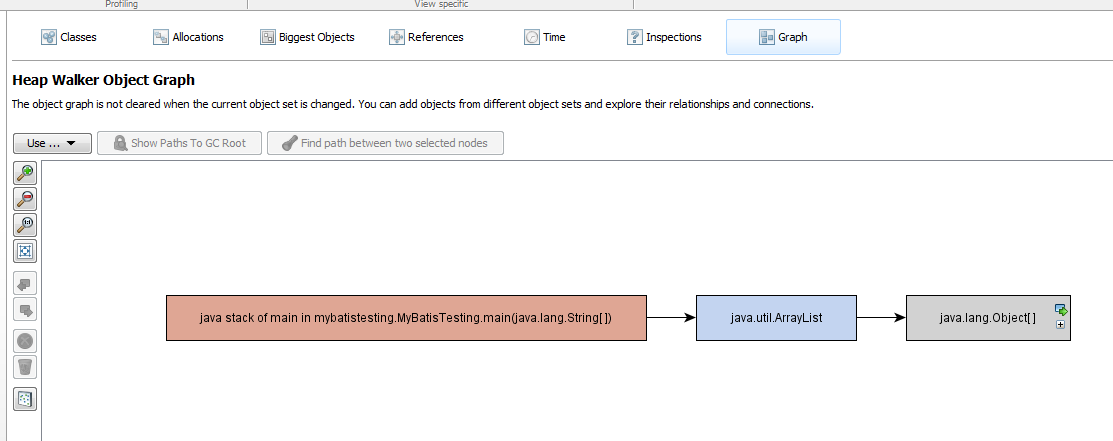
You can open java_pid5812.hprof using your preferable application, for example using Eclipse MAT or JProfiler.

eclipse mat

jprofiler 1

jprofiler 2

Have fun 😉

[PostgreSQL] Got Error “FATAL: database databasename does not exist” Despite Database is Exists on PGAdmin

Today i spent a ridiculous amount of time trying to figure out how come suddenly my java application cannot connect to postgresql database. It gives error “FATAL: database databasename does not exist”, and the weird thing is that i can browse and query to my postgresql database from PGAdmin and other database browser.

Here is my application’s complete error stacktrace

Caused by: org.postgresql.util.PSQLException: FATAL: database "geoportal" does not exist
    at org.postgresql.core.v3.ConnectionFactoryImpl.readStartupMessages(ConnectionFactoryImpl.java:684)
    at org.postgresql.core.v3.ConnectionFactoryImpl.openConnectionImpl(ConnectionFactoryImpl.java:199)
    at org.postgresql.core.ConnectionFactory.openConnection(ConnectionFactory.java:66)
    at org.postgresql.jdbc2.AbstractJdbc2Connection.<init>(AbstractJdbc2Connection.java:127)
    at org.postgresql.jdbc3.AbstractJdbc3Connection.<init>(AbstractJdbc3Connection.java:29)
    at org.postgresql.jdbc3g.AbstractJdbc3gConnection.<init>(AbstractJdbc3gConnection.java:21)
    at org.postgresql.jdbc4.AbstractJdbc4Connection.<init>(AbstractJdbc4Connection.java:41)
    at org.postgresql.jdbc4.Jdbc4Connection.<init>(Jdbc4Connection.java:24)
    at org.postgresql.Driver.makeConnection(Driver.java:414)
    at org.postgresql.Driver.connect(Driver.java:282)

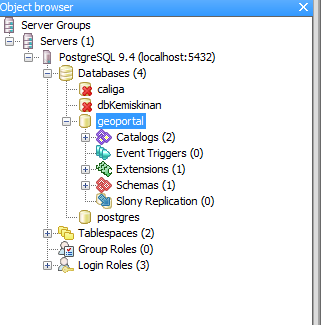
Weird because i can see my db both from PGAdmin and psql console,
pg geoportal

pg console

When suddenly i realize when im checking my postgresql port, and i can see 2 different postgresql with different PID occupied the same port, 5432. Somehow my PGAdmin and psql connect to the right instance while my application connect to the wrong instance.
pgsql

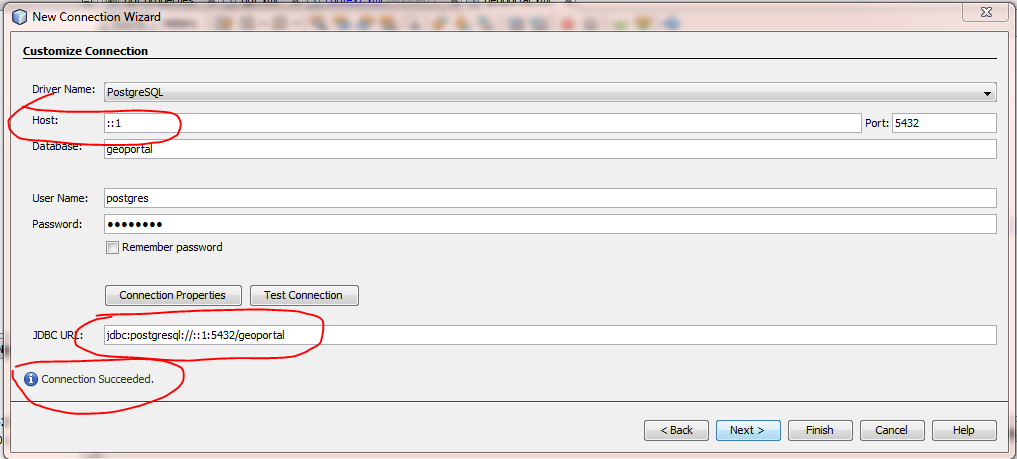
After killing my unwanted postgresql PID from taskmanager, suddenly my java application can run well again.
pg success connect

Weird MyBatis Error, “Error setting null for parameter [number] with JdbcType OTHER”

I had a very weird error today, when connecting MyBatis to Oracle Database, the complete error is like this,

Error setting null for parameter #2 with JdbcType OTHER . 
Try setting a different JdbcType for this parameter or a different jdbcTypeForNull configuration property. 
Cause: java.sql.SQLException: Invalid column type: 1111

After researching for a while, i found out that it happen because i miss to fill a parameter on mybatis xml query file. This is my xml file,

<?xml version="1.0" encoding="UTF-8" ?>
<!DOCTYPE mapper PUBLIC "-//mybatis.org//DTD Mapper 3.0//EN" "http://mybatis.org/dtd/mybatis-3-mapper.dtd" >
<mapper namespace="mybatistesting.MyMapper" >    
    <select resultType="java.util.Map" id="select" parameterType="java.util.Map">
        SELECT
            *
        FROM
            RISALAH
        WHERE UUID = #{UUID} AND CONTENT = #{CONTENT}
    </select>
</mapper>

And this is my main java file,

package mybatistesting;

import java.util.HashMap;
import java.util.Map;
import mybatistesting.config.MyBatisSqlSessionFactory;
import org.apache.ibatis.session.SqlSession;

public class MyBatisTesting {

    public static void main(String[] args) throws Exception {
        SqlSession sqlSession = MyBatisSqlSessionFactory.getSqlSessionFactory().openSession(true);
        MyMapper mapper = sqlSession.getMapper(MyMapper.class);
        Map map1 = new HashMap();
        map1.put("UUID", "1");
        for (Map map : mapper.select(map1)) {
            System.out.println("map "+map);
        }
    }
}

As you can see, i only set UUID as query parameter on my java file, despite that i need at least 2 parameter on my xml file. Here is how to fix it,

package mybatistesting;

import java.util.HashMap;
import java.util.Map;
import mybatistesting.config.MyBatisSqlSessionFactory;
import org.apache.ibatis.session.SqlSession;

public class MyBatisTesting {

    public static void main(String[] args) throws Exception {
        SqlSession sqlSession = MyBatisSqlSessionFactory.getSqlSessionFactory().openSession(true);
        MyMapper mapper = sqlSession.getMapper(MyMapper.class);
        Map map1 = new HashMap();
        map1.put("UUID", "1");
        map1.put("CONTENT", "1");
        for (Map map : mapper.select(map1)) {
            System.out.println("map "+map);
        }
    }
}

Hope it helps others, cheers 😉