Mybatis recently introduce a new caching mechanism using Redis (http://mybatis.github.io/redis-cache/index.html), and in this tutorial i’m trying to create a simple demonstration for it. MyBatis’ Redis caching is a little bit different with other MyBatis’ caching provider, such as EhCache or OsCache because you need to install Redis server before using it.
Because Redis project does not officially support Windows and i need Redis to run as a windows service so im downloading redis-service.exe from this url (https://github.com/rgl/redis/downloads), install and run it. You can see Redis is running on port 6379.
Because MyBatis Redis Cache hasnt available on Maven repository, so next step is download MyBatis Redis Cache project from github (https://github.com/mybatis/redis-cache), build it into jar and install it manually into our pom.xml file from local folder.
Okay, so here is my pom.xml file, you can see im manually installing mybatis-redis from local repository,
<?xml version="1.0" encoding="UTF-8"?>
<project xmlns="http://maven.apache.org/POM/4.0.0" xmlns:xsi="http://www.w3.org/2001/XMLSchema-instance" xsi:schemaLocation="http://maven.apache.org/POM/4.0.0 http://maven.apache.org/xsd/maven-4.0.0.xsd">
    <modelVersion>4.0.0</modelVersion>
    <groupId>com.edw</groupId>
    <artifactId>MybatisRedisExample</artifactId>
    <version>0.0.1-SNAPSHOT</version>
    <packaging>jar</packaging>

    <repositories>
        <repository>
            <id>local</id>
            <url>file://${basedir}/lib</url>
        </repository>
    </repositories>

    <properties>
        <project.build.sourceEncoding>UTF-8</project.build.sourceEncoding>
        <maven.compiler.source>1.7</maven.compiler.source>
        <maven.compiler.target>1.7</maven.compiler.target>
    </properties>
    <dependencies>
        <dependency>
            <groupId>log4j</groupId>
            <artifactId>log4j</artifactId>
            <version>1.2.17</version>
        </dependency>
        <dependency>
            <groupId>mysql</groupId>
            <artifactId>mysql-connector-java</artifactId>
            <version>5.1.6</version>
        </dependency>
        <dependency>
            <groupId>org.mybatis</groupId>
            <artifactId>mybatis</artifactId>
            <version>3.2.2</version>
        </dependency>

        <dependency>
            <groupId>org.mybatis.caches</groupId>
            <artifactId>mybatis-redis</artifactId>
            <version>1.0.0-SNAPSHOT</version>
        </dependency>
        <dependency>
            <groupId>org.apache.commons</groupId>
            <artifactId>commons-pool2</artifactId>
            <version>2.3</version>
        </dependency>

        <dependency>
            <groupId>redis.clients</groupId>
            <artifactId>jedis</artifactId>
            <version>2.6.2</version>
        </dependency>
    </dependencies>
</project>
Now create a database and a simple table for example,
CREATE DATABASE `test`;
DROP TABLE IF EXISTS `testing`;
CREATE TABLE `testing` (
  `id` int(11) NOT NULL AUTO_INCREMENT,
  `name` varchar(20) NOT NULL,
  `address` varchar(50) NOT NULL,
  PRIMARY KEY (`id`)
) ENGINE=InnoDB AUTO_INCREMENT=4 DEFAULT CHARSET=latin1;


INSERT INTO `testing` VALUES ('1', 'edw', '123');
INSERT INTO `testing` VALUES ('2', 'pepe', 'epep');
INSERT INTO `testing` VALUES ('3', 'dodol', 'dodll');
And a java bean for our table representation
package com.edw.mybatisredisexample.bean;

public class Testing {

    private String name;
    private String address;

    public String getName() {
        return name;
    }

    public void setName(String name) {
        this.name = name;
    }

    public String getAddress() {
        return address;
    }

    public void setAddress(String address) {
        this.address = address;
    }

    public Testing() {
    }
}
And an xml file and a java file, named TestingMapper to handle all the queries,
package com.edw.mybatisredisexample.mapper;

import com.edw.mybatisredisexample.bean.Testing;
import java.util.List;
import java.util.Map;

public interface TestingMapper {
    void insert(Testing testing);
    List<Map> select();
}
<?xml version="1.0" encoding="UTF-8" ?>
<!DOCTYPE mapper PUBLIC "-//mybatis.org//DTD Mapper 3.0//EN" "http://mybatis.org/dtd/mybatis-3-mapper.dtd" >
<mapper namespace="com.edw.mybatisredisexample.mapper.TestingMapper" >

    <cache type="org.mybatis.caches.redis.RedisCache" />

    <select id="insert" parameterType="com.edw.mybatisredisexample.bean.Testing" >
        insert into testing (name, address)
        values ( #{name,jdbcType=VARCHAR}, #{address,jdbcType=VARCHAR} )
    </select>

    <select resultType="java.util.Map" id="select" >
        SELECT
            *
        FROM
            testing
    </select>
</mapper>
Dont forget to register our xml file on MyBatis’ Configuration.xml
<?xml version="1.0" encoding="UTF-8" ?>
<!DOCTYPE configuration
PUBLIC "-//mybatis.org//DTD Config 3.0//EN"
"http://mybatis.org/dtd/mybatis-3-config.dtd">
<configuration>
    <environments default="development">
        <environment id="development">
            <transactionManager type="JDBC"/>
            <dataSource type="UNPOOLED">
                <property name="driver" value="com.mysql.jdbc.Driver"/>
                <property name="url" value="jdbc:mysql://localhost/test"/>
                <property name="username" value="root"/>
                <property name="password" value="password"/>
            </dataSource>
        </environment>
    </environments>
    <mappers>
        <mapper resource="TestingMapper.xml" />
    </mappers>
</configuration>
And a java class to load our MyBatis xml configuration
package com.edw.mybatisredisexample.config;

import java.io.IOException;
import java.io.Reader;
import org.apache.ibatis.io.Resources;
import org.apache.ibatis.session.SqlSessionFactory;
import org.apache.ibatis.session.SqlSessionFactoryBuilder;

public class MyBatisSqlSessionFactory {

    private static final SqlSessionFactory FACTORY;

    static {
        try {
            Reader reader = Resources.getResourceAsReader("Configuration.xml");
            FACTORY = new SqlSessionFactoryBuilder().build(reader);
        } catch (IOException e) {
            throw new RuntimeException("Fatal Error. Cause: " + e, e);
        }
    }

    public static SqlSessionFactory getSqlSessionFactory() {
        return FACTORY;
    }
}
Next is creating our Redis connection configuration, redis.properties
redis.host=localhost
redis.port=6379
redis.timeout=5000
redis.password=
redis.namespace=edw
redis.database=0
After everything is ready, next is create a Main file
package com.edw.mybatisredisexample;

import com.edw.mybatisredisexample.config.MyBatisSqlSessionFactory;
import com.edw.mybatisredisexample.mapper.TestingMapper;
import java.util.List;
import java.util.Map;
import org.apache.ibatis.session.SqlSession;
import org.apache.log4j.Logger;

public class Main {

    private Logger logger = Logger.getLogger(this.getClass());

    public static void main(String[] args) throws Exception {
        new Main().testQuery();
    }

    private void testQuery() throws Exception {
        logger.debug("start ----");

        for (int i = 0; i < 10; i++) {
            SqlSession sqlSession = null;
            try {
                sqlSession = MyBatisSqlSessionFactory.getSqlSessionFactory().openSession(true);
                TestingMapper testingMapper = sqlSession.getMapper(TestingMapper.class);
                List<Map> maps = testingMapper.select();

                for (Map map : maps) {
                    logger.debug(map);
                }
            } catch (Exception e) {
                logger.error(e.getMessage(), e);
            } finally {
                if (sqlSession != null) {
                    sqlSession.close();
                }
            }

            Thread.sleep(5000);
        }

        logger.debug("end ----");
    }
}
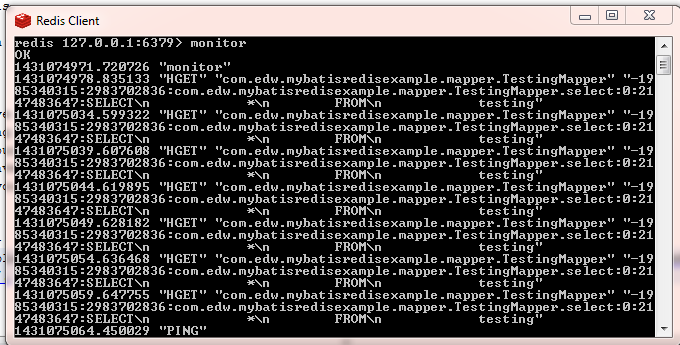
Using monitor command, this is what you will see on your Redis console,
And on my netbeans console,
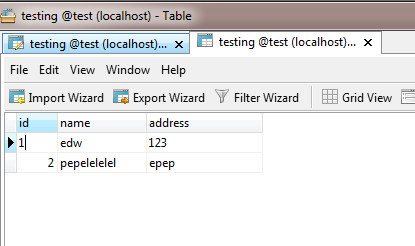
It will keep showing the same value despite i’ve delete and update some values on database directly,
You can see my complete sourcecode on my github page (https://github.com/edwinkun/MybatisRedisExample).