
On my last EJB3 tutorial, im still using the old fashioned way of EJB3. Still importing lots of jars, which is very dangerous due to the fact that sometimes i forgot which jar i need to include.
That’s why now im trying to use one of Glassfish’s feature application, appclient. It can bundle all the libraries and dependencies your EJB client needed, so it save your time from including various Glassfish’s jars to your project.
Lets start with a very simple ejb interface class,
package com.edw.facade;

public interface ConnectionFacadeRemote {
    String sayHello(String string);
    int sayAge(int age);
}
And a simple main class,
package com.edw.main;

import com.edw.facade.ConnectionFacadeRemote;
import java.util.Properties;
import javax.naming.Context;
import javax.naming.InitialContext;
import org.apache.log4j.Logger;

public class Main {

    private Logger logger = Logger.getLogger(Main.class);

    private void connect() {
        try{
            Properties props = new Properties();
            props.put(Context.INITIAL_CONTEXT_FACTORY, "com.sun.enterprise.naming.SerialInitContextFactory");
            props.setProperty("org.omg.CORBA.ORBInitialHost", "localhost");
            props.setProperty("org.omg.CORBA.ORBInitialPort", "3700");

            InitialContext ctx = new InitialContext();
            ConnectionFacadeRemote connectionFacadeRemote = (ConnectionFacadeRemote) ctx.lookup("com.edw.facade.ConnectionFacadeRemote");
            logger.debug(connectionFacadeRemote.sayHello("edwin "));
            logger.debug("my age is " + connectionFacadeRemote.sayAge(12) + " years");
        }catch(Exception ex){
            logger.error(ex,ex);
        }
    }

    public static void main(String[] args) {
        Main tejbc = new Main();
        tejbc.connect();
    }
}
After you create all classes needed, you have to build your application into .jar.
Next is to pull all the jar needed for this EJB client application to run smoothly. First go to your Server glassfish’s bin folder located in your Server glassfish installation folder, in my PC it would be (C:\Program Files\glassfish-3.0.1\glassfish\bin). And execute the package-appclient command.
C:\Program Files\glassfish-3.0.1\glassfish\bin>package-appclient
Creating C:\Program Files\glassfish-3.0.1\glassfish\lib\appclient.jar

It would create a jar file, appclient.jar, which located in your glassfish lib installation folder.

Next is copy your appclient.jar into your client computers. Extract it, and execute appclient command. The appclient format would be, appclient -jar
C:\Users\edw\Documents\appclient\appclient\glassfish\bin>appclient -jar "C:\Users\edw\Documents\NetBeansProjects\TestEJBClient\dist\TestEJBClient.jar"
Apr 19, 2012 6:28:03 PM com.sun.enterprise.transaction.JavaEETransactionManagerSimplified initDelegates
INFO: Using com.sun.enterprise.transaction.jts.JavaEETransactionManagerJTSDelegate as the delegate
2012-04-19 18:28:10,067 [Main] DEBUG com.edw.main.Main:22 - hello edwin
2012-04-19 18:28:10,072 [Main] DEBUG com.edw.main.Main:23 - my age is 24 years

You can see the server side’s source code here. And here is my netbeans project structure
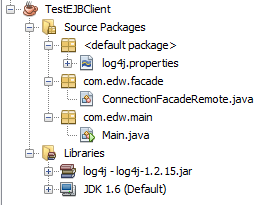
Not too hard right 😉
Hi edwin –
i have read your tutorial.
I have also tried for call a ejb3 on glassfsih from a web application on Tomcat6 .
Into the web-inf library i have put all jars from the module directory pasted from the appclient .
But i get a classnotfound SerialIntiCOntext.
But it is into namingglassfish.jar .
I have also write a class itn othe same project wiht a metod main. I can so cal it like a standalone jse. and if i run the class it work . i not get the Exception fro class not found .
You can help me?
Mauro
Hi Mauro,
try putting your Glassfish jar into apache tomcat’s lib folder instead of your project’s \WEB-INF folder
Hi, i’m looking how can i distribute this, i want to know if there ir a way to automatize the execution of de jar app Thanks
may i know what are you trying to achieve? If you are trying to run your app with appcient.jar, you could include it on your application’s path.