Ora2Pg is a free tool to migrate Oracle (and MySQL) databases to PostgreSQL. It connects to an Oracle database, scans it automatically, extracts its structure or data, and generates SQL scripts which we can load directly into PostgreSQL.
For this blog post, I’m trying to do a simple data migration from Oracle to PostgreSQL, both of which are running as containers.
Oracle
Let’s start by running our Oracle instance.
$ podman run  -p 1521:1521 \
        -e ORACLE_PASSWORD='YourStrongPass123' \
        -e APP_USER=db_test \
        -e APP_USER_PASSWORD='DbTest123' \
        -v oradata:/opt/oracle/oradata \
        docker.io/gvenzl/oracle-free:slim

Trying to pull docker.io/gvenzl/oracle-free:slim...
Getting image source signatures
Copying blob 0478c6754a70 done   |
Copying blob 4a89c51c0a93 done   |
Copying config 41bcf6415d done   |
Writing manifest to image destination
CONTAINER: starting up...
CONTAINER: first database startup, initializing...
CONTAINER: uncompressing database data files, please wait...
CONTAINER: done uncompressing database data files, duration: 2 seconds.
CONTAINER: starting up Oracle Database...
Connect with the user db_test and password DbTest123, then run the queries below
CREATE TABLE tb_football_clubs (
    club_id       NUMBER GENERATED ALWAYS AS IDENTITY PRIMARY KEY,
    name          VARCHAR2(100) NOT NULL UNIQUE,
    city          VARCHAR2(50)  NOT NULL,
    country       VARCHAR2(50)  NOT NULL,
    stadium       VARCHAR2(100),
    founded_year  NUMBER(4)
);

CREATE TABLE tb_football_players (
    player_id     NUMBER GENERATED ALWAYS AS IDENTITY PRIMARY KEY,
    club_id       NUMBER NOT NULL,
    full_name     VARCHAR2(100) NOT NULL,
    position      VARCHAR2(20) NOT NULL,
    nationality   VARCHAR2(50),
    shirt_number  NUMBER(2),
    CONSTRAINT fk_player_club FOREIGN KEY (club_id)
        REFERENCES tb_football_clubs (club_id),
    CONSTRAINT uq_club_shirt UNIQUE (club_id, shirt_number)
);

CREATE INDEX idx_players_club ON tb_football_players (club_id);

INSERT INTO tb_football_clubs (name, city, country, stadium, founded_year) VALUES ('Real Madrid', 'Madrid', 'Spain', 'Santiago Bernabeu', 1902);
INSERT INTO tb_football_clubs (name, city, country, stadium, founded_year) VALUES ('FC Barcelona', 'Barcelona', 'Spain', 'Camp Nou', 1899);
INSERT INTO tb_football_clubs (name, city, country, stadium, founded_year) VALUES ('Manchester City', 'Manchester', 'England', 'Etihad Stadium', 1880);
INSERT INTO tb_football_clubs (name, city, country, stadium, founded_year) VALUES ('Liverpool', 'Liverpool', 'England', 'Anfield', 1892);
INSERT INTO tb_football_clubs (name, city, country, stadium, founded_year) VALUES ('Bayern Munich', 'Munich', 'Germany', 'Allianz Arena', 1900);

INSERT INTO TB_FOOTBALL_PLAYERS (club_id, full_name, position, nationality, SHIRT_NUMBER) VALUES (1, 'Jude Bellingham', 'Midfielder', 'England', 5);
INSERT INTO TB_FOOTBALL_PLAYERS (club_id, full_name, position, nationality, SHIRT_NUMBER) VALUES (1, 'Kylian Mbappe', 'Forward', 'France', 10);
INSERT INTO TB_FOOTBALL_PLAYERS (club_id, full_name, position, nationality, SHIRT_NUMBER) VALUES (2, 'Lamine Yamal', 'Forward', 'Spain', 10);
INSERT INTO TB_FOOTBALL_PLAYERS (club_id, full_name, position, nationality, SHIRT_NUMBER) VALUES (3, 'Erling Haaland', 'Forward', 'Norway', 9);
INSERT INTO TB_FOOTBALL_PLAYERS (club_id, full_name, position, nationality, SHIRT_NUMBER) VALUES (3, 'Phil Foden', 'Midfielder', 'England', 47);
INSERT INTO TB_FOOTBALL_PLAYERS (club_id, full_name, position, nationality, SHIRT_NUMBER) VALUES (4, 'Virgil van Dijk', 'Defender', 'Netherlands', 4);
INSERT INTO TB_FOOTBALL_PLAYERS (club_id, full_name, position, nationality, SHIRT_NUMBER) VALUES (4, 'Alisson Becker', 'Goalkeeper', 'Brazil', 1);
INSERT INTO TB_FOOTBALL_PLAYERS (club_id, full_name, position, nationality, SHIRT_NUMBER) VALUES (4, 'Florian Wirtz', 'Midfielder', 'Germany', 7);
INSERT INTO TB_FOOTBALL_PLAYERS (club_id, full_name, position, nationality, SHIRT_NUMBER) VALUES (4, 'Dominik Szoboszlai', 'Midfielder', 'Hungary', 8);
INSERT INTO TB_FOOTBALL_PLAYERS (club_id, full_name, position, nationality, SHIRT_NUMBER) VALUES (4, 'Hugo Ekitike', 'Forward', 'France', 22);
INSERT INTO TB_FOOTBALL_PLAYERS (club_id, full_name, position, nationality, SHIRT_NUMBER) VALUES (5, 'Manuel Neuer', 'Goalkeeper', 'Germany', 1);
INSERT INTO TB_FOOTBALL_PLAYERS (club_id, full_name, position, nationality, SHIRT_NUMBER) VALUES (5, 'Jamal Musiala', 'Midfielder', 'Germany', 10);
INSERT INTO TB_FOOTBALL_PLAYERS (club_id, full_name, position, nationality, SHIRT_NUMBER) VALUES (5, 'Harry Kane', 'Forward', 'England', 1);
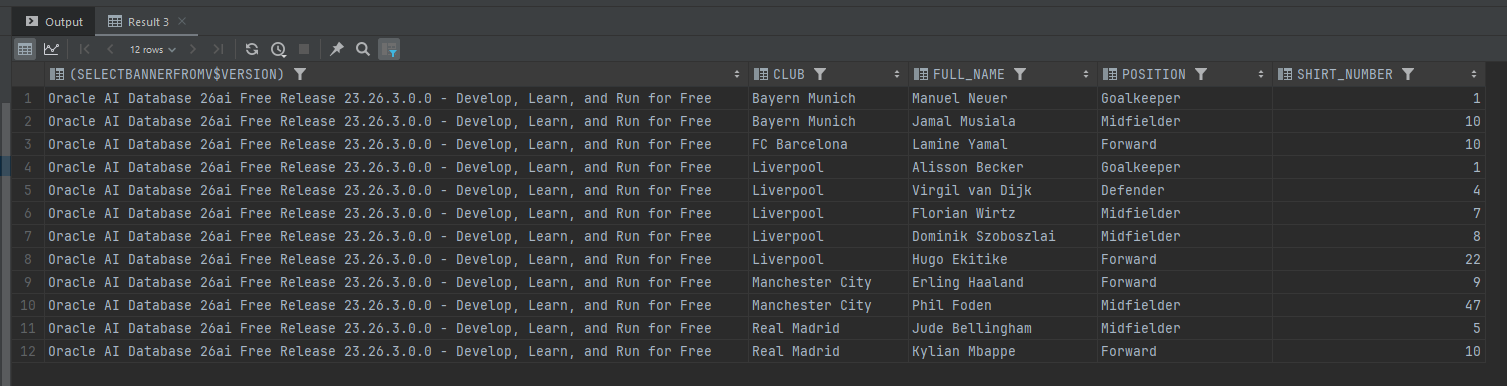
Run the following query to verify the inserted data,
SELECT (SELECT banner FROM v$version), c.name AS club, p.full_name, p.position, p.shirt_number
FROM tb_football_players p
JOIN tb_football_clubs c ON c.club_id = p.club_id
ORDER BY c.name, p.shirt_number;
PostgreSQL
Now let’s start and initialize our PostgreSQL instance,
$ podman run  -p 5432:5432 \
        -e POSTGRES_USER=postgres \
        -e POSTGRES_PASSWORD='password' \
        -e POSTGRES_DB=db_test \
        docker.io/library/postgres:17

Trying to pull docker.io/library/postgres:17...
Getting image source signatures
Copying blob 3be737420556 done   |
Copying blob ecc510c1e359 done   |
Copying config 327daa8fae done   |
Writing manifest to image destination
The files belonging to this database system will be owned by user "postgres".
This user must also own the server process.

The database cluster will be initialized with locale "en_US.utf8".
The default database encoding has accordingly been set to "UTF8".
The default text search configuration will be set to "english".

Data page checksums are disabled.

fixing permissions on existing directory /var/lib/postgresql/data ... ok
creating subdirectories ... ok
selecting dynamic shared memory implementation ... posix
selecting default "max_connections" ... 100
selecting default "shared_buffers" ... 128MB
selecting default time zone ... Etc/UTC
creating configuration files ... ok
running bootstrap script ... ok
performing post-bootstrap initialization ... ok
syncing data to disk ... ok
Create PostgreSQL table,
CREATE TABLE tb_football_clubs (
    club_id       BIGINT GENERATED ALWAYS AS IDENTITY PRIMARY KEY,
    name          VARCHAR(100) NOT NULL UNIQUE,
    city          VARCHAR(50)  NOT NULL,
    country       VARCHAR(50)  NOT NULL,
    stadium       VARCHAR(100),
    founded_year  NUMERIC(4)
);

CREATE TABLE tb_football_players (
    player_id     BIGINT GENERATED ALWAYS AS IDENTITY PRIMARY KEY,
    club_id       BIGINT NOT NULL,
    full_name     VARCHAR(100) NOT NULL,
    position      VARCHAR(20) NOT NULL,
    nationality   VARCHAR(50),
    shirt_number  NUMERIC(2),
    CONSTRAINT fk_player_club FOREIGN KEY (club_id)
        REFERENCES tb_football_clubs (club_id),
    CONSTRAINT uq_club_shirt UNIQUE (club_id, shirt_number)
);

CREATE INDEX idx_players_club ON tb_football_players (club_id);
Ora2Pg
We can start downloading Ora2Pg by running this command,
$ podman pull georgmoser/ora2pg
Create directories to store ora2pg configurations
$ mkdir -p ora2pg/config/
Next, create an ora2pg.conf file under the ora2pg/config/ folder with the following configuration
ORACLE_DSN   dbi:Oracle:host=host.containers.internal;port=1521;service_name=FREEPDB1
ORACLE_USER  db_test
ORACLE_PWD   DbTest123
SCHEMA       DB_TEST


PG_DSN       dbi:Pg:dbname=db_test;host=host.containers.internal;port=5432
PG_USER      postgres
PG_PWD       password

TYPE         COPY
DATA_LIMIT   10000
NLS_LANG     AMERICAN_AMERICA.UTF8
USER_GRANTS  1
NO_START_SCN   1
PG_VERSION     17
Since we are using Podman, we set the database host to host.containers.internal
Run the Ora2Pg from our image using Podman,
$ podman run --rm \
                    -v ~/Documents/ora2pg/config:/config:Z \
                    georgmoser/ora2pg \
                    ora2pg -t COPY -c /config/ora2pg.conf --no_start_scn

INFO: No CONFIG_LOCATION variable provided. Using default '/config/ora2pg.conf'
INFO: No OUTPUT_LOCATION variable provided. Using default '/data'
INFO: No ORA_HOST variable provided. Using value of 'ORACLE_DSN' from '/config/ora2pg.conf'
INFO: No ORA_USER variable provided. Using value of 'ORACLE_USER' from  '/config/ora2pg.conf'
INFO: No ORA_PWD variable provided. Using value of 'ORACLE_PWD' from  '/config/ora2pg.conf'
INFO: executing: 'ora2pg -t COPY -c /config/ora2pg.conf --no_start_scn'
[2026-10-08 06:14:14] [============>            ] 1/2 tables (50.0%) scanning table TB_FOOTBALL_CLUB[2026-10-08 06:14:14] [========================>] 2/2 tables (100.0%) scanning table TB_FOOTBALL_PLA[2026-10-08 06:14:14] [========================>] 2/2 tables (100.0%) end of scanning.
[2026-10-08 06:14:24] [========================>] 5/5 rows (100.0%) Table TB_FOOTBALL_CLUBS (5 recs/sec)
[2026-10-08 06:14:24] [=======>                 ]  5/17 total rows (29.4%) - (0 sec., avg: 5 recs/sec).
[2026-10-08 06:14:24] [=======>                 ]  5/17 rows (29.4%) on total estimated data (1 sec.[2026-10-08 06:14:24] [========================>] 12/12 rows (100.0%) Table TB_FOOTBALL_PLAYERS (12 recs/sec)
[2026-10-08 06:14:24] [========================>] 17/17 total rows (100.0%) - (0 sec., avg: 17 recs/sec).

[2026-10-08 06:14:24] [========================>] 17/17 rows (100.0%) on total estimated data (1 secNOTICE:  relation "iseq$$_73355" does not exist, skipping
NOTICE:  relation "iseq$$_73359" does not exist, skipping
NOTICE:  relation "iseq$$_73369" does not exist, skipping
NOTICE:  relation "iseq$$_73373" does not exist, skipping
Fixing function calls in output files...

Schema Export Complete
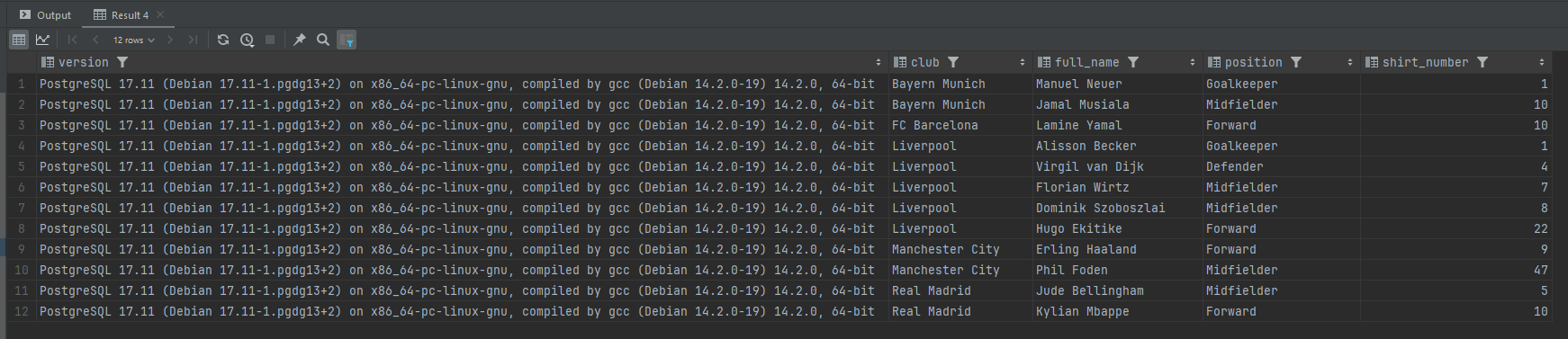
And we can see the result of our migrated data using the below query,
SELECT version(), c.name AS club, p.full_name, p.position, p.shirt_number
FROM tb_football_players p
JOIN tb_football_clubs c ON c.club_id = p.club_id
ORDER BY c.name, p.shirt_number;
With the below result,